AI agent for real estate brokers
Active Listing Price Review Agent
Give sellers clear weekly updates and act early on price
What it does
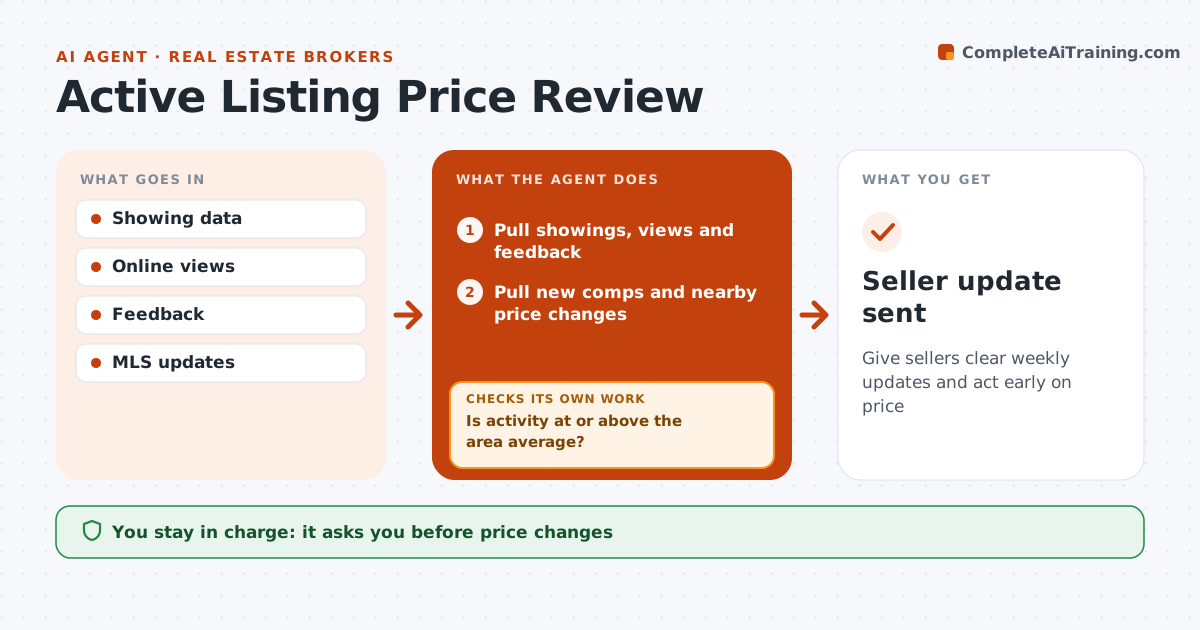
Listing price conversations with sellers need evidence, not opinion. Each week this agent pulls every active listing's showings, online views, buyer feedback and days on market, plus new comps and nearby price changes. A listing is behind when showings stay below the area average for 14 days. In slow seasons it compares with the same period last year instead. For listings that are behind, it drafts a seller update with options: improve presentation, change price or wait, each with the evidence. The agent and seller decide on any change. The next week it checks whether activity improved and, if not, prepares updated options. Edge case: listings in a normally slow season are compared with the same period last year so they are not flagged unfairly.
How it works
Follow the arrows from top to bottom. The orange dashed arrow is the loop: when a check fails, the agent goes back and tries again.
Read the steps as a list
- Weekly listing review
- Pull showings, views and feedback
- Pull new comps and nearby price changes
- Pick the comparison period, using last year in slow seasons
- Is activity at or above the area average?If not: draft options for the seller with evidence. Back to step 4.
- Agent and seller agree on any changeThe agent waits here for your OK.
- Update the listing plan
- Did activity improve the following week?If not: prepare updated options for the next conversation. Back to step 5.
- Seller update sent
How it decides
A listing is behind when showings are below the area average for 14 days.
- Behind means below average showings for 14 days
- Seasonal comparisons in slow months
- Show evidence for every suggestion
Make it yours
Every agent is a starting point. You choose these settings for your own situation.
- Review day
- Benchmark source
- Seller update format
What keeps you in control
It always asks you first
- Price changes
- Seller messages
Hard limits
- Never changes listing prices
- Never pressures sellers
It stops when
- Done: listing sold
- Stop: listing withdrawn
Set it up
We guide you through the set-up, step by step
Members get the full set-up guide for this agent. No technical skills needed: you copy, paste and upload.
- One set of instructions to paste into your AI, with the clicks for ChatGPT, Claude, Microsoft 365 Copilot, Gemini and Grok
- The agent then walks you through connecting your own data, one source at a time
- A downloadable copy with the flow chart, the rules and the full guide