AI agent for school administrators
Admissions and Transfer Document Chase Agent
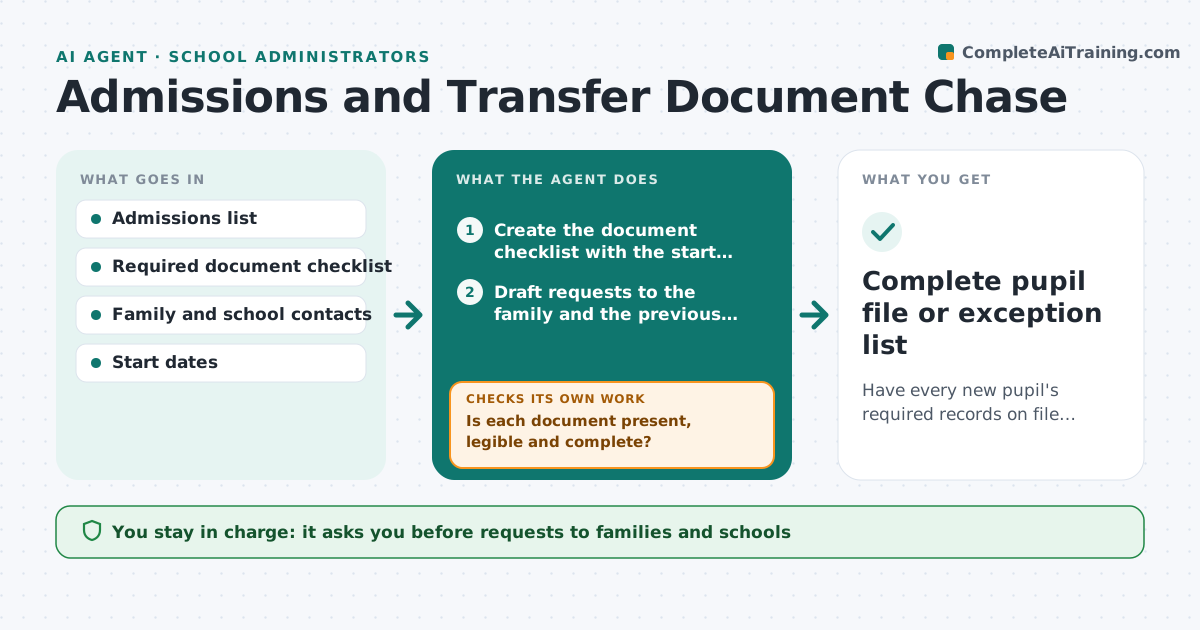
Have every new pupil's required records on file before the start date.
What it does
When a pupil is accepted, the office needs birth proof, immunization records, address proof, special needs files and a transfer file from the previous school. Parents forget, schools reply slowly, and the pupil arrives with half the file. This agent keeps a checklist for each new pupil. It sends requests to families and previous schools, checks what arrives and whether it is readable and complete, and updates the list. It reminds on a schedule and flags any pupil whose file is incomplete as the start date approaches. Edge case: if a previous school's file is delayed for 10 days, it drafts a call script for the office and offers to book a request through the district. The leader approves any exception to start without a document.
How it works
Follow the arrows from top to bottom. The orange dashed arrow is the loop: when a check fails, the agent goes back and tries again.
Read the steps as a list
- Place accepted for a new pupil
- Create the document checklist with the start date
- Draft requests to the family and the previous school
- Office approves requests before they are sentThe agent waits here for your OK.
- Check incoming mail and uploads
- Is each document present, legible and complete?If not: Request a clearer or full copy and note the reason. Back to step 4.
- Update the checklist and rank missing items by days to start
- Is anything still missing 14 days before the start date?If not: Send a second request and prepare a call script for the office. Back to step 4.
- Leader approves any exception to start without a documentThe agent waits here for your OK.
- Complete pupil file or exception list
How it decides
Compares documents received to the required list and orders the chase by days left to the start date; a document is accepted only if complete and legible.
- Missing items at 14 days to start trigger a second request
- At 7 days the leader gets a list of incomplete files
- Unreadable scans are rejected, not accepted
- Medical records are stored only in the restricted folder
Make it yours
Every agent is a starting point. You choose these settings for your own situation.
- Required documents by year group
- Chase schedule (default 14 and 7 days before start)
- Who sends the requests
- Languages for family messages
- Exception rules
What keeps you in control
It always asks you first
- Requests to families and schools
- Any exception to start without a document
- Any contact with the district
Hard limits
- Never share a pupil's records with anyone outside the school
- Never accept incomplete documents as complete
It stops when
- Done: file complete
- Stop: place declined
- Stop: pupil starts under an approved exception
Set it up
We guide you through the set-up, step by step
Members get the full set-up guide for this agent. No technical skills needed: you copy, paste and upload.
- One set of instructions to paste into your AI, with the clicks for ChatGPT, Claude, Microsoft 365 Copilot, Gemini and Grok
- The agent then walks you through connecting your own data, one source at a time
- A downloadable copy with the flow chart, the rules and the full guide