AI agent for compliance officers
Policy Attestation Chase Agent
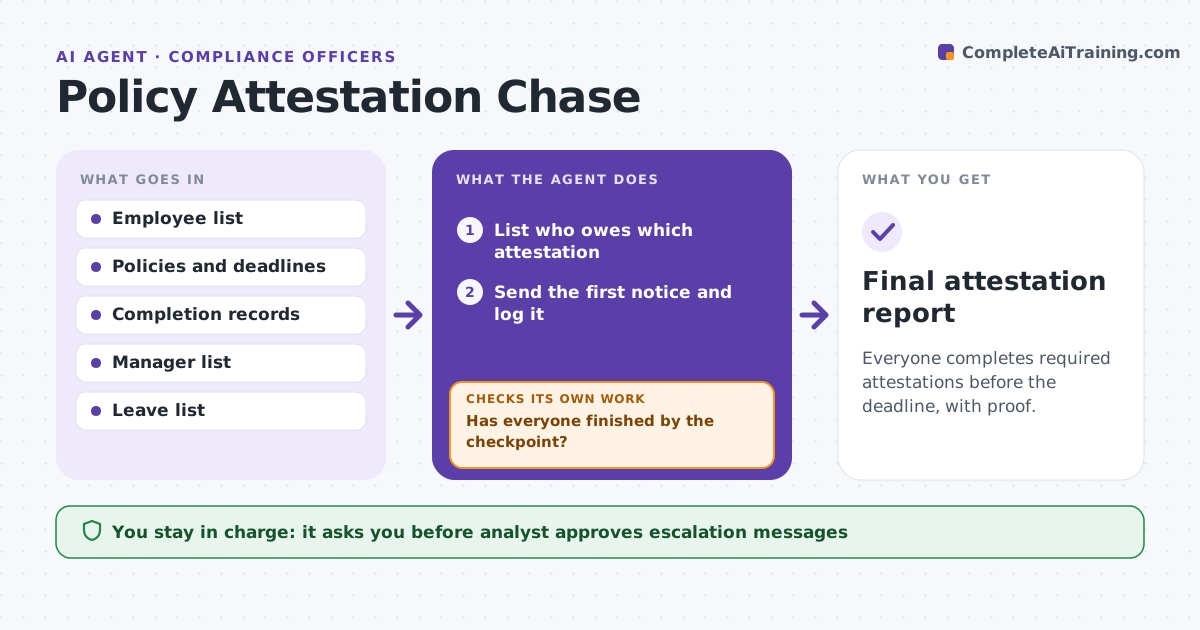
Everyone completes required attestations before the deadline, with proof.
What it does
Every year staff must attest that they read and follow the code of conduct and key policies. Many do not do it on time and the analyst spends weeks chasing. This agent lists who owes an attestation, sends reminders on a schedule, escalates to managers and checks completion. After each batch it updates the report and removes people who have finished. It decides the next step from the number of days overdue. The analyst approves escalation messages. Edge case: an employee on leave appears overdue, so the agent checks the leave list and moves the date.
How it works
Follow the arrows from top to bottom. The orange dashed arrow is the loop: when a check fails, the agent goes back and tries again.
Read the steps as a list
- Attestation cycle opens
- List who owes which attestation
- Send the first notice and log it
- Check completion records on schedule
- Has everyone finished by the checkpoint?If not: send the next reminder, or escalate when the deadline passes. Back to step 4.
- Draft escalation messages to managers
- Analyst approves escalation messagesThe agent waits here for your OK.
- Update the completion report
- Final attestation report
How it decides
It sends a first reminder at launch, then at 7 and 3 days, then escalates at the deadline. It excludes people on approved leave.
- Remind at launch, 7 days and 3 days before the deadline
- Escalate to the manager after the deadline
- Skip people on approved leave and set a new date
- Report completion by department
Make it yours
Every agent is a starting point. You choose these settings for your own situation.
- Reminder schedule
- Deadline
- Escalation path
- Leave handling
- Report format
What keeps you in control
It always asks you first
- Analyst approves escalation messages
Hard limits
- Never send an escalation without analyst approval
- Never share individual status outside compliance and managers
It stops when
- Done: all required staff attested
- Stop: a policy changed and attestation is withdrawn
Set it up
We guide you through the set-up, step by step
Members get the full set-up guide for this agent. No technical skills needed: you copy, paste and upload.
- One set of instructions to paste into your AI, with the clicks for ChatGPT, Claude, Microsoft 365 Copilot, Gemini and Grok
- The agent then walks you through connecting your own data, one source at a time
- A downloadable copy with the flow chart, the rules and the full guide