AI agent for customer success managers
Adoption Milestone Tracking Agent
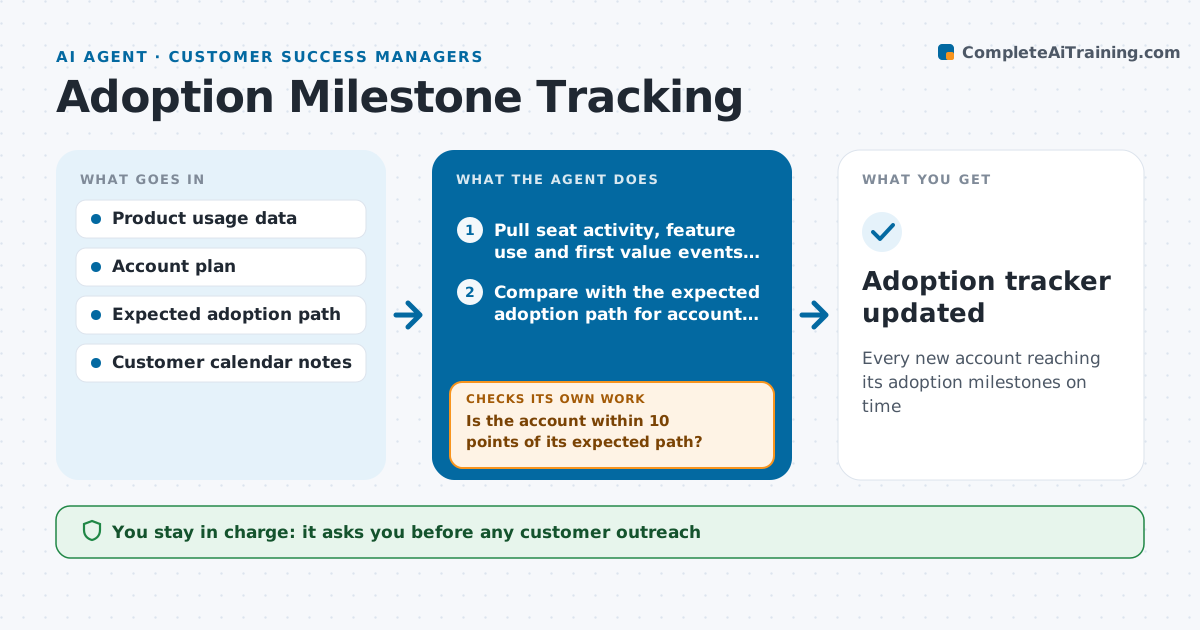
Every new account reaching its adoption milestones on time
What it does
New customers who do not reach early value tend to churn, but slow adoption is easy to miss across many accounts. Each week this agent tracks adoption for every account in onboarding or early life: share of seats active, key features used, and the first value moment, such as a first report shared. It compares each account with the expected path for its size. Accounts falling behind get a suggested action, chosen in order: a targeted tip email, a training session, or a call with the sponsor. After the action, it checks whether usage moved within two weeks. If not, it tries the next action on the list or escalates to the specialist. The specialist approves all outreach. Edge case: low usage during the customer's known holiday period is not flagged.
How it works
Follow the arrows from top to bottom. The orange dashed arrow is the loop: when a check fails, the agent goes back and tries again.
Read the steps as a list
- Weekly adoption check
- Pull seat activity, feature use and first value events per account
- Compare with the expected adoption path for account size
- Is the account within 10 points of its expected path?If not: pick the next action on the list for that account. Back to step 3.
- Draft the chosen action for accounts behind
- Specialist approves outreachThe agent waits here for your OK.
- Did usage improve within two weeks?If not: try the next action or escalate to the specialist. Back to step 5.
- Adoption tracker updated
How it decides
It compares each account against the expected path for its size and picks the lightest action that fits the gap.
- Start with a tip email, then training, then sponsor call
- Skip flags during known customer holidays
- Escalate if two actions fail
Make it yours
Every agent is a starting point. You choose these settings for your own situation.
- Adoption milestones
- Expected path by account size
- Action sequence
- Check frequency
What keeps you in control
It always asks you first
- Any customer outreach
Hard limits
- Never emails customers without approval
- No usage data shared outside the account team
It stops when
- Done: account reaches milestones
- Stop: account hands over to steady-state CSM
Set it up
We guide you through the set-up, step by step
Members get the full set-up guide for this agent. No technical skills needed: you copy, paste and upload.
- One set of instructions to paste into your AI, with the clicks for ChatGPT, Claude, Microsoft 365 Copilot, Gemini and Grok
- The agent then walks you through connecting your own data, one source at a time
- A downloadable copy with the flow chart, the rules and the full guide