AI agent for customer service managers
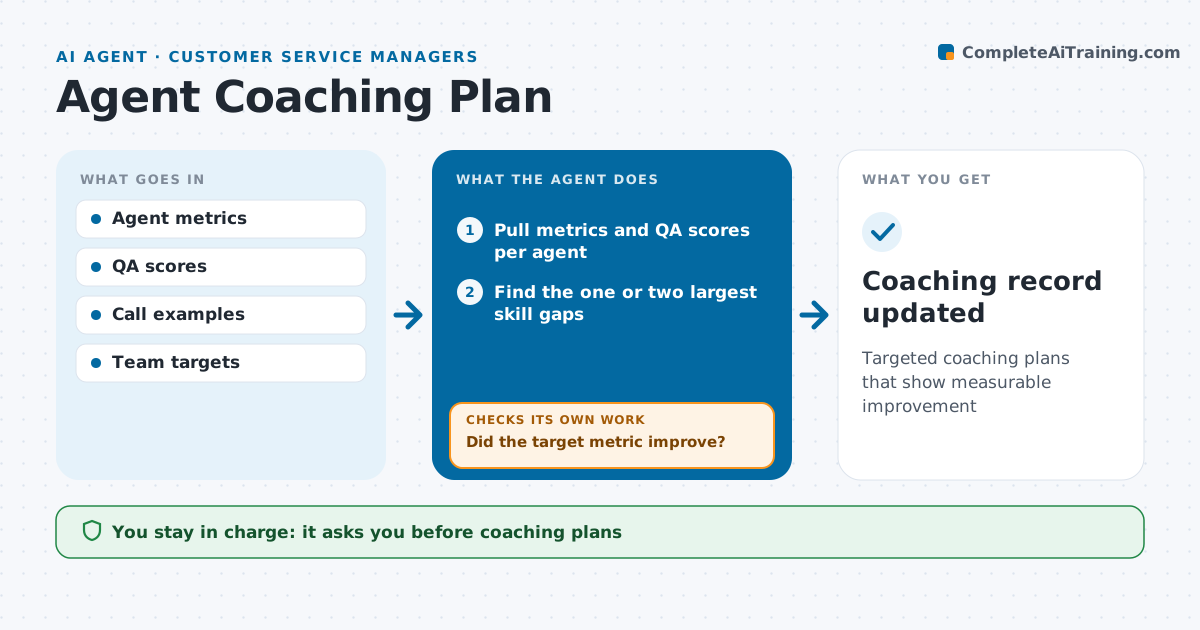
Agent Coaching Plan Agent
Targeted coaching plans that show measurable improvement
What it does
Coaching often targets whatever the supervisor last heard, not what would help the person most. Each month this agent reviews each frontline agent's handle time, first call resolution, QA scores, survey scores and schedule adherence. It finds the one or two skills that would make the biggest difference for that person and drafts a coaching plan with real call examples and practice tasks. After four weeks it checks whether the target metric moved. If not, it looks for a different cause, such as a system issue, missing access or a different skill, and updates the plan. The supervisor reviews every plan before coaching sessions and owns the conversation with the agent. Edge case: a sudden drop for one agent after a schedule change is flagged as a possible personal or workload issue for the supervisor to discuss privately.
How it works
Follow the arrows from top to bottom. The orange dashed arrow is the loop: when a check fails, the agent goes back and tries again.
Read the steps as a list
- Monthly coaching cycle
- Pull metrics and QA scores per agent
- Find the one or two largest skill gaps
- Draft plan with call examples and practice tasks
- Supervisor reviews the plan before the sessionThe agent waits here for your OK.
- Wait four weeks and measure the target metric
- Did the target metric improve?If not: look for another cause and revise the plan. Back to step 3.
- Coaching record updated
How it decides
It picks skills by gap against team target multiplied by call volume affected.
- At most two focus skills per plan
- Sudden drops after schedule changes go to the supervisor as a conversation
- Check results at four weeks
Make it yours
Every agent is a starting point. You choose these settings for your own situation.
- Metrics used
- Follow-up period (default 4 weeks)
- Focus skills per plan
- Plan format
What keeps you in control
It always asks you first
- Coaching plans
- Any performance warning
Hard limits
- Never issues warnings or discipline
- Never shares one agent's data with another
It stops when
- Done: metric at target
- Stop: agent leaves the team
Set it up
We guide you through the set-up, step by step
Members get the full set-up guide for this agent. No technical skills needed: you copy, paste and upload.
- One set of instructions to paste into your AI, with the clicks for ChatGPT, Claude, Microsoft 365 Copilot, Gemini and Grok
- The agent then walks you through connecting your own data, one source at a time
- A downloadable copy with the flow chart, the rules and the full guide