AI agent for conversion rate optimization specialists
Analytics Funnel Hypothesis Agent
Find the cause of the biggest funnel drop through a series of tested hypotheses.
What it does
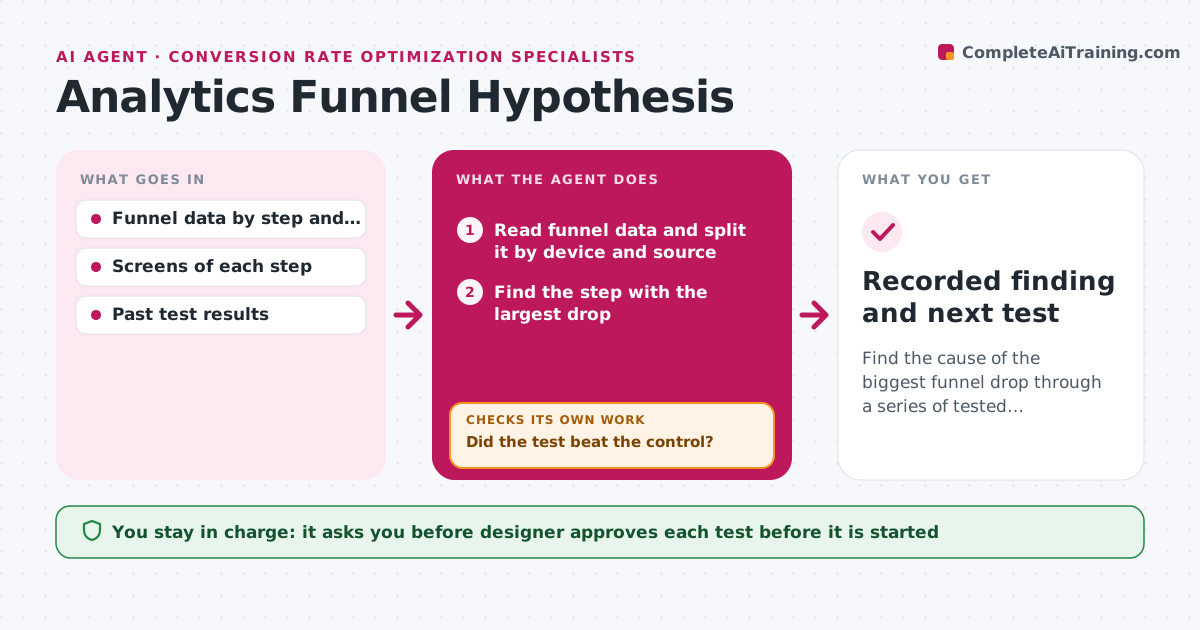
Your analytics show that 60% of people leave at step two of sign-up, but nobody knows why. This agent reads the funnel data and finds the biggest drop between steps. It opens the matching screens and inspects them for likely causes, such as a long form, an unclear label, a slow load or a hidden button. It writes a ranked list of hypotheses and proposes a small test for the top one, with the metric and the sample needed. When the test has run, it reads the result. If the hypothesis fails, it drops it and moves to the next one. If it works, it records the lift and checks whether the drop moved to a later step. The designer approves each test before it goes live. Edge case: the drop only appears on mobile, so the agent splits the data by device first.
How it works
Follow the arrows from top to bottom. The orange dashed arrow is the loop: when a check fails, the agent goes back and tries again.
Read the steps as a list
- Weekly funnel data arrives
- Read funnel data and split it by device and source
- Find the step with the largest drop
- Inspect the matching screens and load times
- Write ranked hypotheses with a proposed test
- Designer approves the test before it goes liveThe agent waits here for your OK.
- Read the test results when the sample is reached
- Did the test beat the control?If not: drop this hypothesis and propose the next one on the list. Back to step 5.
- Did the drop simply move to a later step?If not: rerun the analysis on the new weakest step. Back to step 2.
- Recorded finding and next test
How it decides
It ranks hypotheses by the size of the drop, the evidence on the screen and how cheap the test is. A hypothesis fails when the test shows no lift beyond the noise range.
- Look at a step only if it has at least 500 visitors in the period
- Rank hypotheses with the cheapest test first when evidence is equal
- Call a test a win only at a lift above 5% with the sample reached
- Always compare mobile and desktop before forming a hypothesis
Make it yours
Every agent is a starting point. You choose these settings for your own situation.
- Minimum visitors per step (default 500)
- Lift needed to call a win (default 5%)
- Funnels to watch
- Test tool and sample size rule
- Review day of the week
What keeps you in control
It always asks you first
- Designer approves each test before it is started
Hard limits
- Never launch a test or change a live page
- Never report a win before the sample size is reached
It stops when
- Done: a winning change is recorded and the funnel is rechecked
- Stop: three hypotheses in a row fail, so ask the designer for user research
Set it up
We guide you through the set-up, step by step
Members get the full set-up guide for this agent. No technical skills needed: you copy, paste and upload.
- One set of instructions to paste into your AI, with the clicks for ChatGPT, Claude, Microsoft 365 Copilot, Gemini and Grok
- The agent then walks you through connecting your own data, one source at a time
- A downloadable copy with the flow chart, the rules and the full guide