AI agent for home inspectors
Ancillary Test Lab Result Agent
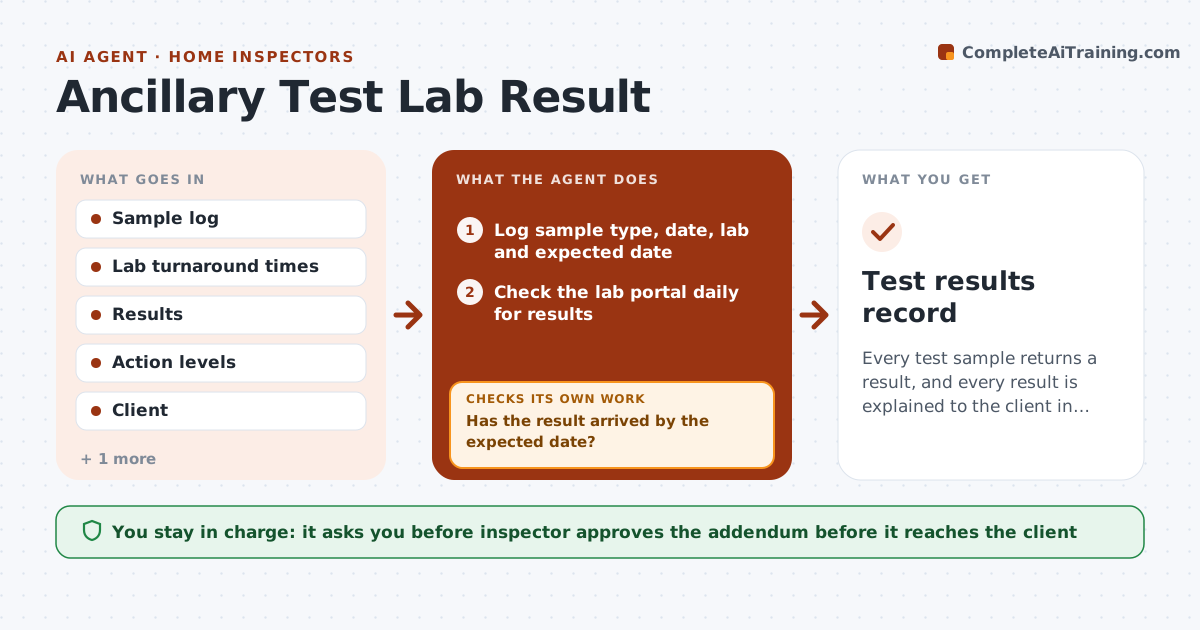
Every test sample returns a result, and every result is explained to the client in an approved addendum.
What it does
You collect a radon canister on Monday, the lab result comes a week later, and nobody adds it to the report. This agent tracks each sample from collection to the lab result. It records the sample type, date and lab, chases late labs, and checks results against action levels, such as radon at 4 pCi/L. It drafts the report note or addendum. If a result looks wrong, for example a duplicate sample that differs a lot, it asks for a retest. You approve the addendum before it goes to the client. Edge case: a sample that sits past its holding time, like a water bacteria test, is flagged as invalid and a new sample is requested.
How it works
Follow the arrows from top to bottom. The orange dashed arrow is the loop: when a check fails, the agent goes back and tries again.
Read the steps as a list
- Sample collected
- Log sample type, date, lab and expected date
- Check the lab portal daily for results
- Has the result arrived by the expected date?If not: Draft a message to chase the lab and warn the inspector. Back to step 3.
- Compare the result with the action level and holding time
- Is the sample valid and duplicates consistent?If not: Flag for retest and request a new sample or analysis. Back to step 2.
- Draft the addendum with plain language and next steps
- Inspector approves the addendumThe agent waits here for your OK.
- Attach to the report and notify the client
- Test results record
How it decides
It compares each result with the action level, flags invalid samples by holding time or duplicate mismatch, and drafts the matching note.
- Use the published action level for each test
- Chase labs 1 day after the promised date
- Treat duplicates differing by over 25% as suspect
- Mark samples past holding time invalid
Make it yours
Every agent is a starting point. You choose these settings for your own situation.
- Action levels
- Labs and turnaround times
- Duplicate tolerance (default 25%)
- Addendum wording
What keeps you in control
It always asks you first
- Inspector approves the addendum before it reaches the client
Hard limits
- Never give medical or legal advice
- Never send results to clients without approval
It stops when
- Done: results delivered
- Stop: lab cannot provide a valid result
Set it up
We guide you through the set-up, step by step
Members get the full set-up guide for this agent. No technical skills needed: you copy, paste and upload.
- One set of instructions to paste into your AI, with the clicks for ChatGPT, Claude, Microsoft 365 Copilot, Gemini and Grok
- The agent then walks you through connecting your own data, one source at a time
- A downloadable copy with the flow chart, the rules and the full guide