AI agent for animators
Animation Dailies Notes Agent
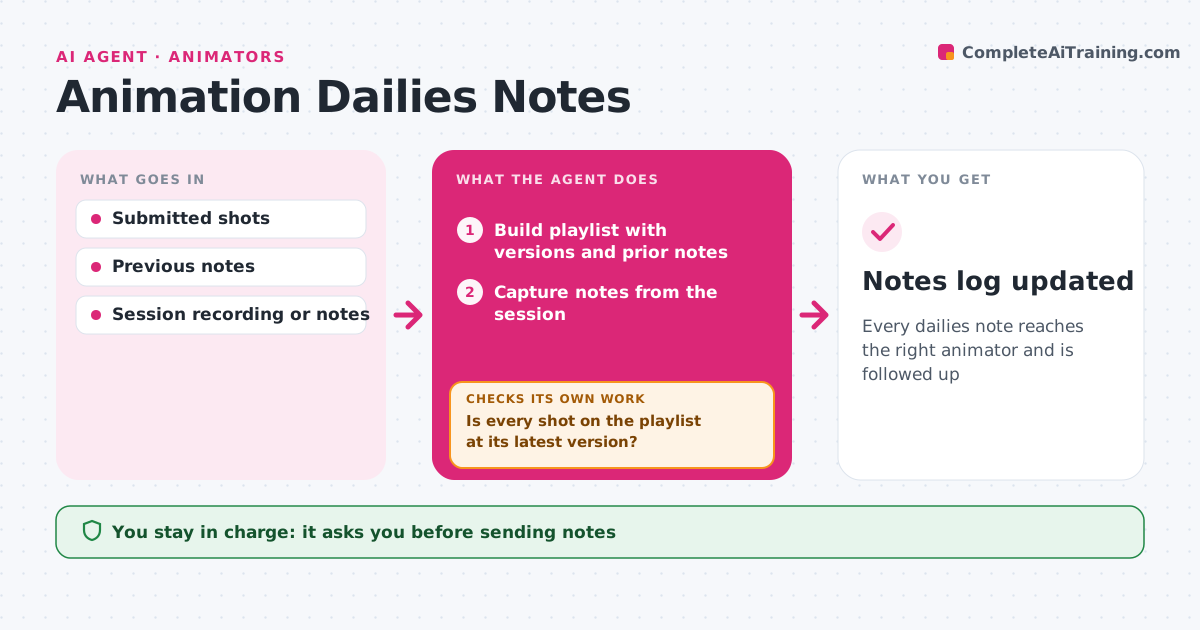
Every dailies note reaches the right animator and is followed up
What it does
Dailies notes get lost or applied to the wrong file, and the same notes come up again a week later. Before dailies, this agent builds the playlist from shots submitted since the last session, with version numbers and the previous notes for each. During the review it takes notes from the recording or the note-taker and ties each to a shot, frame and animator. It drafts a clean note list, and the lead approves it before notes go to each animator. At the next dailies it checks whether each note was addressed in the new version. Notes not addressed go back on the playlist. Edge case: a verbal note that is not about a specific frame is turned into a question for the lead.
How it works
Follow the arrows from top to bottom. The orange dashed arrow is the loop: when a check fails, the agent goes back and tries again.
Read the steps as a list
- Dailies scheduled
- Build playlist with versions and prior notes
- Is every shot on the playlist at its latest version?If not: swap in the latest version and flag the mismatch. Back to step 2.
- Capture notes from the session
- Tie notes to shot, frame and animator
- Lead approves sending notesThe agent waits here for your OK.
- Were last session's notes addressed in new versions?If not: put open notes back on the next playlist. Back to step 5.
- Notes log updated
How it decides
It links each note to shot and frame and carries open notes forward until addressed.
- Unclear notes become questions for the lead
- Open notes carry forward
- Notes go only to the shot owner
Make it yours
Every agent is a starting point. You choose these settings for your own situation.
- Playlist rules
- Note format
- Delivery channel
- Carry-forward limit
What keeps you in control
It always asks you first
- Sending notes
Hard limits
- Never changes shot status
- Notes stay in the project
It stops when
- Done: notes sent
- Stop: session cancelled
Set it up
We guide you through the set-up, step by step
Members get the full set-up guide for this agent. No technical skills needed: you copy, paste and upload.
- One set of instructions to paste into your AI, with the clicks for ChatGPT, Claude, Microsoft 365 Copilot, Gemini and Grok
- The agent then walks you through connecting your own data, one source at a time
- A downloadable copy with the flow chart, the rules and the full guide