AI agent for 3d artists
Creative Render Failure Recovery Agent
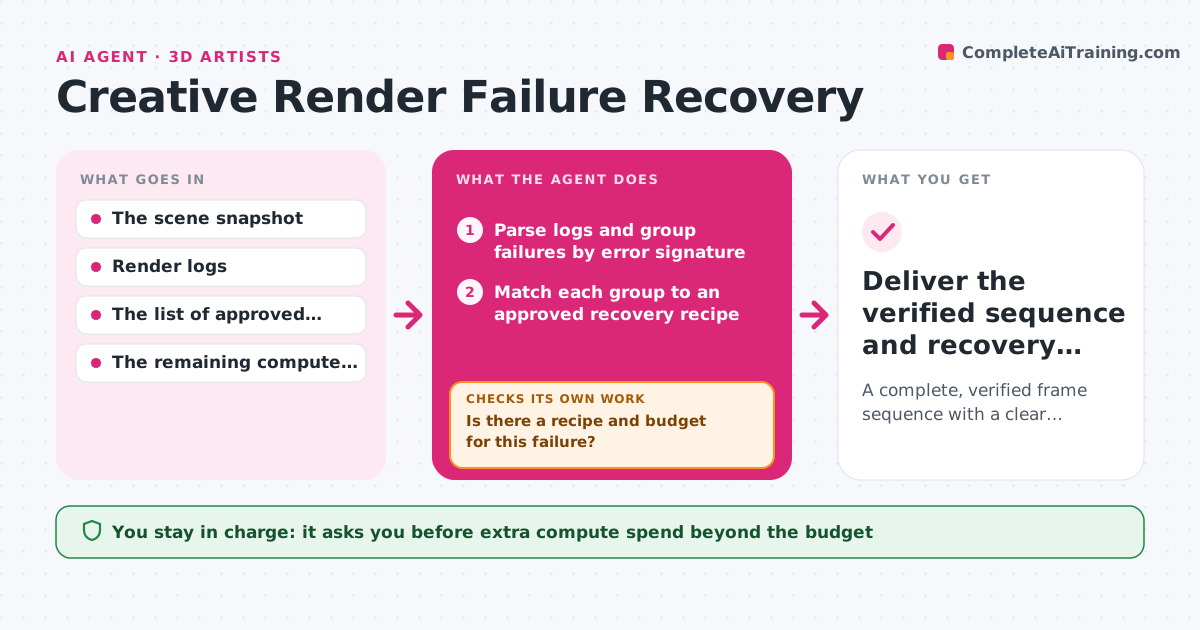
A complete, verified frame sequence with a clear history of what was recovered and how.
What it does
Render farms fail for many reasons: a node runs out of memory, a texture path is wrong, or a plugin times out. Artists lose hours restarting jobs by hand and often rerun frames that will fail again. This agent reads the render logs, groups failed frames by error signature, and matches each group to a list of approved recovery recipes. When a recipe exists and there is compute budget left, it relaunches only the affected frames in an isolated queue. It then inspects the new frames for gaps, black frames and corruption. If the same error comes back, it switches to a different approved recipe or stops and escalates with the evidence. The render coordinator approves extra compute and any scene edits. Edge case: a missing texture file is never retried, because no recipe can fix a file that does not exist.
How it works
Follow the arrows from top to bottom. The orange dashed arrow is the loop: when a check fails, the agent goes back and tries again.
Read the steps as a list
- Render job ends with failed or missing frames
- Parse logs and group failures by error signature
- Match each group to an approved recovery recipe
- Is there a recipe and budget for this failure?If not: escalate the group with logs. Back to step 2.
- Relaunch the affected frames in an isolated queue
- Check the new frames for gaps, black frames and corruption
- Are the frames complete and clean?If not: same error twice: switch recipe or escalate. Back to step 3.
- Merge recovered frames into the sequence
- Render coordinator approves extra compute or scene edits if neededThe agent waits here for your OK.
- Deliver the verified sequence and recovery history
How it decides
It reads the error signature of each failed frame range and matches it to a recipe (more memory, fewer threads, local texture cache, single-frame retry). It retries only when the evidence suggests a temporary cause. If a retry reproduces the same error, it treats the cause as persistent and changes recipe or escalates instead of looping.
- Retry or escalate: retry only for transient signatures (timeouts, out-of-memory spikes); escalate missing files and scene errors.
- Which recipe: the cheapest approved recipe that matches the signature.
- When to stop: the same error twice in a row, or the compute budget reached.
Make it yours
Every agent is a starting point. You choose these settings for your own situation.
- Compute budget per job for automatic retries (default 10% of the original render cost)
- Error signatures treated as transient and safe to retry (default timeouts and memory spikes)
- Number of identical failures before escalation (default 2)
- Integrity checks run on new frames (default black frame, missing frame and file size checks)
- Where escalations go (default the render coordinator's queue)
What keeps you in control
It always asks you first
- Extra compute spend beyond the budget
- Any scene edit
- Recovery recipes not on the approved list
Hard limits
- Retries run in an isolated queue so production jobs are not disturbed.
- Never edits the scene.
- Hard stop at the compute budget.
It stops when
- Done: all frames present and verified.
- Blocked: the same failure persists after the allowed recipes.
- Budget reached: report what is left and the estimated cost to finish.
Set it up
We guide you through the set-up, step by step
Members get the full set-up guide for this agent. No technical skills needed: you copy, paste and upload.
- One set of instructions to paste into your AI, with the clicks for ChatGPT, Claude, Microsoft 365 Copilot, Gemini and Grok
- The agent then walks you through connecting your own data, one source at a time
- A downloadable copy with the flow chart, the rules and the full guide