AI agent for 3d artists
Topology and UV Cleanup Audit Agent
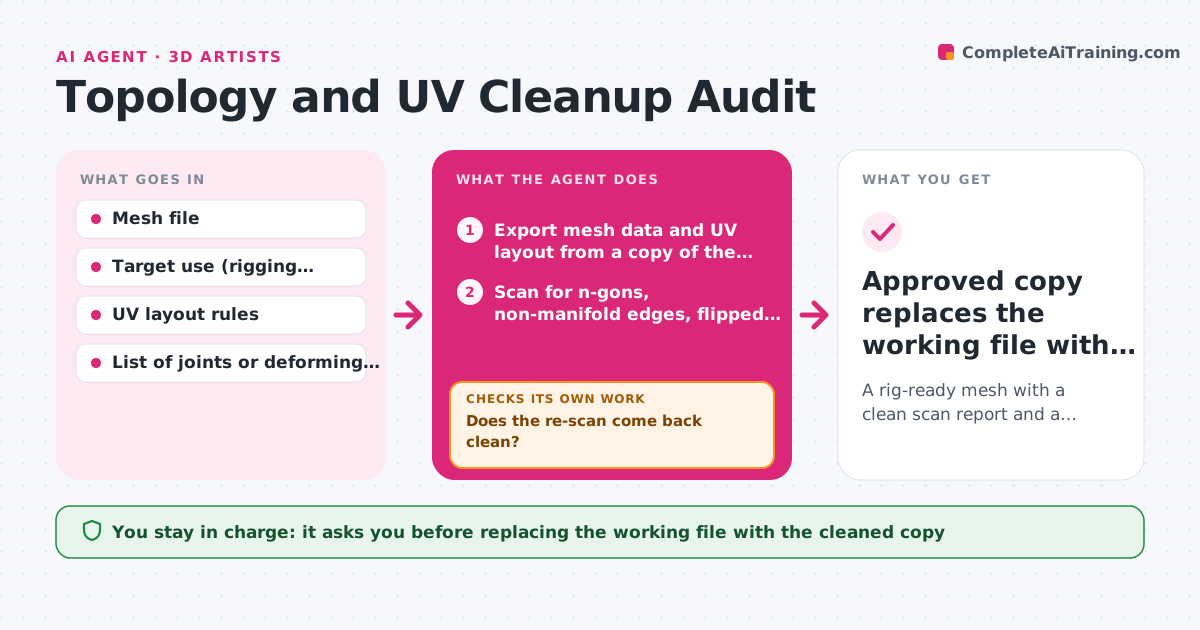
A rig-ready mesh with a clean scan report and a cleaned copy the artist has approved
What it does
A mesh marked ready often hides bad topology, and the faults surface only after texturing or rigging has started. When the artist marks a model ready, this agent exports the mesh data and scans for n-gons, non-manifold edges, flipped normals, stretched or overlapping UV islands and edge loops that will pinch at joints. It sorts findings into safe fixes and judgment calls. It applies only safe fixes, such as flipping normals or merging doubled vertices, on a copy of the file. Then it re-runs the full scan, because one fix can create a new fault. It loops until the report is clean or the same fault repeats three times. Judgment calls go on a list with screenshots. The artist always approves the cleaned copy before it replaces the working file. Edge case: an n-gon on a flat panel that never deforms is left alone.
How it works
Follow the arrows from top to bottom. The orange dashed arrow is the loop: when a check fails, the agent goes back and tries again.
Read the steps as a list
- Model marked ready
- Export mesh data and UV layout from a copy of the file
- Scan for n-gons, non-manifold edges, flipped normals and UV overlap or stretch
- Check edge loops around joints for pinching
- Apply safe fixes on the copy and list judgment calls with screenshots
- Does the re-scan come back clean?If not: re-run the scan on the fixed copy, undo any fix that created a new fault, then try a different fix. Back to step 3.
- Did any fix change the silhouette or UV density beyond the limit?If not: revert that fix and move it to the judgment list. Back to step 5.
- Artist reviews the cleaned copy and judgment listThe agent waits here for your OK.
- Approved copy replaces the working file with the scan report attached
How it decides
A fault is fixed automatically only if it is on the safe list and cannot change the silhouette. Anything on a deforming area is left for the artist.
- Auto-fix only normals, doubled vertices and loose geometry
- Flag UV islands with more than 20% stretch or any overlap on a unique-texture asset
- Leave n-gons on rigid, non-deforming parts alone
- Stop after three passes if the same fault keeps coming back
Make it yours
Every agent is a starting point. You choose these settings for your own situation.
- Maximum stretch allowed on UV islands (default 20%)
- Which faults count as safe to auto-fix
- Target use: rigging, texturing or both
- Maximum fix passes before stopping (default 3)
What keeps you in control
It always asks you first
- Replacing the working file with the cleaned copy
- Fixes on deforming areas such as shoulders or faces
Hard limits
- Never edits the original file
- Never changes the silhouette or vertex positions without approval
It stops when
- Done: the scan is clean and the artist approved the copy
- Stop: the same fault returns after three passes, or the export fails
Set it up
We guide you through the set-up, step by step
Members get the full set-up guide for this agent. No technical skills needed: you copy, paste and upload.
- One set of instructions to paste into your AI, with the clicks for ChatGPT, Claude, Microsoft 365 Copilot, Gemini and Grok
- The agent then walks you through connecting your own data, one source at a time
- A downloadable copy with the flow chart, the rules and the full guide