AI agent for insurance actuaries
Annuity Feature Change Pricing Agent
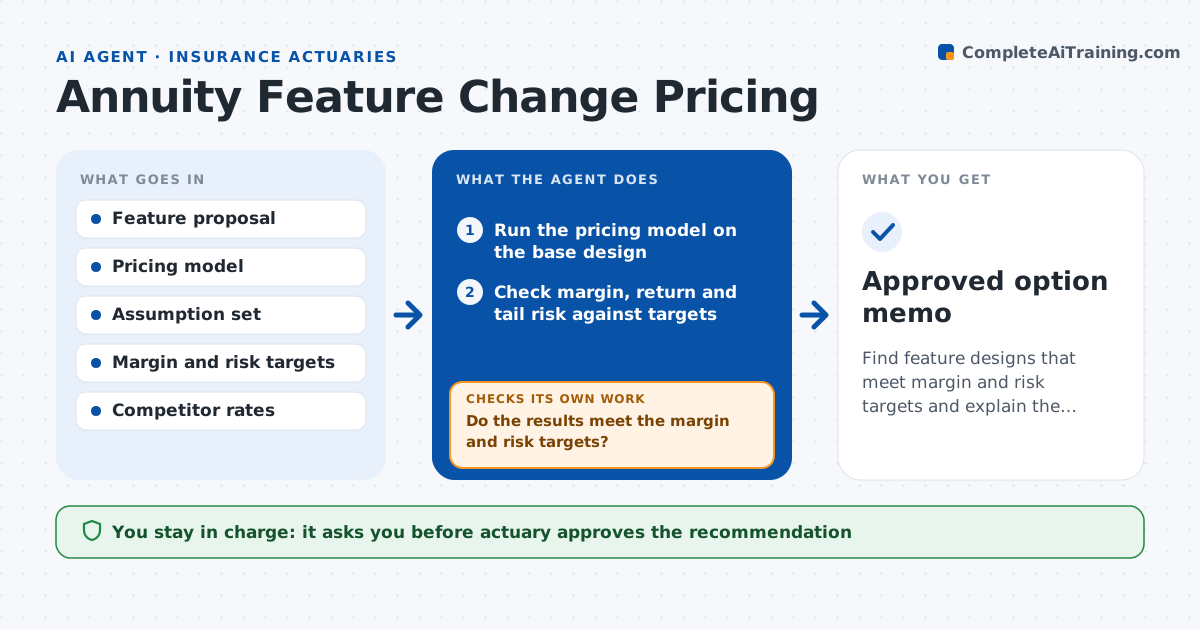
Find feature designs that meet margin and risk targets and explain the options.
What it does
When product teams want to add a feature to an annuity, such as a higher roll-up rate or a new rider, actuaries rebuild the pricing by hand and guess the margin. This agent takes the proposed feature change and reruns pricing with the new design. It checks margins and risk measures against the targets and compares several design options, such as different fees, caps or rates. If margins fall below target, it adjusts one parameter at a time, such as the rider fee or the cap, and reruns until the target is met or no option works. It then drafts a memo comparing options. The actuary approves the recommendation.
How it works
Follow the arrows from top to bottom. The orange dashed arrow is the loop: when a check fails, the agent goes back and tries again.
Read the steps as a list
- Product change proposal arrives
- Run the pricing model on the base design
- Check margin, return and tail risk against targets
- Do the results meet the margin and risk targets?If not: adjust one parameter such as fee, cap or rate, and rerun. Back to step 3.
- Build two or three alternative designs
- Run each alternative
- Compare options and test sensitivity to key assumptions
- Does the preferred option still meet targets under the sensitivity cases?If not: drop or adjust that option. Back to step 5.
- Draft the recommendation memo
- Actuary approves the recommendationThe agent waits here for your OK.
- Approved option memo
How it decides
It picks the design that meets margin and risk targets with the smallest change from the product team's proposal.
- Require a profit margin of at least the target on the base case
- Change one parameter at a time to see its effect
- Test interest rates up and down 100 basis points
- Prefer the option closest to the original proposal
Make it yours
Every agent is a starting point. You choose these settings for your own situation.
- Margin and risk targets
- Parameters allowed to change
- Sensitivity cases
- Memo template
What keeps you in control
It always asks you first
- Actuary approves the recommendation
- Chief actuary approves any price or feature sent to product teams
Hard limits
- Never releases prices or filings
- Shows assumptions behind every result
It stops when
- Done: at least one option meets targets and the memo is approved
- Stop: no tested design meets the targets
Set it up
We guide you through the set-up, step by step
Members get the full set-up guide for this agent. No technical skills needed: you copy, paste and upload.
- One set of instructions to paste into your AI, with the clicks for ChatGPT, Claude, Microsoft 365 Copilot, Gemini and Grok
- The agent then walks you through connecting your own data, one source at a time
- A downloadable copy with the flow chart, the rules and the full guide