AI agent for immigration consultants
Appeal Deadline Agent
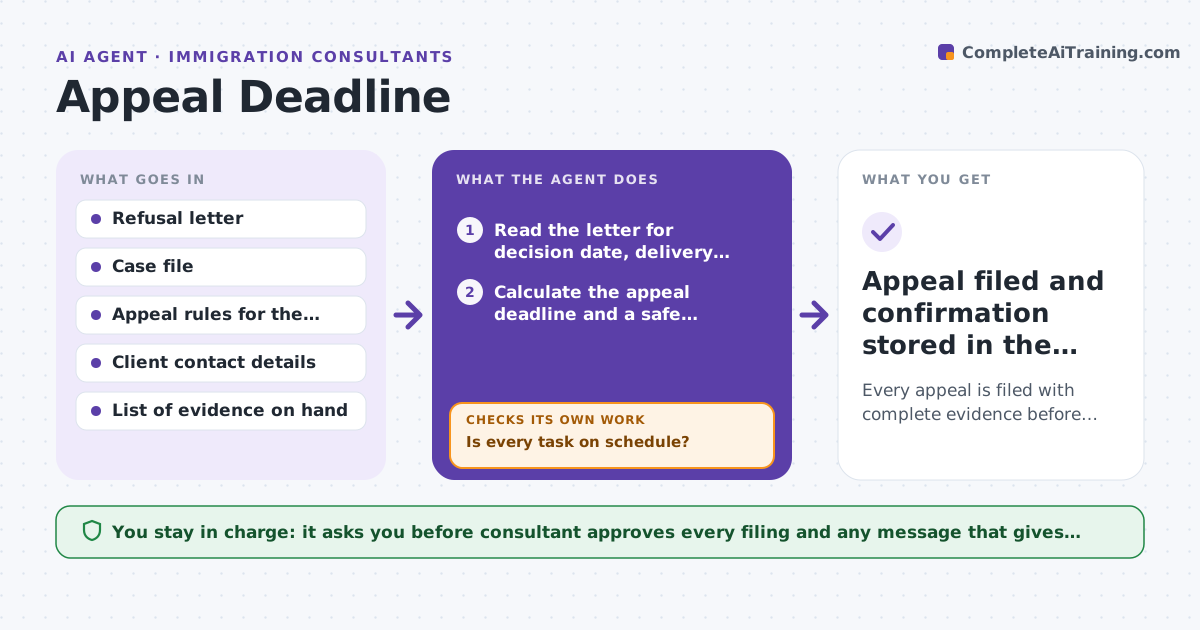
Every appeal is filed with complete evidence before the deadline, with early warning when tasks slip.
What it does
A refusal letter lands and the clock starts. The consultant has to work out which deadline applies, what evidence and forms are needed, and who owes what. This agent reads each refusal letter, finds the decision date and the appeal route, and calculates the deadline using the rules for that country and delivery method. It builds a dated task list for evidence, forms and client signatures, then watches progress. When a task slips or a new document arrives, it recalculates the plan and warns early. After each warning it checks whether the task moved, and escalates if not. It never files anything. The consultant approves every filing. Edge case: a letter delivered by post may allow extra days, but the agent plans against the earlier date and flags the difference.
How it works
Follow the arrows from top to bottom. The orange dashed arrow is the loop: when a check fails, the agent goes back and tries again.
Read the steps as a list
- Refusal letter added to the case
- Read the letter for decision date, delivery method and appeal route
- Calculate the appeal deadline and a safe internal target date
- Build the task list for evidence, forms and signatures with due dates
- Request missing items from the client and update the case tracker
- Is every task on schedule?If not: warn the consultant, rebuild the plan around the slipped task and chase the client again. Back to step 4.
- Assemble the filing pack and run a completeness review against the form requirements
- Is the pack complete and signed?If not: list the gaps, request the missing pieces and re-review. Back to step 5.
- Consultant approves the filingThe agent waits here for your OK.
- Appeal filed and confirmation stored in the case file
How it decides
It plans against the earliest possible deadline and ranks tasks by how many days of slack remain. It escalates when a task is not done by its own due date.
- Plan against the earlier of the two possible deadlines when delivery date is unclear.
- Set the internal target 5 days before the legal deadline.
- Escalate to the consultant when a task is 2 days overdue or deadline slack drops under 7 days.
- Recalculate the whole plan whenever a new document changes the facts.
Make it yours
Every agent is a starting point. You choose these settings for your own situation.
- Internal buffer before the deadline (default 5 days)
- Jurisdictions and appeal routes covered
- Reminder schedule for clients (default every 3 days)
- Escalation threshold in days of slack (default 7)
What keeps you in control
It always asks you first
- Consultant approves every filing and any message that gives legal advice to the client
Hard limits
- Never file or send advice without the consultant's approval
- Show the rule and date source behind every deadline
It stops when
- Done: appeal filed and confirmation saved.
- Stop: deadline passed or consultant closes the case.
Set it up
We guide you through the set-up, step by step
Members get the full set-up guide for this agent. No technical skills needed: you copy, paste and upload.
- One set of instructions to paste into your AI, with the clicks for ChatGPT, Claude, Microsoft 365 Copilot, Gemini and Grok
- The agent then walks you through connecting your own data, one source at a time
- A downloadable copy with the flow chart, the rules and the full guide