AI agent for 3d artists
Asset Performance Budget Agent
Assets and scenes within performance budgets on target devices
What it does
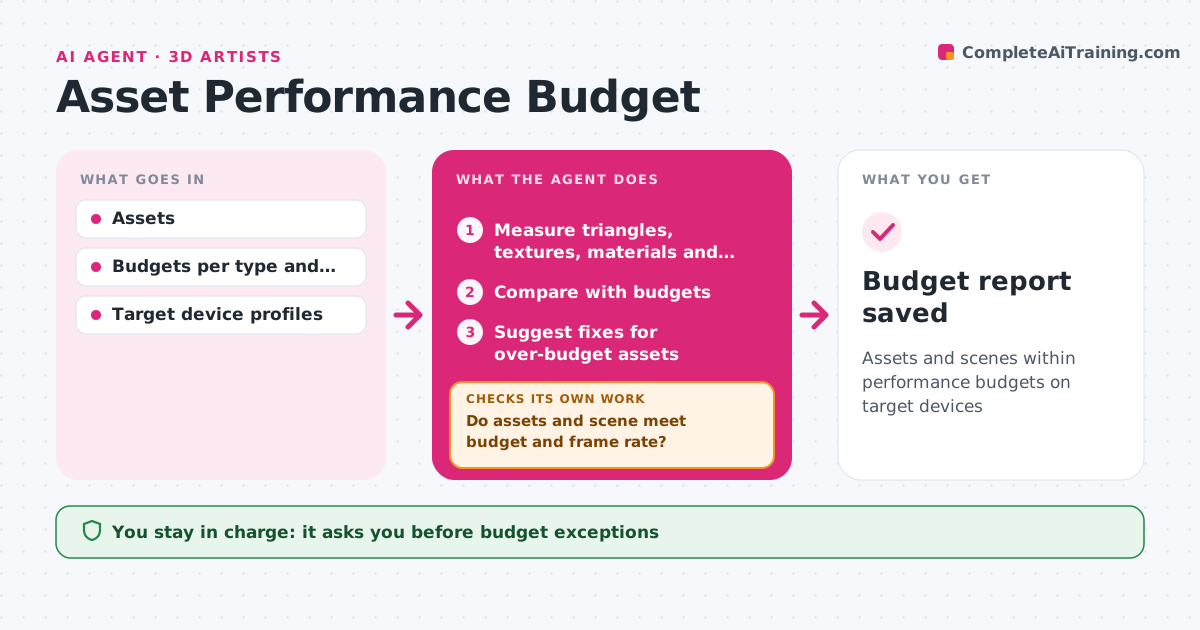
Games that blow their performance budget stutter on the target device, and the cause is often a few heavy assets. For each asset and scene, this agent measures triangle counts per level of detail, texture sizes and memory, material counts and draw calls. It compares them with the budget for that asset type and platform. Over-budget assets get suggestions, such as reducing texture size, merging materials or adding a level of detail. After changes, it measures again. It also tests the scene's frame rate on the target device profile. If the scene still misses its target, it ranks the biggest contributors and suggests the next fix. The art lead approves any budget exception. Edge case: a hero asset seen up close can have a larger budget if another asset gives up memory.
How it works
Follow the arrows from top to bottom. The orange dashed arrow is the loop: when a check fails, the agent goes back and tries again.
Read the steps as a list
- Asset added or nightly run
- Measure triangles, textures, materials and draw calls
- Compare with budgets
- Suggest fixes for over-budget assets
- Test scene frame rate on target device profile
- Do assets and scene meet budget and frame rate?If not: rank biggest contributors and suggest next fixes. Back to step 2.
- Art lead approves budget exceptionsThe agent waits here for your OK.
- Budget report saved
How it decides
It ranks over-budget items by their share of the scene's cost and suggests the cheapest fix first.
- Texture size reduction is tried first
- Hero asset exceptions need offsetting savings
- Frame rate target per platform
Make it yours
Every agent is a starting point. You choose these settings for your own situation.
- Budgets per asset type
- Target platforms
- Frame rate targets
- Nightly run time
What keeps you in control
It always asks you first
- Budget exceptions
Hard limits
- Never changes assets itself
- Never lowers budgets without approval
It stops when
- Done: within budget
- Stop: target device profile missing
Set it up
We guide you through the set-up, step by step
Members get the full set-up guide for this agent. No technical skills needed: you copy, paste and upload.
- One set of instructions to paste into your AI, with the clicks for ChatGPT, Claude, Microsoft 365 Copilot, Gemini and Grok
- The agent then walks you through connecting your own data, one source at a time
- A downloadable copy with the flow chart, the rules and the full guide