AI agent for operations managers
Automation Candidate Scoring Agent
A ranked, evidence-based list of automation candidates with pilots chosen by the manager
What it does
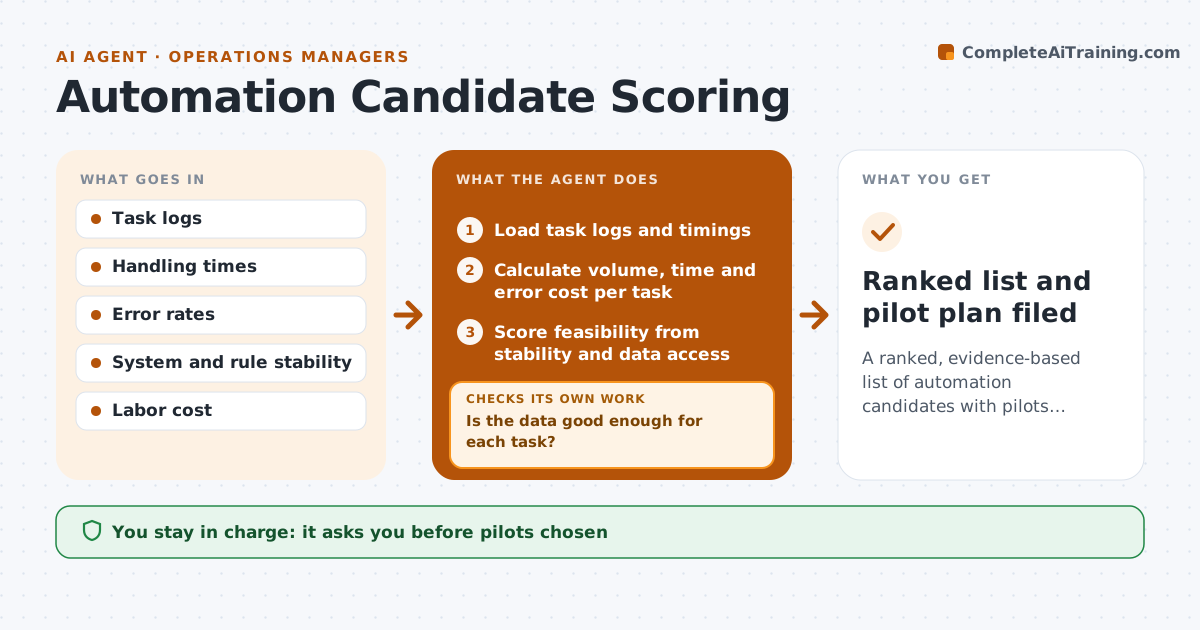
Automation ideas are chosen by enthusiasm rather than value. This agent measures volume, handling time and error rate of manual tasks from logs. It scores each task for value and feasibility, and checks the data behind each score. When the data is doubtful, it asks for a sample, for example a week of timings, and rescoring. It produces a ranked list with the reasoning and the expected payback. The manager approves which pilots go ahead. The list shows the evidence for each score so the manager can challenge it. Edge case: a task has high volume but changes every month, so the agent lowers its feasibility score.
How it works
Follow the arrows from top to bottom. The orange dashed arrow is the loop: when a check fails, the agent goes back and tries again.
Read the steps as a list
- Quarterly review of manual tasks
- Load task logs and timings
- Calculate volume, time and error cost per task
- Is the data good enough for each task?If not: request a sample of timings or count and recompute. Back to step 2.
- Score feasibility from stability and data access
- Rank tasks by value and feasibility
- Estimate payback for the top candidates
- Is the payback inside the target for each pilot?If not: narrow the scope or drop the candidate and rescore. Back to step 5.
- Manager approves the pilotsThe agent waits here for your OK.
- Ranked list and pilot plan filed
How it decides
Value equals volume times time saved and errors avoided. Feasibility depends on rule stability and data access. Data under the quality limit triggers a sample.
- Require at least 4 weeks of data
- Lower feasibility when rules change monthly
- Drop candidates with payback over 18 months
- Rank by value times feasibility
Make it yours
Every agent is a starting point. You choose these settings for your own situation.
- Payback limit (default 18 months)
- Data period
- Scoring weights
- Task areas
What keeps you in control
It always asks you first
- Pilots chosen
Hard limits
- Never start a pilot
- Never use personal data beyond task counts
It stops when
- Done: pilots approved
- Stop: no usable task logs
Set it up
We guide you through the set-up, step by step
Members get the full set-up guide for this agent. No technical skills needed: you copy, paste and upload.
- One set of instructions to paste into your AI, with the clicks for ChatGPT, Claude, Microsoft 365 Copilot, Gemini and Grok
- The agent then walks you through connecting your own data, one source at a time
- A downloadable copy with the flow chart, the rules and the full guide