AI agent for process development scientists
Batch Record Deviation Review Agent
Batch records reviewed quickly with recurring issues caught
What it does
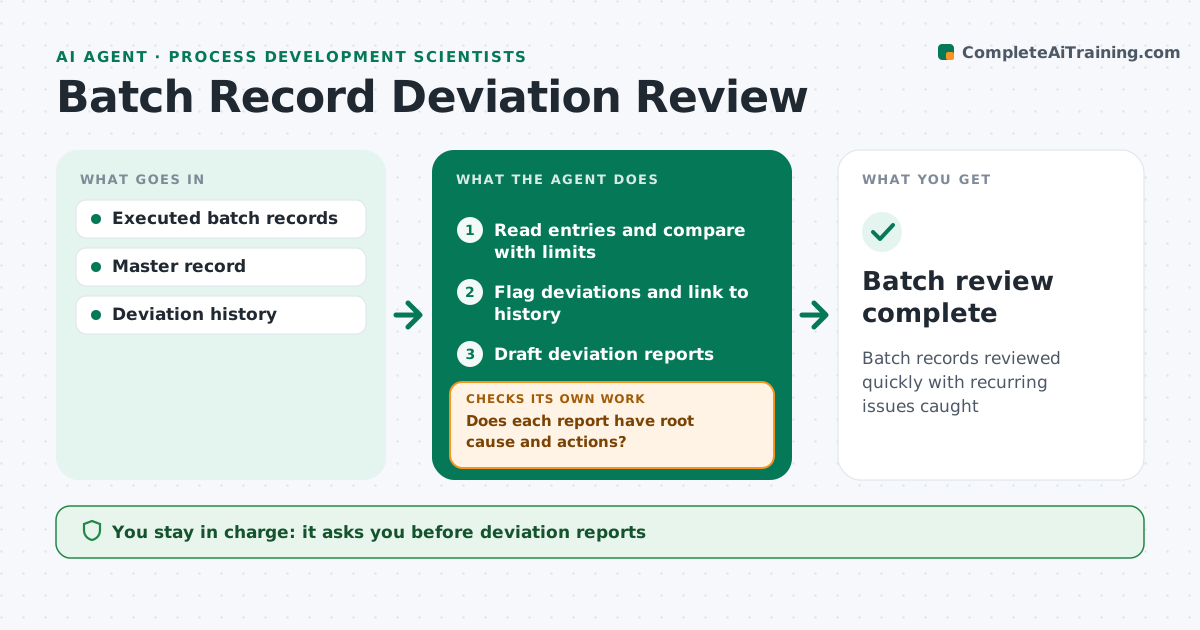
Completed batch records must be reviewed for deviations before a batch can be released, and reviewers often page through hundreds of entries by hand. This agent reads each executed batch record and compares every entry with the limits in the master record. It flags out-of-range values, missing signatures, late entries and skipped steps. It links each deviation to past ones with similar causes, so repeat problems stand out. It drafts the deviation report with the facts already filled in. Before closure, it checks that root cause and corrective actions are complete. If either is missing, it chases the owners and checks again. You approve every deviation report and give the input for batch disposition. Edge case: a value just inside limits but trending toward the edge across several batches is flagged as a watch item.
How it works
Follow the arrows from top to bottom. The orange dashed arrow is the loop: when a check fails, the agent goes back and tries again.
Read the steps as a list
- Batch record completed
- Read entries and compare with limits
- Flag deviations and link to history
- Draft deviation reports
- Does each report have root cause and actions?If not: chase owners. Back to step 4.
- Scientist approves reportsThe agent waits here for your OK.
- Batch review complete
How it decides
It flags entries outside limits or missing, and links deviations to similar past ones.
- Flag trends toward limits
- Link similar deviations
- Block closure without root cause
Make it yours
Every agent is a starting point. You choose these settings for your own situation.
- Limits
- Trend rule
- Report template
- Owner list
What keeps you in control
It always asks you first
- Deviation reports
- Batch disposition input
Hard limits
- Never decides batch release
It stops when
- Done: review complete
- Stop: record incomplete
Set it up
We guide you through the set-up, step by step
Members get the full set-up guide for this agent. No technical skills needed: you copy, paste and upload.
- One set of instructions to paste into your AI, with the clicks for ChatGPT, Claude, Microsoft 365 Copilot, Gemini and Grok
- The agent then walks you through connecting your own data, one source at a time
- A downloadable copy with the flow chart, the rules and the full guide