AI agent for journalists
Beat Records Monitor Agent
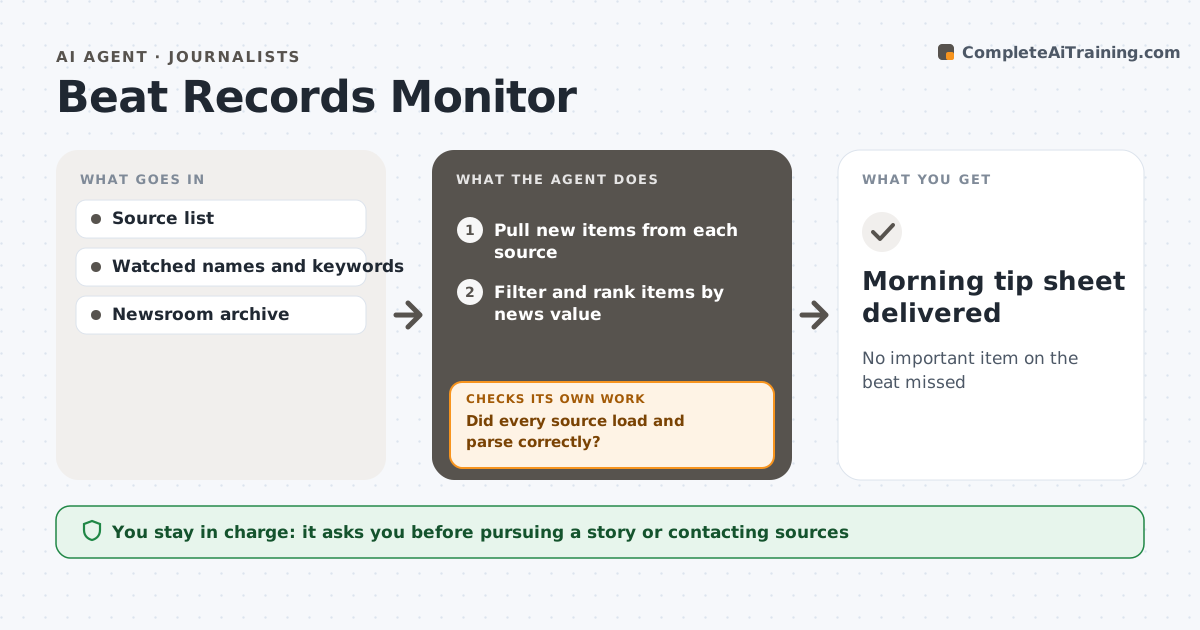
No important item on the beat missed
What it does
A beat reporter has to watch many sources: council agendas, court dockets, business filings, inspection reports and press releases. This agent checks your chosen sources every morning and pulls what is new since yesterday. It first checks that each source loaded and parsed correctly. If one failed or changed format, it retries and then flags it in the tip sheet instead of quietly missing items. It filters items by the keywords, people and companies you watch and ranks them by likely news value, with watched names highest. For the top items it pulls your newsroom's past coverage so you have background fast. It then checks the top items are truly new and not repeats of things you already covered. You decide what to chase. Edge case: a sealed court filing shows only as a docket line, and the agent notes it cannot see the document.
How it works
Follow the arrows from top to bottom. The orange dashed arrow is the loop: when a check fails, the agent goes back and tries again.
Read the steps as a list
- Morning run
- Pull new items from each source
- Did every source load and parse correctly?If not: retry, then flag broken sources in the tip sheet. Back to step 2.
- Filter and rank items by news value
- Pull past coverage for top items
- Are the top items new and not already covered?If not: drop repeats and promote the next items. Back to step 4.
- Assemble the tip sheet
- Reporter picks items to pursueThe agent waits here for your OK.
- Morning tip sheet delivered
How it decides
It ranks new items by matches with watched names and keywords and by how often similar items became stories before.
- Rank items with watched names highest
- Flag sources that fail or change format
- Note documents that are sealed or behind fees
Make it yours
Every agent is a starting point. You choose these settings for your own situation.
- Sources to watch
- Keywords and names
- Delivery time
- Tip sheet length
What keeps you in control
It always asks you first
- Pursuing a story or contacting sources
Hard limits
- Uses public sources only
- Never contacts anyone
It stops when
- Done: tip sheet delivered
- Stop: most sources down; alert the reporter
Set it up
We guide you through the set-up, step by step
Members get the full set-up guide for this agent. No technical skills needed: you copy, paste and upload.
- One set of instructions to paste into your AI, with the clicks for ChatGPT, Claude, Microsoft 365 Copilot, Gemini and Grok
- The agent then walks you through connecting your own data, one source at a time
- A downloadable copy with the flow chart, the rules and the full guide