AI agent for chief human resources officers
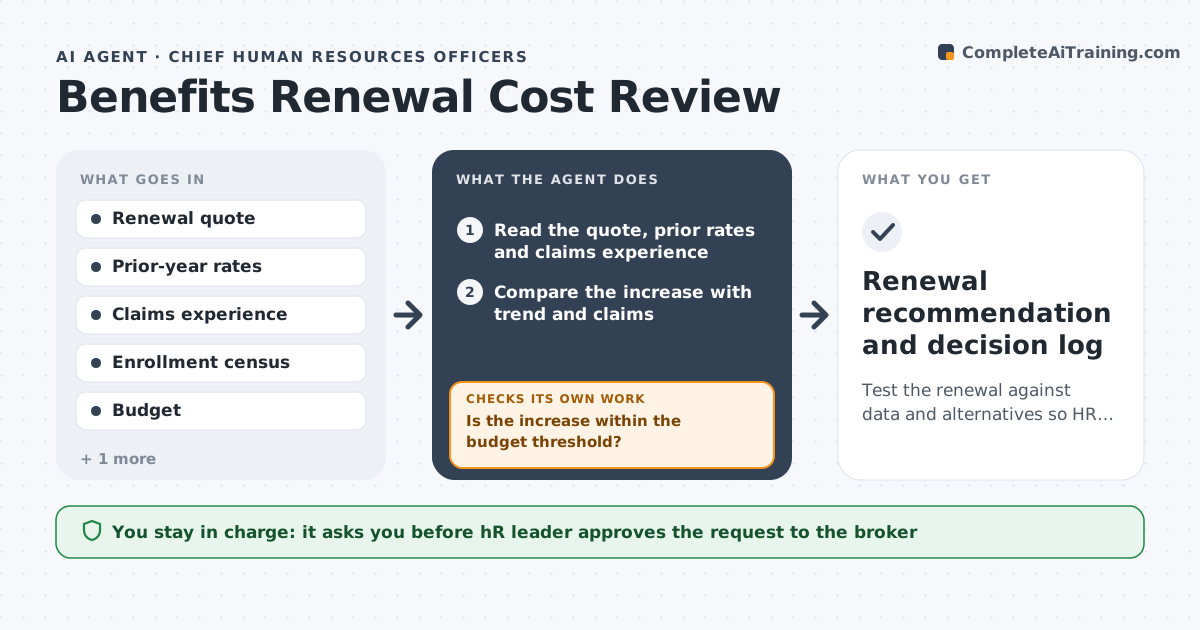
Benefits Renewal Cost Review Agent
Test the renewal against data and alternatives so HR chooses a plan with eyes open
What it does
The medical renewal arrives six weeks before open enrollment with a 14 percent increase and little explanation. This agent reads the quote and compares it with last year's rates and the plan's claims experience. It models plan design changes, such as higher deductibles or a narrower network, and estimates their effect on cost and on how many employees would likely move plans. If the increase exceeds the threshold HR set, it drafts a request for alternate quotes and tracks replies. It then re-runs the comparison with each new quote. It prepares a short recommendation with the cost, participation effect and trade-offs. The HR leader approves the plan sent to the broker. Edge case: if claims data is under 12 months old, it flags the quote as hard to judge.
How it works
Follow the arrows from top to bottom. The orange dashed arrow is the loop: when a check fails, the agent goes back and tries again.
Read the steps as a list
- Renewal quote arrives
- Read the quote, prior rates and claims experience
- Compare the increase with trend and claims
- Model plan design changes and cost per employee
- Is the increase within the budget threshold?If not: Draft a request for alternate quotes and model more design options. Back to step 3.
- Track replies and load new quotes
- Do at least two options fit the threshold and participation target?If not: Request more quotes or widen the plan design options and rerun. Back to step 6.
- Draft the recommendation with costs and trade-offs
- HR leader approves the plan sent to the brokerThe agent waits here for your OK.
- Renewal recommendation and decision log
How it decides
It accepts a quote only if the increase is within the budget threshold. Above it, it requires at least two alternate scenarios or quotes before recommending.
- Challenge any increase above 8 percent
- Require two alternates before recommending when above threshold
- Check expected participation shifts against a 5 percent tolerance
- Flag quotes based on less than 12 months of claims
Make it yours
Every agent is a starting point. You choose these settings for your own situation.
- Increase threshold (default 8 percent)
- Alternate quotes required (default 2)
- Participation tolerance (default 5 percent)
- Plan design options modeled (default deductible, network, tier)
What keeps you in control
It always asks you first
- HR leader approves the request to the broker
- HR leader approves the final plan recommendation
Hard limits
- Never accept or reject a quote on its own
- Never contact the broker without approval
- Keep claims data aggregated and anonymous
It stops when
- Done: Plan chosen and communicated by HR
- Stop: Quotes cannot meet the threshold, so hand the options to the HR leader
Set it up
We guide you through the set-up, step by step
Members get the full set-up guide for this agent. No technical skills needed: you copy, paste and upload.
- One set of instructions to paste into your AI, with the clicks for ChatGPT, Claude, Microsoft 365 Copilot, Gemini and Grok
- The agent then walks you through connecting your own data, one source at a time
- A downloadable copy with the flow chart, the rules and the full guide