AI agent for product managers
Beta Program Tester Management Agent
Keep every feature covered by active testers with useful feedback
What it does
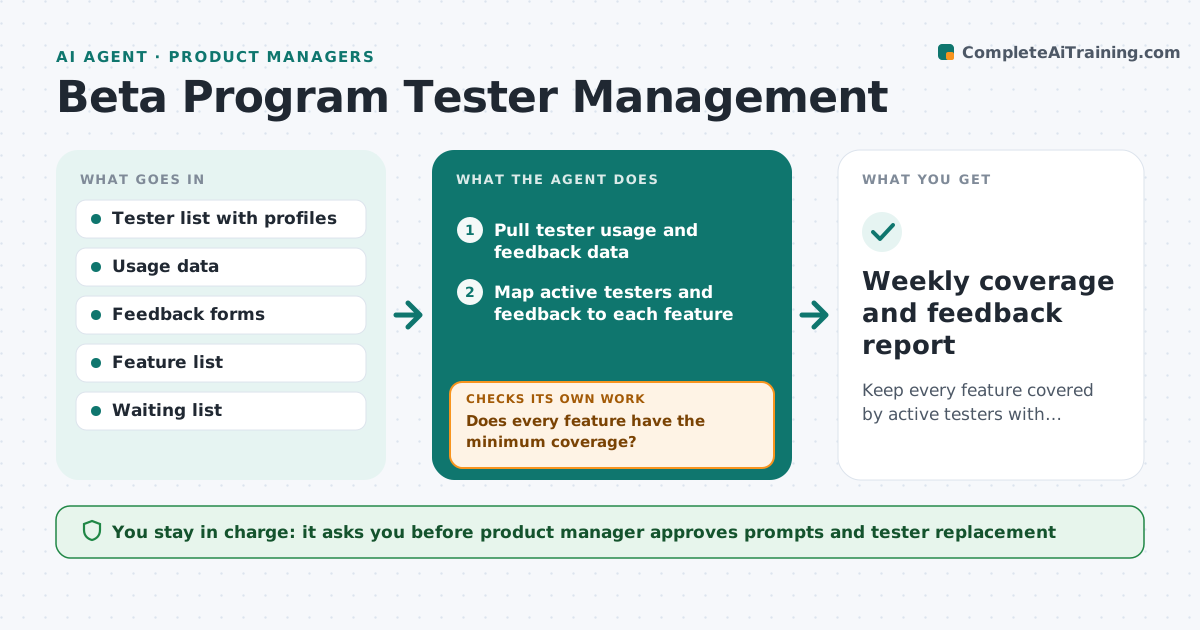
A product manager recruits 60 beta testers and a month later 20 are active and only a few features have received feedback. This agent keeps the program healthy. It tracks tester activity from product usage and survey responses, finds the inactive ones and sends tailored prompts, such as a short task related to a feature that has little coverage. It collects feedback by feature and reports gaps so the manager knows what is untested. Testers who stay inactive after two prompts are replaced from a waiting list so each feature keeps coverage. It checks coverage again after the replacements. The manager approves messages and removals. Edge case: a tester is active but only on one feature. The agent asks about a second feature instead.
How it works
Follow the arrows from top to bottom. The orange dashed arrow is the loop: when a check fails, the agent goes back and tries again.
Read the steps as a list
- Beta program starts or daily check runs
- Pull tester usage and feedback data
- Map active testers and feedback to each feature
- Does every feature have the minimum coverage?If not: List low-coverage features and the testers best placed to cover them. Back to step 2.
- Find testers inactive for 7 days
- Draft a tailored prompt for each tester with a small task
- Product manager approves the messagesThe agent waits here for your OK.
- Send prompts and log replies
- Did the tester act within 5 days of the second prompt?If not: Propose replacing the tester from the waiting list and onboarding them. Back to step 6.
- Weekly coverage and feedback report
How it decides
A tester is inactive after 7 days without use. A feature has enough coverage with at least 5 active testers and 5 pieces of feedback.
- Inactive means no usage for 7 days
- Two unanswered prompts lead to replacement
- A feature needs 5 active testers and 5 feedback items
- New testers must match the target profile of the lost tester
Make it yours
Every agent is a starting point. You choose these settings for your own situation.
- Inactivity days (default 7)
- Prompts before replacement (default 2)
- Coverage targets per feature
- Message tone and incentives
- Report day
What keeps you in control
It always asks you first
- Product manager approves prompts and tester replacement
Hard limits
- Never removes a tester without approval
- Does not share one tester's feedback with others
It stops when
- Done: every feature meets coverage
- Stop: waiting list empty, ask the manager to recruit
Set it up
We guide you through the set-up, step by step
Members get the full set-up guide for this agent. No technical skills needed: you copy, paste and upload.
- One set of instructions to paste into your AI, with the clicks for ChatGPT, Claude, Microsoft 365 Copilot, Gemini and Grok
- The agent then walks you through connecting your own data, one source at a time
- A downloadable copy with the flow chart, the rules and the full guide