AI agent for construction estimators
Bid Day Countdown Agent
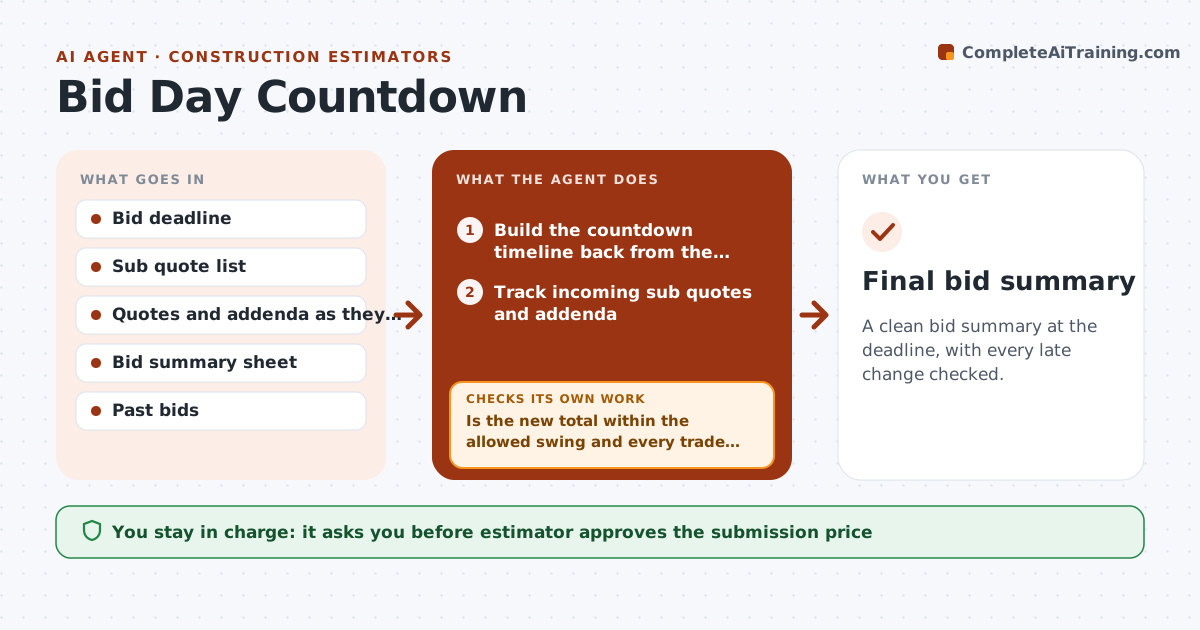
A clean bid summary at the deadline, with every late change checked.
What it does
At 2pm on bid day, five sub quotes arrive and one of them reads $1.2M instead of $120k. This agent runs the countdown. It sets a timeline back from the deadline, tracks incoming sub quotes and addenda, and updates the bid summary as each arrives. After every change, it reruns the totals and checks, such as scope coverage, duplicated or missing trades, and unusual swings. If the total moves outside a set range, it flags the cause and asks you to confirm before accepting. You approve the submission price. Edge case: a quote that excludes a key item is shown with the cost to cover it so you can compare low bids fairly.
How it works
Follow the arrows from top to bottom. The orange dashed arrow is the loop: when a check fails, the agent goes back and tries again.
Read the steps as a list
- Bid day begins
- Build the countdown timeline back from the deadline
- Track incoming sub quotes and addenda
- Check each quote for scope, exclusions and math
- Update the bid summary
- Is the new total within the allowed swing and every trade covered?If not: Flag the cause, ask the estimator to confirm or fix the quote. Back to step 2.
- Compare low quotes on the same scope basis
- Are all addenda acknowledged and included in the price?If not: List the missing addenda and update the summary. Back to step 3.
- Run the final checklist at 60 and 15 minutes before deadline
- Estimator approves the submission priceThe agent waits here for your OK.
- Final bid summary
How it decides
It accepts a quote into the summary after checking scope, math and size against the estimate, and flags totals that swing more than the set range.
- Flag any total change over 3% from the last version
- Normalize quotes for exclusions before comparing
- Require addenda acknowledged before submission
- Run final checks 60 and 15 minutes before deadline
Make it yours
Every agent is a starting point. You choose these settings for your own situation.
- Allowed swing (default 3%)
- Deadline checkpoints
- Trades to cover
- Quote comparison method
What keeps you in control
It always asks you first
- Estimator approves the submission price
Hard limits
- Never submit the bid itself
- Never accept a quote without checks
It stops when
- Done: bid submitted by the estimator
- Stop: missing trade coverage at 15 minutes before deadline
Set it up
We guide you through the set-up, step by step
Members get the full set-up guide for this agent. No technical skills needed: you copy, paste and upload.
- One set of instructions to paste into your AI, with the clicks for ChatGPT, Claude, Microsoft 365 Copilot, Gemini and Grok
- The agent then walks you through connecting your own data, one source at a time
- A downloadable copy with the flow chart, the rules and the full guide