AI agent for construction estimators
Bid Risk Contingency Agent
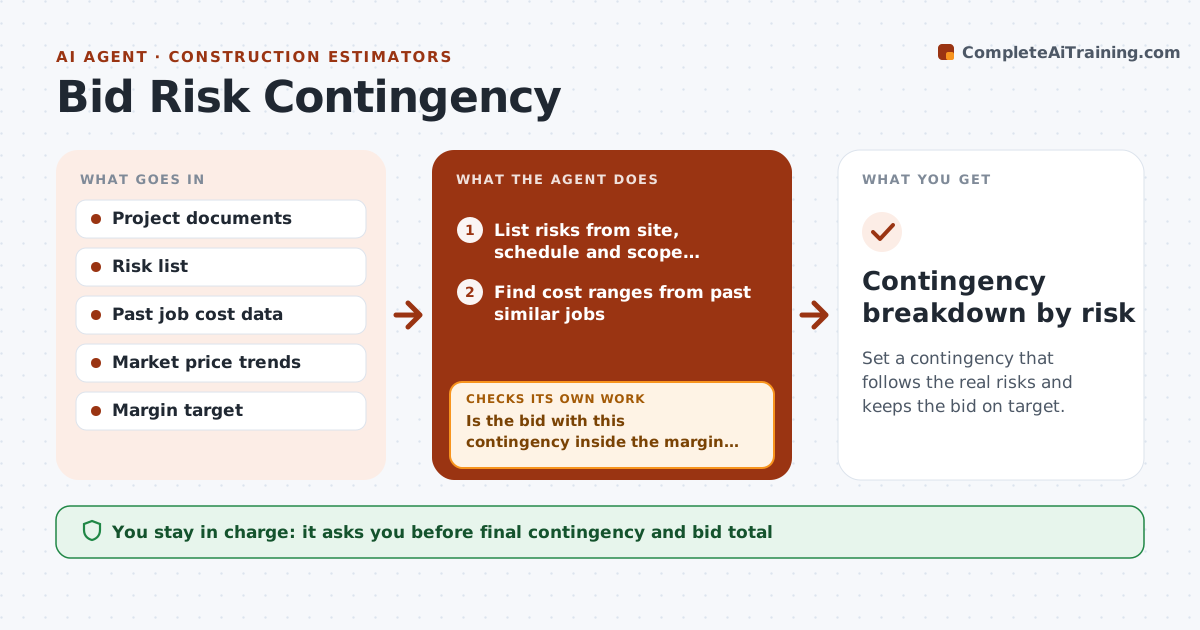
Set a contingency that follows the real risks and keeps the bid on target.
What it does
Contingency is often a flat percentage added at the end. This agent builds it from the risks. It lists the project's risks from the site conditions, schedule, market prices and scope clarity. For each, it finds cost ranges from your past jobs and sets a probable cost. It sums them into a contingency figure and checks the bid total against your margin target and the owner's budget. If the total is off, it adjusts, for example by reducing the ones you can control, and recalculates. You approve all bid adjustments. Edge case: steel prices rise 8% in a month, and the agent raises the material risk before the number is locked.
How it works
Follow the arrows from top to bottom. The orange dashed arrow is the loop: when a check fails, the agent goes back and tries again.
Read the steps as a list
- Bid estimate is nearly complete
- List risks from site, schedule and scope documents with affected cost items
- Find cost ranges from past similar jobs
- Set a probable cost for each risk and sum them
- Check the market price trends for key materials
- Is the bid with this contingency inside the margin target and the owner's budget?If not: Show the gap and which risks drive it. Back to step 4.
- Look for risks that can be reduced or priced out
- Recalculate the contingency and the bid total
- Does the new total meet the targets?If not: Test another adjustment, or tell the estimator the targets conflict. Back to step 7.
- Estimator approves the bid adjustmentsThe agent waits here for your OK.
- Contingency breakdown by risk
How it decides
It weights each risk's cost range by probability. It checks the total against the target and adjusts the risks it can reduce before it lowers any figure.
- Probable cost is range midpoint times probability
- Do not reduce a risk without a named action
- Material risks use current market trend
- The sum must be shown by risk, not as a percent only
Make it yours
Every agent is a starting point. You choose these settings for your own situation.
- Margin target
- Risk categories
- Past jobs used
- Probability scale
- Budget limit
What keeps you in control
It always asks you first
- Final contingency and bid total
Hard limits
- Never submits a bid
- Shows every assumption
- Never hides a risk to meet a target
It stops when
- Done: contingency meets margin and budget
- Stop: targets conflict; the estimator decides
Set it up
We guide you through the set-up, step by step
Members get the full set-up guide for this agent. No technical skills needed: you copy, paste and upload.
- One set of instructions to paste into your AI, with the clicks for ChatGPT, Claude, Microsoft 365 Copilot, Gemini and Grok
- The agent then walks you through connecting your own data, one source at a time
- A downloadable copy with the flow chart, the rules and the full guide