AI agent for chief compliance officers
Board Compliance Report Agent
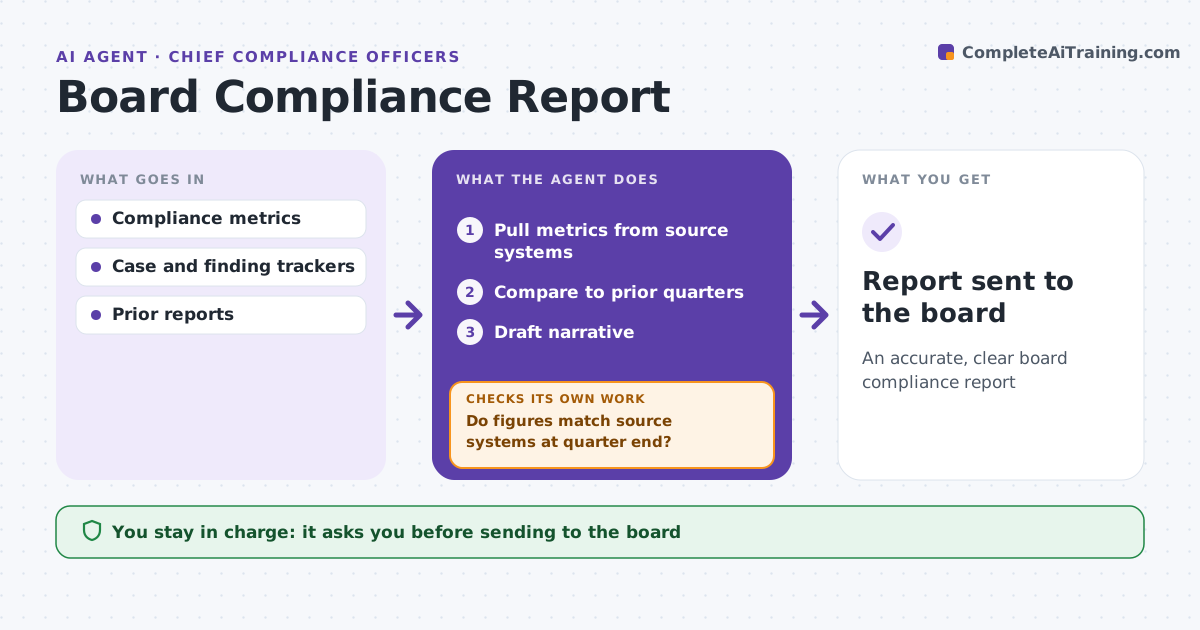
An accurate, clear board compliance report
What it does
Board compliance reports pull numbers from many systems, and one wrong figure undermines trust in the whole report. Each quarter this agent pulls metrics from the case system, training records, the regulatory change log, audits, testing and complaints. It compares them with prior quarters, explains any metric change over 25 percent, and highlights open high-risk findings older than 90 days. It drafts narrative sections. It then checks each metric against its source system as of quarter end and confirms that open findings match the tracker. If a figure does not match, it re-pulls the data or asks the owner, and checks again. The CCO edits and approves the report before it goes to the board or risk committee. Edge case: a finding was closed after quarter end, so the agent reports it as open at quarter end with a note on the closure.
How it works
Follow the arrows from top to bottom. The orange dashed arrow is the loop: when a check fails, the agent goes back and tries again.
Read the steps as a list
- Quarter ends
- Pull metrics from source systems
- Compare to prior quarters
- Draft narrative
- Do figures match source systems at quarter end?If not: re-pull or ask the owner. Back to step 2.
- CCO approves reportThe agent waits here for your OK.
- Report sent to the board
How it decides
It uses quarter-end data and checks each figure against the source system.
- High-risk finding open over 90 days: highlight
- Metric change over 25%: explain
- Post-quarter closure: note
Make it yours
Every agent is a starting point. You choose these settings for your own situation.
- Metrics included
- Report template
- Trend periods
- Highlight rules
What keeps you in control
It always asks you first
- Sending to the board
Hard limits
- Never sends to the board
- Never changes findings
It stops when
- Done: report sent
- Stop: source data missing
Set it up
We guide you through the set-up, step by step
Members get the full set-up guide for this agent. No technical skills needed: you copy, paste and upload.
- One set of instructions to paste into your AI, with the clicks for ChatGPT, Claude, Microsoft 365 Copilot, Gemini and Grok
- The agent then walks you through connecting your own data, one source at a time
- A downloadable copy with the flow chart, the rules and the full guide