AI agent for board members
Board Meeting Follow-Up Action Tracker Agent
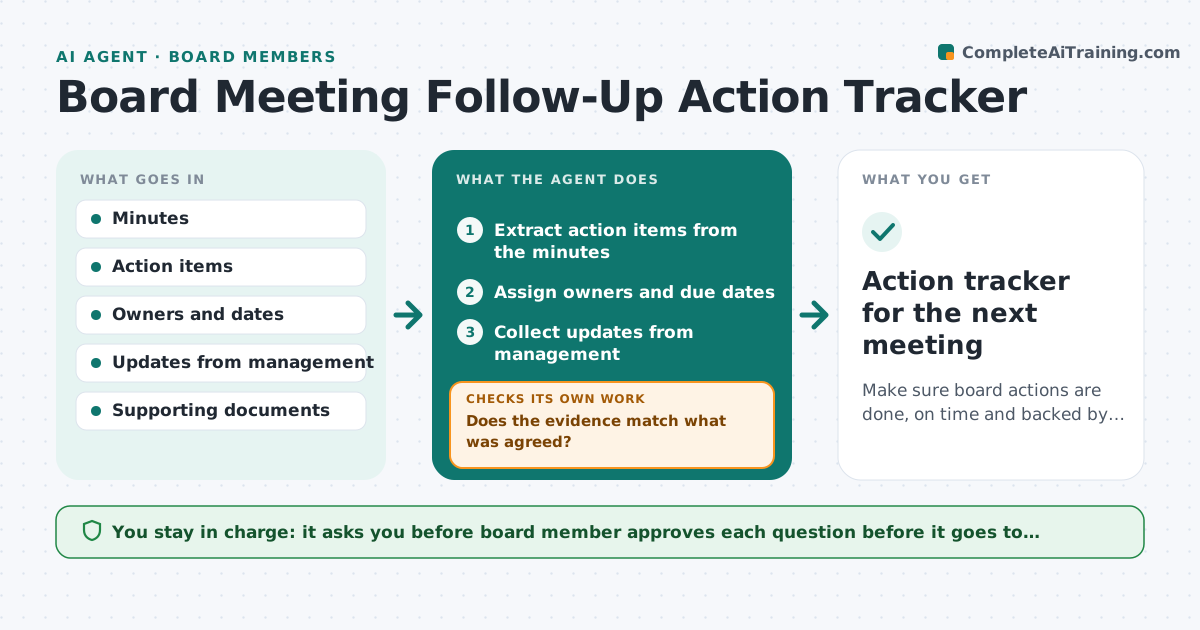
Make sure board actions are done, on time and backed by evidence.
What it does
After a board meeting, actions are agreed and then forgotten, or management reports them done without evidence. The agent extracts action items from the minutes, assigns owners and dates, and tracks updates. When an owner says an item is complete, it checks the claim against evidence such as a document, a policy or data. It flags overdue items and drafts questions for the chair. The board member approves the questions before they go to management. Edge case: management reports that a cyber policy was updated, but the policy on file still has last year's date, so the agent asks for the new version.
How it works
Follow the arrows from top to bottom. The orange dashed arrow is the loop: when a check fails, the agent goes back and tries again.
Read the steps as a list
- Board meeting ends
- Extract action items from the minutes
- Assign owners and due dates
- Collect updates from management
- Does the evidence match what was agreed?If not: Draft a question asking for the specific document or data. Back to step 3.
- Flag overdue items
- Draft questions for the chair
- Board member approves the questions before they go to managementThe agent waits here for your OK.
- Send approved questions and track answers
- Are all actions closed or on a new date?If not: Re-check the evidence and update the list. Back to step 3.
- Action tracker for the next meeting
How it decides
An action is closed only when the evidence matches what the board asked for. A reported completion without evidence is queried. Overdue items go to the chair's list.
- An item past due by 7 days goes on the chair's list
- A reported done without evidence is open
- A document date must be after the meeting
- Questions are limited to 5 per update
Make it yours
Every agent is a starting point. You choose these settings for your own situation.
- Overdue threshold (default 7 days)
- Update frequency (default weekly)
- Evidence required by action type
- Questions per update
What keeps you in control
It always asks you first
- Board member approves each question before it goes to management
Hard limits
- Never contacts management without the member's approval
- Never alters the minutes
It stops when
- Done: actions closed or carried to the next meeting
- Stop: board changes or withdraws an action
Set it up
We guide you through the set-up, step by step
Members get the full set-up guide for this agent. No technical skills needed: you copy, paste and upload.
- One set of instructions to paste into your AI, with the clicks for ChatGPT, Claude, Microsoft 365 Copilot, Gemini and Grok
- The agent then walks you through connecting your own data, one source at a time
- A downloadable copy with the flow chart, the rules and the full guide