AI agent for payroll administrators
Bonus and Supplemental Wage Run Check Agent
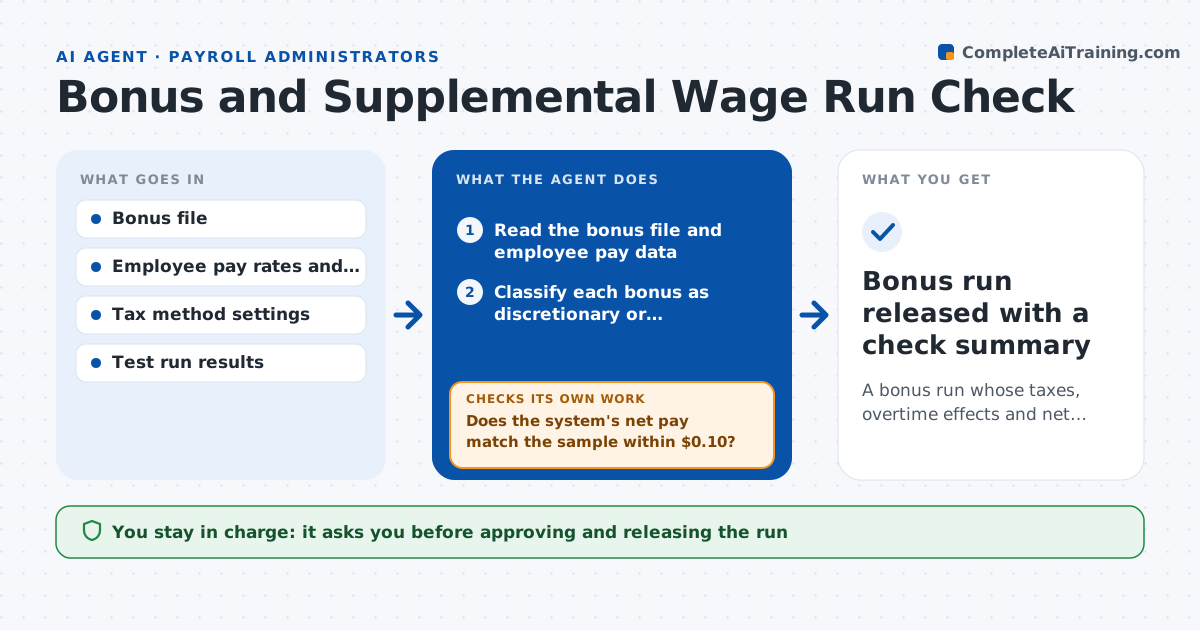
A bonus run whose taxes, overtime effects and net pay are verified before checks are released
What it does
A bonus run looks simple until it goes wrong. Supplemental wages can be taxed by the flat rate method or by the aggregate method, large bonuses over $1 million trigger a higher rate, and nondiscretionary bonuses must be added back into the regular rate for overtime. This agent reads the bonus file and checks each line: employee, type of bonus, amount and pay date. It decides the tax method, tests for caps and for the higher rate, and works out whether any overtime recalculation is owed. It computes net pay for a sample of employees and compares it with what the payroll system produces in a test run. If a sample is off, it finds the cause and reruns. Payroll approves the run. Edge case: a quarterly production bonus raises the regular rate for 40 hours of overtime in that quarter.
How it works
Follow the arrows from top to bottom. The orange dashed arrow is the loop: when a check fails, the agent goes back and tries again.
Read the steps as a list
- A bonus file is submitted
- Read the bonus file and employee pay data
- Classify each bonus as discretionary or nondiscretionary
- Select the tax method and check the threshold for the higher rate
- Compute overtime effect for nondiscretionary bonuses
- Pick a sample of employees and compute net pay
- Run a test calculation in the payroll system
- Does the system's net pay match the sample within $0.10?If not: find the setting or file error causing the difference, correct and rerun the test. Back to step 4.
- Are there any oddities such as duplicate lines or amounts above limit?If not: hold the flagged lines and ask the sender to confirm. Back to step 2.
- Payroll approves the runThe agent waits here for your OK.
- Bonus run released with a check summary
How it decides
It selects flat or aggregate withholding by company policy and law, adds nondiscretionary bonuses to the regular rate, and accepts the run only when sample net pay matches within a few cents.
- Sample at least 10% of lines or 25, whichever is greater
- Add nondiscretionary bonuses to the regular rate for the period
- Flag bonuses above $50,000 for confirmation
- Hold duplicate employee lines
Make it yours
Every agent is a starting point. You choose these settings for your own situation.
- Sample size (default 10% or 25)
- Tax method by bonus type
- Amount that needs confirmation (default $50,000)
- Pay frequency
What keeps you in control
It always asks you first
- Approving and releasing the run
Hard limits
- Never releases the run itself
- Does not change bonus amounts
- Shows its overtime calculation
It stops when
- Done: sample and test run agree and the run is approved
- Stop: the bonus file cannot be read or confirmed
Set it up
We guide you through the set-up, step by step
Members get the full set-up guide for this agent. No technical skills needed: you copy, paste and upload.
- One set of instructions to paste into your AI, with the clicks for ChatGPT, Claude, Microsoft 365 Copilot, Gemini and Grok
- The agent then walks you through connecting your own data, one source at a time
- A downloadable copy with the flow chart, the rules and the full guide