AI agent for hr information system (hris) specialists
Payroll Pre-Run Data Check Agent
Send clean, approved data to payroll before every run
What it does
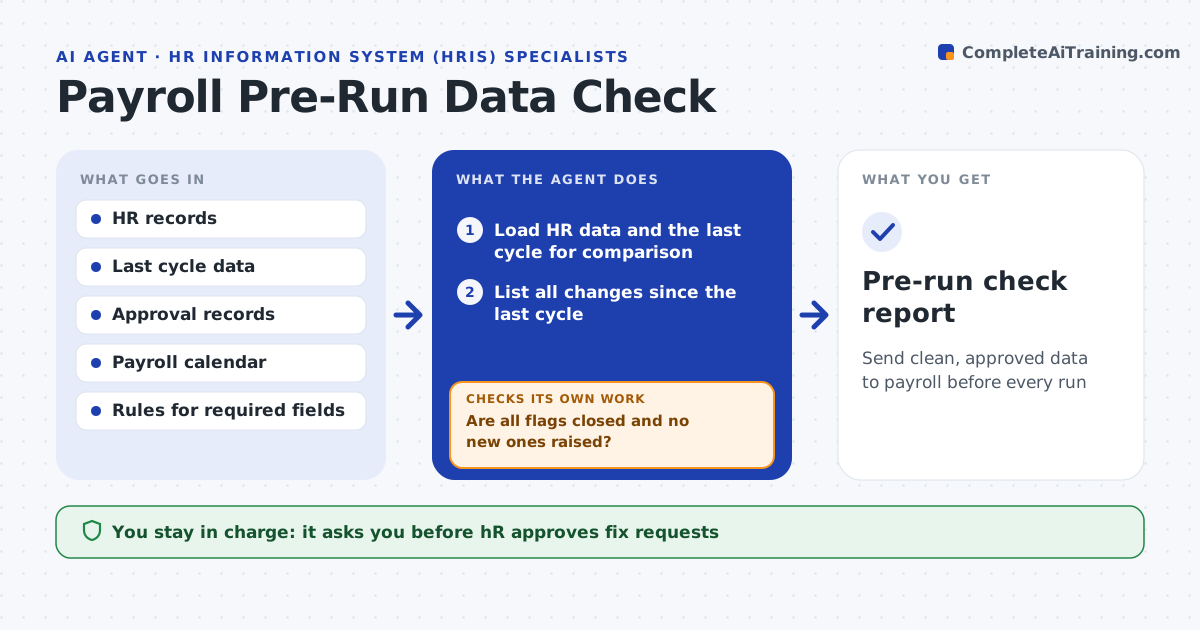
A missing bank account or a salary change entered twice creates a pay error that takes days to fix. Before each payroll run, this agent compares the HR data with the last cycle. It lists everything that changed: new hires, leavers, salary and rate changes, status changes, address and bank changes. It checks each for missing data such as bank, tax, rate and status, compares pay changes with the approval records, and flags oddities like a raise of 40%, an employee paid twice or a leaver still active. It sends HR the list of fixes, then rechecks after corrections. Payroll approves the run. Edge case: a large bonus has a valid approval but is entered in the wrong period, so the agent flags the period.
How it works
Follow the arrows from top to bottom. The orange dashed arrow is the loop: when a check fails, the agent goes back and tries again.
Read the steps as a list
- Payroll cut-off approaching
- Load HR data and the last cycle for comparison
- List all changes since the last cycle
- Check required fields: bank, tax, rate, status
- Match each pay change to an approval record
- Flag oddities such as large changes, duplicates and active leavers
- HR approves the fix requestsThe agent waits here for your OK.
- Send fix requests and read the corrections
- Are all flags closed and no new ones raised?If not: send the remaining flags again and recheck before cut-off. Back to step 3.
- Payroll approves the runThe agent waits here for your OK.
- Pre-run check report
How it decides
It flags any change without an approval record, any missing required field and any pay value outside the usual range for that employee.
- Flag any pay change of over 15% for review
- Block any employee with a missing bank or tax field
- Flag a leaver with an active pay status
- Require an approval record for every rate change
Make it yours
Every agent is a starting point. You choose these settings for your own situation.
- Required fields
- Pay change threshold (default 15%)
- Days before cut-off to run (default 8)
- Approval records source
- Who receives flags
What keeps you in control
It always asks you first
- HR approves fix requests
- Payroll approves the run
Hard limits
- Never edit HR or payroll data
- Never approve or release a payroll run
It stops when
- Done: all flags are closed and payroll approves
- Stop: cut-off is reached with open flags and payroll decides
Set it up
We guide you through the set-up, step by step
Members get the full set-up guide for this agent. No technical skills needed: you copy, paste and upload.
- One set of instructions to paste into your AI, with the clicks for ChatGPT, Claude, Microsoft 365 Copilot, Gemini and Grok
- The agent then walks you through connecting your own data, one source at a time
- A downloadable copy with the flow chart, the rules and the full guide