AI agent for credit analysts
Borrower Tax Return to Statement Tie-Out Agent
Reconcile returns and statements so underwriting uses numbers that are consistent and explained
What it does
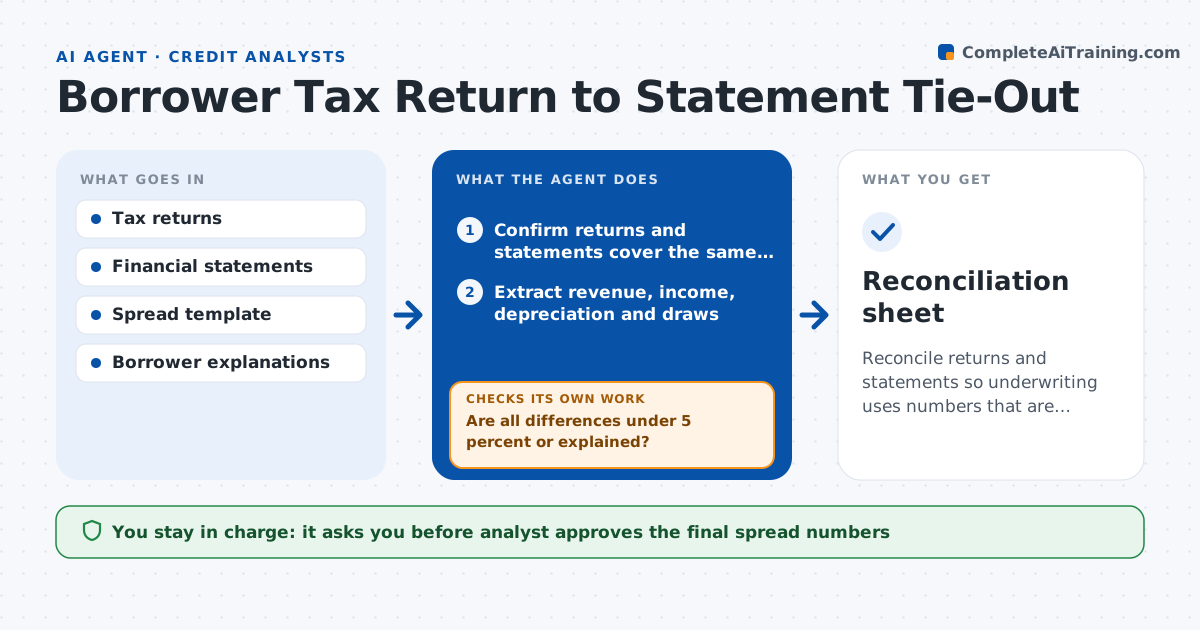
A borrower's statement shows net income of $310,000 and the tax return shows $240,000. The analyst must find out why before relying on either. This agent compares the returns with the financial statements for revenue, income, depreciation and owner draws. It flags differences above a set tolerance and tries to explain them with common reasons, such as depreciation methods, timing or non-cash items. For unexplained differences it requests an explanation from the borrower and adjusts the spread based on the answer. It repeats the tie-out after each adjustment. It produces a reconciliation sheet with each difference and its status. The analyst approves the final numbers. Edge case: a return for a different tax year than the statement is flagged before any comparison.
How it works
Follow the arrows from top to bottom. The orange dashed arrow is the loop: when a check fails, the agent goes back and tries again.
Read the steps as a list
- Returns and statements received
- Confirm returns and statements cover the same period, and request the right period if not
- Extract revenue, income, depreciation and draws
- Compare each line between return and statement
- Match differences to known causes
- Are all differences under 5 percent or explained?If not: Request an explanation with documents from the borrower. Back to step 4.
- Adjust the spread based on accepted explanations
- Rerun the tie-out on the adjusted spread
- Does the adjusted spread tie within 5 percent?If not: List what is unresolved and flag the risk. Back to step 4.
- Analyst approves the final numbersThe agent waits here for your OK.
- Reconciliation sheet
How it decides
It flags any line differing by more than 5 percent and accepts an explanation only when the supporting document is attached.
- Flag lines differing by more than 5 percent
- Accept explanations only with documents
- Compare the same fiscal period only
- Document every adjustment
Make it yours
Every agent is a starting point. You choose these settings for your own situation.
- Difference tolerance (default 5 percent)
- Lines compared (default revenue, income, depreciation, draws)
- Spread template (default the bank's standard)
- Explanation deadline (default 10 days)
What keeps you in control
It always asks you first
- Analyst approves the final spread numbers
Hard limits
- Never alter source documents
- Never accept explanations without support
- Keep borrower data inside bank systems
It stops when
- Done: Reconciliation approved
- Stop: Differences cannot be explained, so hand to the analyst for a decision
Set it up
We guide you through the set-up, step by step
Members get the full set-up guide for this agent. No technical skills needed: you copy, paste and upload.
- One set of instructions to paste into your AI, with the clicks for ChatGPT, Claude, Microsoft 365 Copilot, Gemini and Grok
- The agent then walks you through connecting your own data, one source at a time
- A downloadable copy with the flow chart, the rules and the full guide