AI agent for brand managers
Brand Health Tracking Report Agent
A trustworthy brand health report that explains real changes
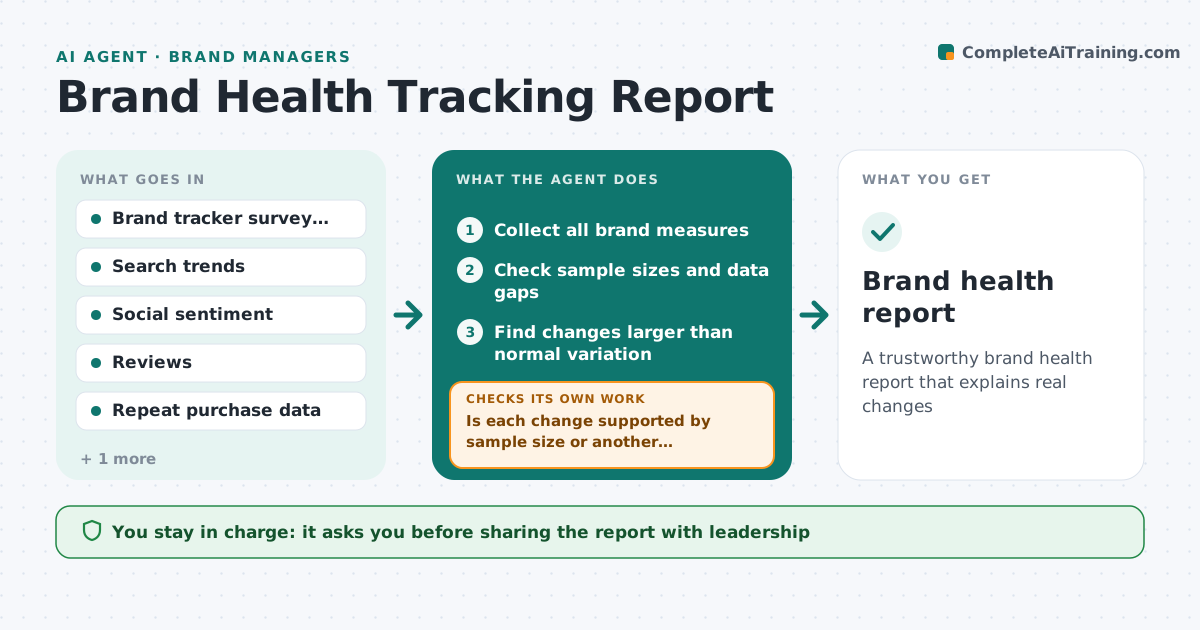
What it does
Brand health is measured in survey trackers, search interest, social sentiment, reviews and repeat purchase, but these are reported separately and changes go unexplained. Each month or quarter this agent collects the measures, checks sample sizes and gaps, and lines them up over time. It looks for changes larger than normal variation and checks whether other measures move the same way. A change seen in only one source with a small sample is marked as noise, not a trend. A change in survey supplier or question wording is noted as a break in the trend. It links changes to known events such as campaigns or price moves. It drafts a report with plain explanations. The brand manager approves before sharing.
How it works
Follow the arrows from top to bottom. The orange dashed arrow is the loop: when a check fails, the agent goes back and tries again.
Read the steps as a list
- Tracker data arrives
- Collect all brand measures
- Check sample sizes and data gaps
- Find changes larger than normal variation
- Is each change supported by sample size or another measure?If not: mark it as noise and recheck other measures. Back to step 4.
- Link changes to campaigns and events
- Draft brand health report
- Brand manager approves the reportThe agent waits here for your OK.
- Brand health report
How it decides
It calls a change real only when it is larger than normal variation and either the sample is large enough or another measure moves the same way.
- Small samples alone do not make a trend
- Wording or supplier changes break the trend line
- Link changes to known events only with matching timing
Make it yours
Every agent is a starting point. You choose these settings for your own situation.
- Measures included
- Reporting frequency
- Minimum sample size
- Audience segments
What keeps you in control
It always asks you first
- Sharing the report with leadership
Hard limits
- Never overstates findings
- Shows sample sizes on every chart
It stops when
- Done: report approved
- Stop: tracker data late; send other measures with a note
Set it up
We guide you through the set-up, step by step
Members get the full set-up guide for this agent. No technical skills needed: you copy, paste and upload.
- One set of instructions to paste into your AI, with the clicks for ChatGPT, Claude, Microsoft 365 Copilot, Gemini and Grok
- The agent then walks you through connecting your own data, one source at a time
- A downloadable copy with the flow chart, the rules and the full guide