AI agent for global head of marketings
SWOT Evidence Refresh Agent
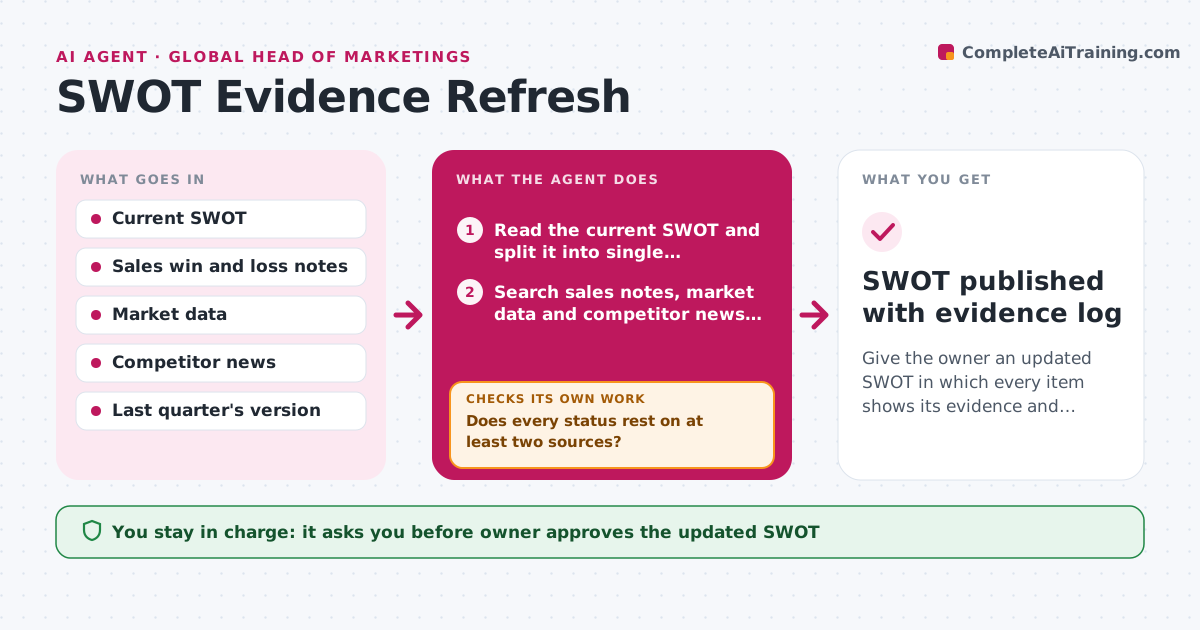
Give the owner an updated SWOT in which every item shows its evidence and status.
What it does
A SWOT written last year still gets quoted in meetings, even though the market has moved. Each quarter the agent reads the current SWOT and takes each statement one at a time. For every item it looks for fresh evidence in sales win and loss notes, market data and competitor moves, then marks the item as confirmed, weakened or unsupported. It also scans the same sources for new strengths, weaknesses, opportunities or threats the document does not mention, and proposes them with sources. If the evidence for an item is thin or conflicting, it searches again in a second source before marking it. The owner decides what goes into the updated version. Edge case: one loud lost deal can make a strength look weak, so the agent requires more than one source before weakening an item.
How it works
Follow the arrows from top to bottom. The orange dashed arrow is the loop: when a check fails, the agent goes back and tries again.
Read the steps as a list
- Quarter starts
- Read the current SWOT and split it into single statements
- Search sales notes, market data and competitor news for each statement
- Mark each statement confirmed, weakened or unsupported
- Does every status rest on at least two sources?If not: search a second source before the status is set. Back to step 3.
- Look for new items the SWOT does not cover
- Draft the updated SWOT with an evidence note per item
- Compare the draft with last quarter's version and list changes
- Is every changed item explained in the change list?If not: add the reason and source for each unexplained change. Back to step 7.
- Owner approves the updated SWOTThe agent waits here for your OK.
- SWOT published with evidence log
How it decides
An item is confirmed with two supporting sources, weakened when evidence points against it, and unsupported when nothing recent is found. One source alone never changes an item's status.
- Require two sources before weakening or confirming an item
- Mark an item unsupported when nothing dated in the last 6 months backs it
- Propose a new item only when it appears in at least two sources
- Keep statements in the owner's wording unless the owner asks to rewrite
Make it yours
Every agent is a starting point. You choose these settings for your own situation.
- Sources used for evidence
- Number of sources needed (default 2)
- Age limit for evidence (default 6 months)
- Review schedule (default quarterly)
- Format of the updated SWOT
What keeps you in control
It always asks you first
- Owner approves the updated SWOT
- Owner approves removing any item
Hard limits
- Never delete an item without owner approval
- Show evidence for every status
It stops when
- Done: updated SWOT approved with evidence log
- Stop: sales notes are unavailable, report which statements could not be tested
Set it up
We guide you through the set-up, step by step
Members get the full set-up guide for this agent. No technical skills needed: you copy, paste and upload.
- One set of instructions to paste into your AI, with the clicks for ChatGPT, Claude, Microsoft 365 Copilot, Gemini and Grok
- The agent then walks you through connecting your own data, one source at a time
- A downloadable copy with the flow chart, the rules and the full guide