AI agent for e-commerce managers
Campaign Asset Approval Chase Agent
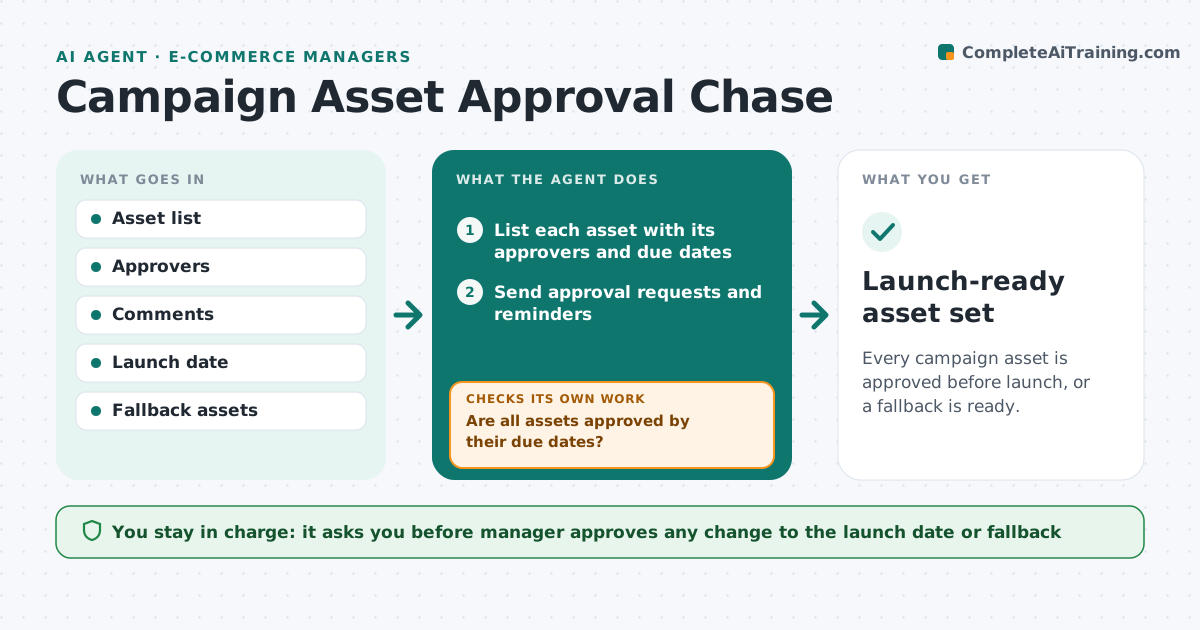
Every campaign asset is approved before launch, or a fallback is ready.
What it does
Campaign launches slip because assets wait on legal, design and regional approvals that nobody is chasing properly. This agent lists every asset and who must approve it, sends reminders on a schedule, reads the comments and sorts them into fixes and conflicts, and updates the launch view. If an approval is late it proposes a fallback asset. The manager approves any date change. It decides by the launch date counted backward and the status of each approval. Edge case: legal and regional teams give conflicting comments on one banner, so the agent flags the conflict for a decision.
How it works
Follow the arrows from top to bottom. The orange dashed arrow is the loop: when a check fails, the agent goes back and tries again.
Read the steps as a list
- Campaign asset list is final
- List each asset with its approvers and due dates
- Send approval requests and reminders
- Read comments and sort into fixes and conflicts
- Send fixes to the asset owner
- Are all assets approved by their due dates?If not: escalate late approvals and propose a fallback asset. Back to step 4.
- Update the launch view
- Manager approves any date change or fallbackThe agent waits here for your OK.
- Launch-ready asset set
How it decides
It sets each approval's due date backward from the launch. It escalates when an approval is late by 1 day, and offers a fallback at 3 days to launch.
- Remind approvers 2 days before due
- Escalate any approval one day late
- Offer a fallback at 3 days to launch
- Flag conflicting comments for decision
Make it yours
Every agent is a starting point. You choose these settings for your own situation.
- Reminder timing
- Escalation days
- Fallback rules
- Launch view format
- Approver list
What keeps you in control
It always asks you first
- Manager approves any change to the launch date or fallback
Hard limits
- Never publish an asset
- Never change a launch date without the manager
It stops when
- Done: all assets approved
- Stop: a conflict has no decision before the launch
Set it up
We guide you through the set-up, step by step
Members get the full set-up guide for this agent. No technical skills needed: you copy, paste and upload.
- One set of instructions to paste into your AI, with the clicks for ChatGPT, Claude, Microsoft 365 Copilot, Gemini and Grok
- The agent then walks you through connecting your own data, one source at a time
- A downloadable copy with the flow chart, the rules and the full guide