AI agent for franchise owners
Brand Standards Self-Audit Agent
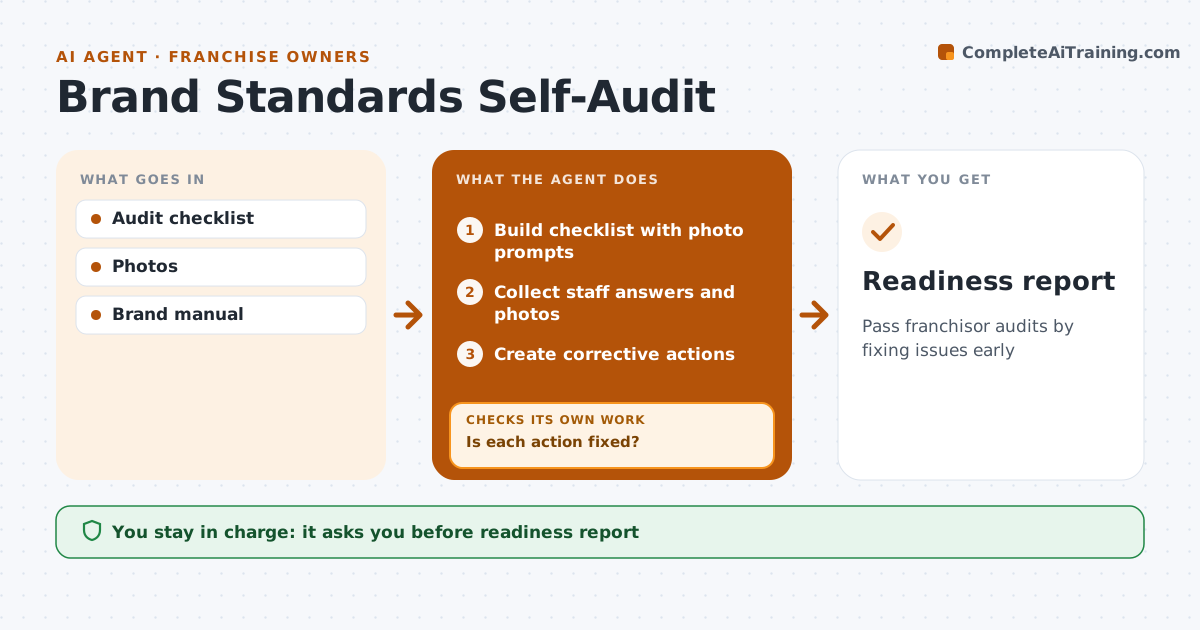
Pass franchisor audits by fixing issues early
What it does
Franchisors audit each location against brand standards for food safety, cleanliness, signage, uniforms and service, and a failed audit can cost fees or the franchise. Each month this agent turns the franchisor's checklist into a self-audit with photo prompts, putting food safety items first. Staff complete it on a phone, and the agent compares answers and photos with the brand manual. An item passes only when the photo shows the standard met. Standards changed in the latest manual update are flagged so staff do not follow the old rule. Each failure becomes a corrective action with an owner and due date. When an owner closes an action, the agent checks the closure photo and keeps it open with a reminder if the photo does not show the fix. The owner approves the readiness report. Edge case: an item that needs a part from the franchisor is noted as pending.
How it works
Follow the arrows from top to bottom. The orange dashed arrow is the loop: when a check fails, the agent goes back and tries again.
Read the steps as a list
- Monthly self-audit
- Build checklist with photo prompts
- Collect staff answers and photos
- Create corrective actions
- Collect closure photos
- Is each action fixed?If not: keep open and remind. Back to step 5.
- Owner approves readiness reportThe agent waits here for your OK.
- Readiness report
How it decides
An item passes when the photo shows the standard met.
- Photos required
- Manual updates flagged
- Food safety items first
Make it yours
Every agent is a starting point. You choose these settings for your own situation.
- Checklist
- Schedule
- Photo rules
- Owners
What keeps you in control
It always asks you first
- Readiness report
Hard limits
- Never submits to franchisor
- Never edits photos
It stops when
- Done: all fixed
- Stop: repair needs capital
Set it up
We guide you through the set-up, step by step
Members get the full set-up guide for this agent. No technical skills needed: you copy, paste and upload.
- One set of instructions to paste into your AI, with the clicks for ChatGPT, Claude, Microsoft 365 Copilot, Gemini and Grok
- The agent then walks you through connecting your own data, one source at a time
- A downloadable copy with the flow chart, the rules and the full guide