AI agent for computer science students
Bug Hunt Debug Journal Agent
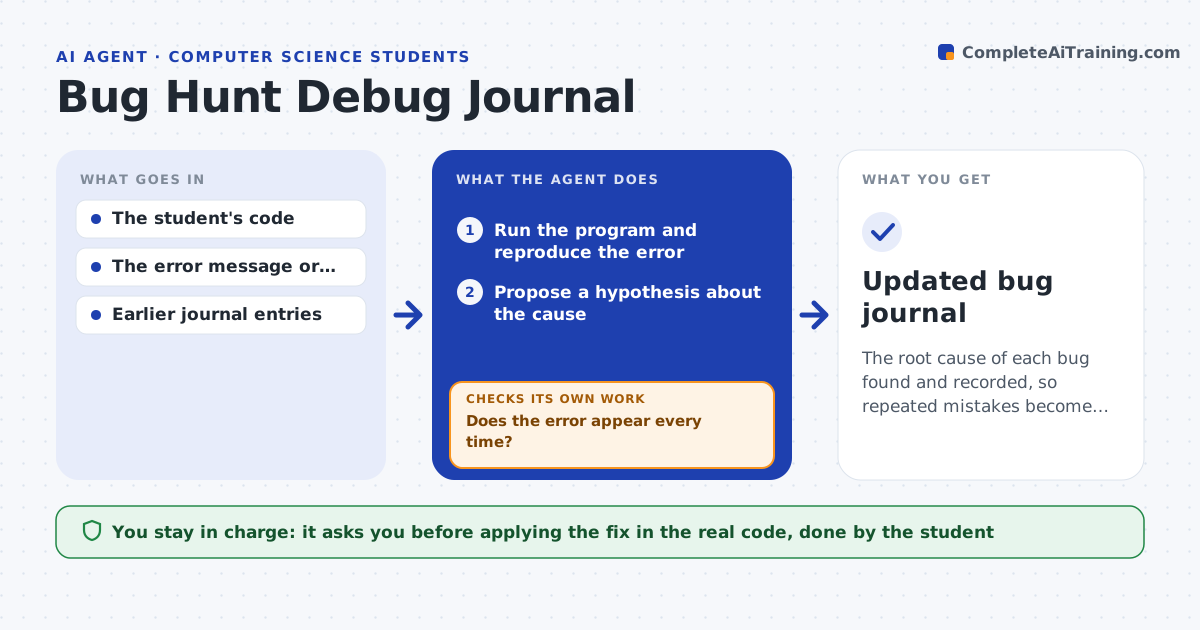
The root cause of each bug found and recorded, so repeated mistakes become visible
What it does
When a program fails, many students change code until it passes and learn nothing. This agent reproduces the error first, so both sides see the same failure. It then proposes a hypothesis about the cause, runs a targeted test or adds a print statement to check it, and reads the result. If the hypothesis fails, it forms the next one from what it just learned and repeats. Once the cause is confirmed, it writes a journal entry with the bug type, the symptom, the cause and the fix idea, and compares it with past entries to flag repeat patterns, such as off-by-one errors in loops. The student applies the fix. Edge case: when the failure is intermittent, the agent runs the test ten times before trusting any result.
How it works
Follow the arrows from top to bottom. The orange dashed arrow is the loop: when a check fails, the agent goes back and tries again.
Read the steps as a list
- Student reports a failing program
- Run the program and reproduce the error
- Does the error appear every time?If not: run it 10 times, record the pattern, and use it to guide the hypothesis. Back to step 2.
- Propose a hypothesis about the cause
- Run a targeted test or add a print line to check it
- Did the result support the hypothesis?If not: form a new hypothesis from the result and test again. Back to step 4.
- Apply the proposed fix in a copy and rerun the tests
- Write the journal entry with bug type, cause and fix
- Compare with past entries and flag repeat patterns
- Student applies the fix in their own codeThe agent waits here for your OK.
- Updated bug journal
How it decides
A hypothesis is accepted only when a targeted test confirms it and the failure goes away in a copy with the fix applied.
- Rerun an intermittent failure at least 10 times
- Stop after 5 failed hypotheses and ask the student for more context
- Flag a pattern when the same bug type appears 3 times
- Test fixes only in a copy of the code
Make it yours
Every agent is a starting point. You choose these settings for your own situation.
- Run count for intermittent bugs (default 10)
- Hypotheses before asking for help (default 5)
- Journal format and location
- Number of repeats before flagging a pattern (default 3)
What keeps you in control
It always asks you first
- Applying the fix in the real code, done by the student
Hard limits
- Never edits the student's real code
- Never marks a bug resolved until the tests pass
It stops when
- Done: cause confirmed and journal entry written
- Stop: the error cannot be reproduced after 10 runs
Set it up
We guide you through the set-up, step by step
Members get the full set-up guide for this agent. No technical skills needed: you copy, paste and upload.
- One set of instructions to paste into your AI, with the clicks for ChatGPT, Claude, Microsoft 365 Copilot, Gemini and Grok
- The agent then walks you through connecting your own data, one source at a time
- A downloadable copy with the flow chart, the rules and the full guide