AI agent for home inspectors
Builder Warranty Inspection Outreach Agent
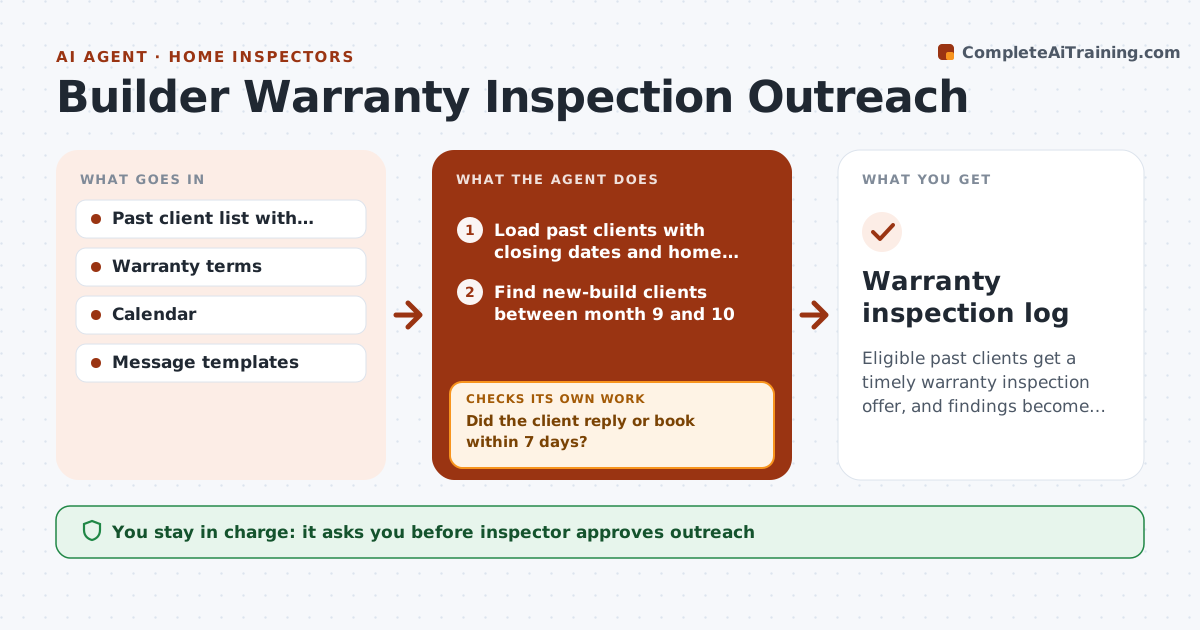
Eligible past clients get a timely warranty inspection offer, and findings become a ready claim summary.
What it does
A new home has a one year builder warranty, and your past clients never think about an inspection until it is too late. This agent tracks closing dates, finds clients approaching month 9 to 10 of the warranty, and drafts reminders. It books visits, tracks completion, and after each visit drafts a warranty claim summary the client can send to the builder. If a client does not reply, it tries another channel once. You approve each outreach message and each summary. Edge case: a client who bought a resale home is skipped, since builder warranties do not apply.
How it works
Follow the arrows from top to bottom. The orange dashed arrow is the loop: when a check fails, the agent goes back and tries again.
Read the steps as a list
- Weekly run
- Load past clients with closing dates and home types
- Find new-build clients between month 9 and 10
- Draft a reminder with the deadline and booking options
- Inspector approves outreach messagesThe agent waits here for your OK.
- Send, track replies and book visits
- Did the client reply or book within 7 days?If not: Send one follow-up through another channel. Back to step 3.
- After the visit, read the inspection findings
- Draft the warranty claim summary with photos
- Inspector approves the summaryThe agent waits here for your OK.
- Warranty inspection log
How it decides
It contacts new-build clients when they reach 9 months and follows up once at 10 months, and skips homes without a builder warranty.
- Contact at month 9, follow up once at month 10
- Skip resale homes
- Book visits at least 30 days before the warranty ends
- Include only items covered by typical warranty terms
Make it yours
Every agent is a starting point. You choose these settings for your own situation.
- Contact months
- Follow-up rule
- Warranty term lengths
- Message tone
What keeps you in control
It always asks you first
- Inspector approves outreach
- Inspector approves each claim summary
Hard limits
- Never contact clients without approval
- Never state warranty coverage as legal fact
It stops when
- Done: clients inspected or declined
- Stop: warranty terms not on record
Set it up
We guide you through the set-up, step by step
Members get the full set-up guide for this agent. No technical skills needed: you copy, paste and upload.
- One set of instructions to paste into your AI, with the clicks for ChatGPT, Claude, Microsoft 365 Copilot, Gemini and Grok
- The agent then walks you through connecting your own data, one source at a time
- A downloadable copy with the flow chart, the rules and the full guide