AI agent for training coordinators
Business Impact Link Agent
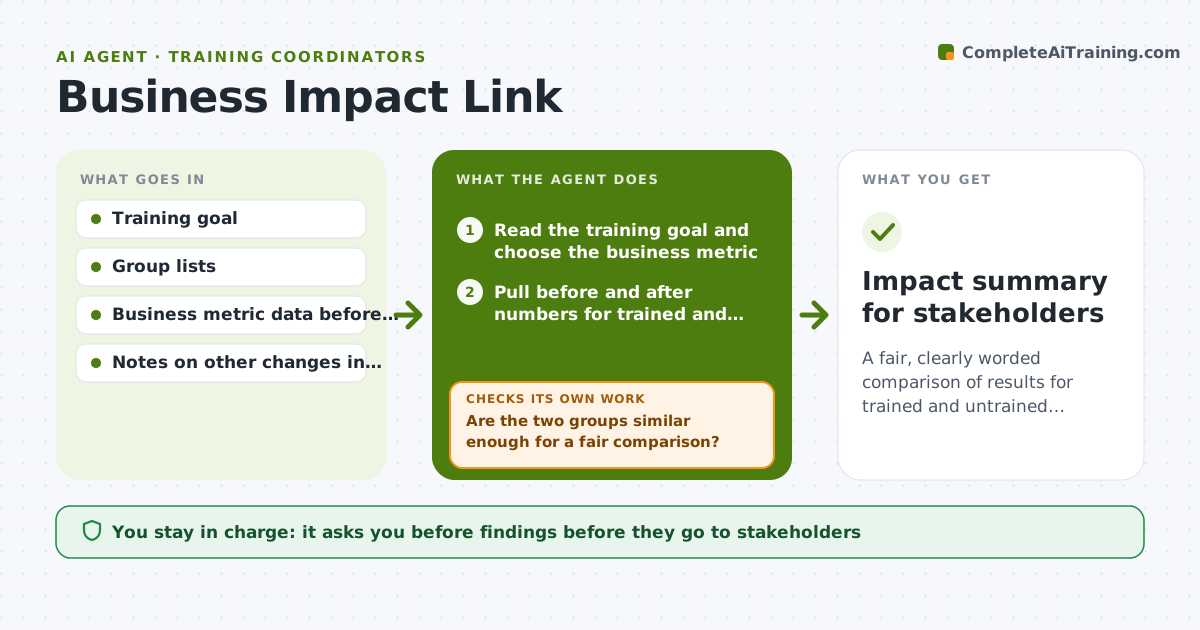
A fair, clearly worded comparison of results for trained and untrained groups.
What it does
Your sponsor asks, Did the training change anything? You only have attendance and smiley sheets. This agent takes the training goal, such as fewer rework tickets, and chooses a matching business metric. It pulls before and after numbers for trained and untrained groups and then checks whether the comparison is fair, looking at team size, season, and other changes during the period. If the groups differ too much, it adjusts the comparison or states the limit in plain words. It also runs the numbers a second time to confirm. Edge case: a sales region that also got a new price list is noted as confounded and excluded or flagged. The manager approves the findings before they go to stakeholders.
How it works
Follow the arrows from top to bottom. The orange dashed arrow is the loop: when a check fails, the agent goes back and tries again.
Read the steps as a list
- Training completed and measurement window reached
- Read the training goal and choose the business metric
- Pull before and after numbers for trained and untrained groups
- Compare results and calculate the difference
- Are the two groups similar enough for a fair comparison?If not: adjust the groups or note the limit and rerun. Back to step 3.
- Check for other changes in the period such as pricing or staffing
- Do the numbers hold when recalculated?If not: find the data mismatch and correct it. Back to step 4.
- Draft findings in plain words with limits
- Manager approves findingsThe agent waits here for your OK.
- Impact summary for stakeholders
How it decides
It accepts a comparison only if the groups are similar in size and conditions, and otherwise adjusts or labels the limit.
- Groups must be within 25% in size or the agent adjusts for it.
- Any other major change in the period is listed as a limit.
- Report a difference only if it shows in more than one month.
- State clearly when the data cannot show cause.
Make it yours
Every agent is a starting point. You choose these settings for your own situation.
- Business metric
- Measurement window
- Group fairness limits
- Data sources
- Output format
What keeps you in control
It always asks you first
- Findings before they go to stakeholders
- Any claim that training caused a result
Hard limits
- Never claim training caused a result without a fair comparison.
- Do not include data from people who asked to be excluded.
It stops when
- Done: findings are fair, checked and approved
- Stop: no usable comparison group exists, so the agent reports that and recommends a better measurement plan
Set it up
We guide you through the set-up, step by step
Members get the full set-up guide for this agent. No technical skills needed: you copy, paste and upload.
- One set of instructions to paste into your AI, with the clicks for ChatGPT, Claude, Microsoft 365 Copilot, Gemini and Grok
- The agent then walks you through connecting your own data, one source at a time
- A downloadable copy with the flow chart, the rules and the full guide