AI agent for training and development managers
Training Simulation Debrief Agent
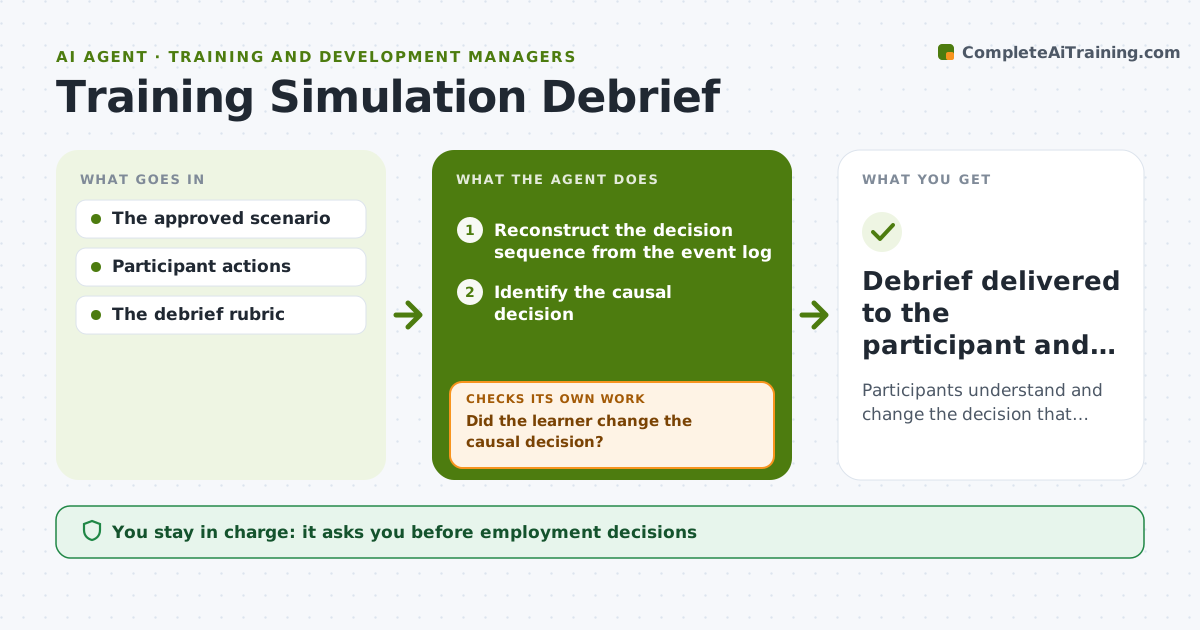
Participants understand and change the decision that caused the outcome.
What it does
Workplace simulations often give feedback on what went wrong but not on the decision that caused it. Participants then fix the symptom and repeat the cause. This agent reads the event log from a simulation run and reconstructs the sequence of the participant's decisions. It identifies the decision with the biggest effect on the outcome and launches a replay branch from just before that point. It checks whether the participant changed that causal decision. If they fixed the symptom but repeated the cause, it picks another branch that makes the cause more visible. It then writes a short debrief focused on the decision. The participant and the course designer receive it. Edge case: when two decisions together caused the outcome, both are named and replayed in order.
How it works
Follow the arrows from top to bottom. The orange dashed arrow is the loop: when a check fails, the agent goes back and tries again.
Read the steps as a list
- Simulation run ends
- Reconstruct the decision sequence from the event log
- Identify the causal decision
- Launch a replay branch from that point
- Did the learner change the causal decision?If not: choose another branch exposing the cause. Back to step 4.
- Write the decision-focused debrief
- Debrief delivered to the participant and designer
How it decides
It picks the replay point from observed consequences and checks whether the revised response changes the causal decision.
- Replay point: just before the decision with the largest effect on the outcome.
- Branch choice: the branch that makes the cause most visible.
- Success: the causal decision changed, not only the visible result.
- Joint causes: replay both decisions in time order.
Make it yours
Every agent is a starting point. You choose these settings for your own situation.
- Scenario library and branch options
- Number of replays per run (default 2)
- Debrief length (default one page)
- Whether the designer receives debriefs (default yes, anonymized)
- Language of the debrief (default plain workplace language)
What keeps you in control
It always asks you first
- Employment decisions
- Certification
Hard limits
- Not used for employment decisions.
It stops when
- Done: causal decision changed.
Set it up
We guide you through the set-up, step by step
Members get the full set-up guide for this agent. No technical skills needed: you copy, paste and upload.
- One set of instructions to paste into your AI, with the clicks for ChatGPT, Claude, Microsoft 365 Copilot, Gemini and Grok
- The agent then walks you through connecting your own data, one source at a time
- A downloadable copy with the flow chart, the rules and the full guide