AI agent for receptionists
Business Travel Booking Agent
Trips booked correctly and within policy with little back and forth
What it does
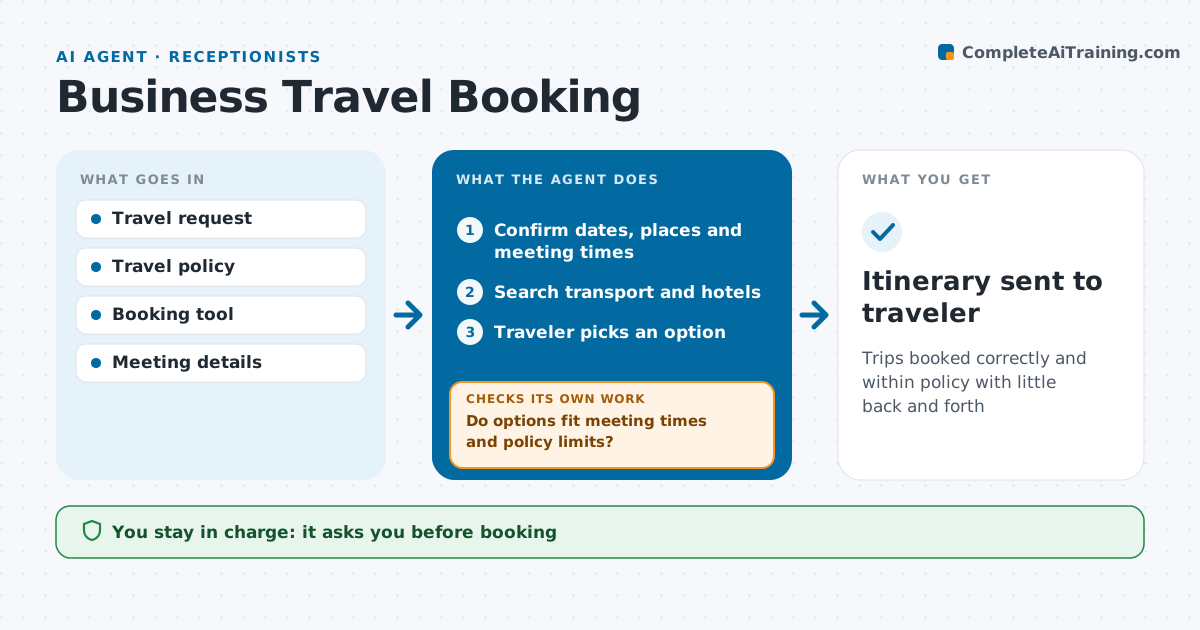
Booking business travel means juggling meeting times, policy limits and preferences, and small mistakes like a wrong return date are costly. When a staff member asks for travel, this agent collects the dates, destinations, meetings and preferences. It searches flights, trains and hotels, filters by the travel policy limits and preferred vendors, and builds two or three options with the total cost. It checks each option: times fit the meetings, the hotel is near the venue, and the total is within policy. Options that fail are replaced. The traveler picks one, and the receptionist approves before booking. After booking, it checks that every confirmation matches the request and fixes any mismatch. Edge case: if no option fits policy, it prepares an exception request with the reason.
How it works
Follow the arrows from top to bottom. The orange dashed arrow is the loop: when a check fails, the agent goes back and tries again.
Read the steps as a list
- Travel request received
- Confirm dates, places and meeting times
- Search transport and hotels
- Do options fit meeting times and policy limits?If not: search again with nearby times or hotels, or draft a policy exception. Back to step 3.
- Traveler picks an option
- Receptionist approves before bookingThe agent waits here for your OK.
- Book and check confirmations against the request
- Itinerary sent to traveler
How it decides
It ranks options by fit with the meeting schedule, then by cost within policy.
- Arrive at least two hours before the first meeting
- Hotels within policy rate and 3 km of the venue
- Out-of-policy needs an exception
Make it yours
Every agent is a starting point. You choose these settings for your own situation.
- Policy limits
- Preferred vendors
- Number of options
- Distance from venue
What keeps you in control
It always asks you first
- Booking
- Policy exceptions
Hard limits
- Never pays outside the booking tool
- Never books without approval
It stops when
- Done: itinerary confirmed
- Stop: trip cancelled
Set it up
We guide you through the set-up, step by step
Members get the full set-up guide for this agent. No technical skills needed: you copy, paste and upload.
- One set of instructions to paste into your AI, with the clicks for ChatGPT, Claude, Microsoft 365 Copilot, Gemini and Grok
- The agent then walks you through connecting your own data, one source at a time
- A downloadable copy with the flow chart, the rules and the full guide