AI agent for quality control specialists
Calibration Out-of-Tolerance Impact Agent
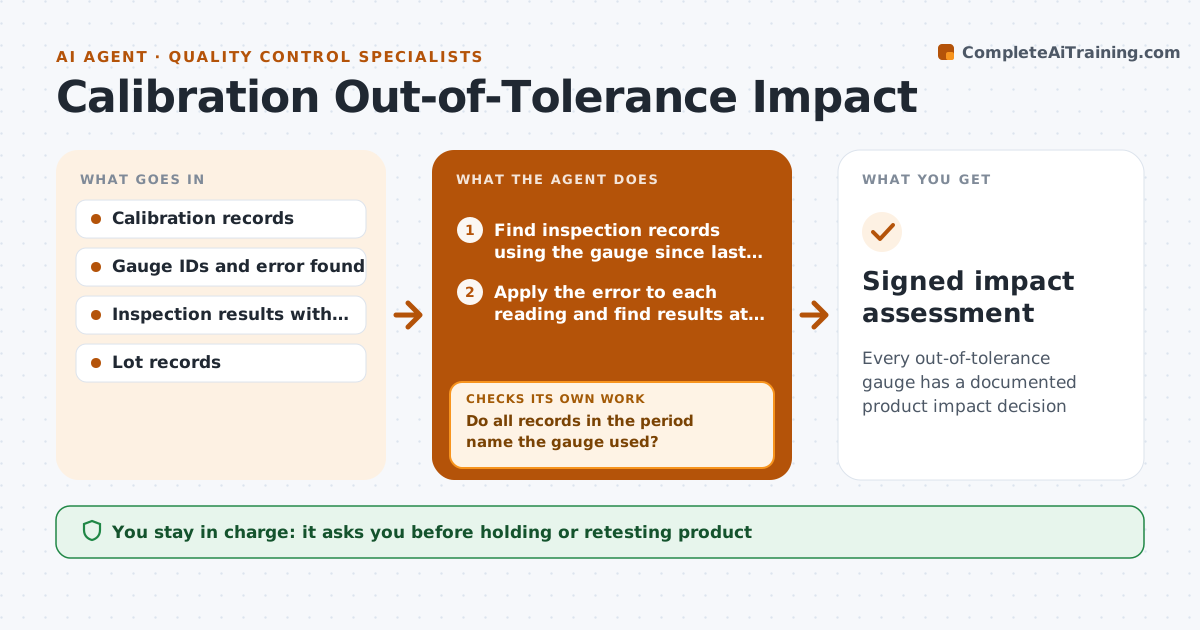
Every out-of-tolerance gauge has a documented product impact decision
What it does
When a gauge fails calibration, it may have passed bad parts or rejected good ones since its last good check, and nobody has time to trace that. This agent watches calibration results and due dates. When a gauge fails, it finds every inspection record that used the gauge since its last passing calibration. If records do not name the gauge, it searches by work center, shift and date to fill the gap. It then compares each reading with the size of the error to find results that could have flipped from pass to fail. It checks that every record in the window is accounted for before closing the list. It drafts an impact assessment and a list of lots, marking shipped and unshipped. The quality lead decides on holds, retests or customer notices. Edge case: if the error is small and all readings sit far from limits, it records no product impact.
How it works
Follow the arrows from top to bottom. The orange dashed arrow is the loop: when a check fails, the agent goes back and tries again.
Read the steps as a list
- Gauge fails calibration
- Find inspection records using the gauge since last pass
- Do all records in the period name the gauge used?If not: search by work center, shift and date to find likely uses. Back to step 2.
- Apply the error to each reading and find results at risk
- List affected lots and where they shipped
- Draft the impact assessment
- Quality lead decides on retest, hold or customer noticeThe agent waits here for your OK.
- Signed impact assessment
How it decides
A reading is at risk when adding the found error would move it across a specification limit.
- A reading is at risk if the error moves it across a limit
- No readings at risk means no product action, but it is still recorded
- Shipped lots at risk go to the quality lead first
Make it yours
Every agent is a starting point. You choose these settings for your own situation.
- Days of warning before calibration is due
- Which gauge types to track
- Report template
- Who decides on shipped lots
What keeps you in control
It always asks you first
- Holding or retesting product
- Notifying a customer
Hard limits
- Never notifies customers
- Never marks a gauge as passed
It stops when
- Done: impact decision recorded
- Stop: records cannot show which gauge was used; escalate
Set it up
We guide you through the set-up, step by step
Members get the full set-up guide for this agent. No technical skills needed: you copy, paste and upload.
- One set of instructions to paste into your AI, with the clicks for ChatGPT, Claude, Microsoft 365 Copilot, Gemini and Grok
- The agent then walks you through connecting your own data, one source at a time
- A downloadable copy with the flow chart, the rules and the full guide