AI agent for call center supervisors
Call Quality Sampling and Scoring Agent
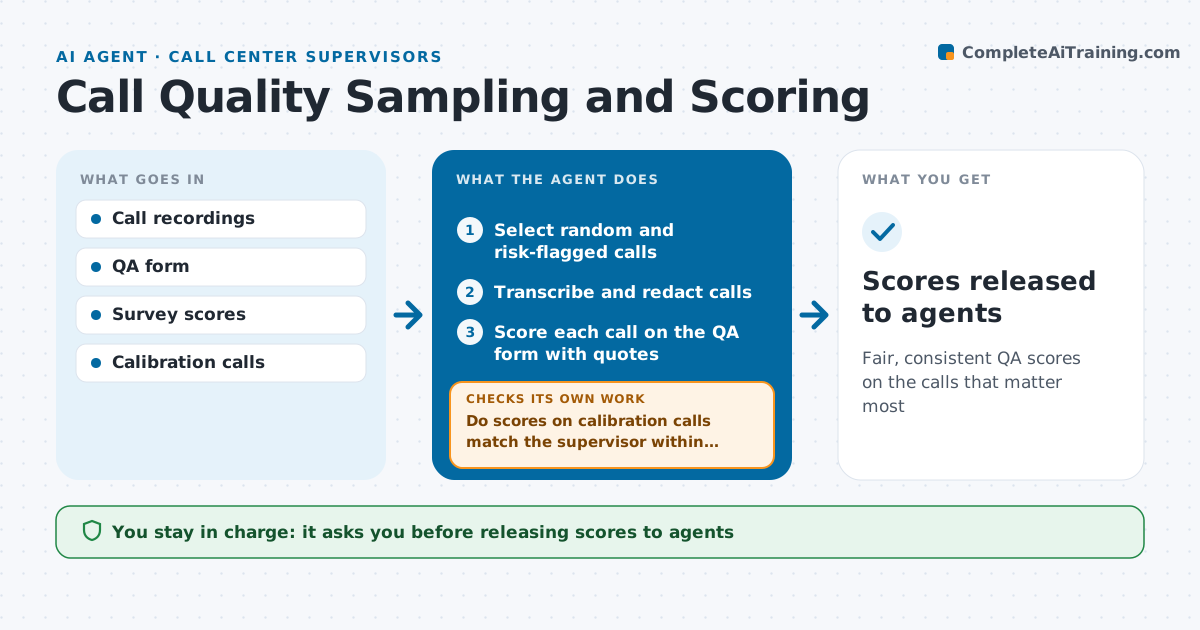
Fair, consistent QA scores on the calls that matter most
What it does
Supervisors can only listen to a handful of calls, so coaching often misses the calls that matter. Each week this agent selects calls to review: a random sample plus calls with long silences, transfers, repeat callers or low survey scores. It transcribes each call and scores it on the QA form, quoting the exact moment behind each mark. Before scoring the full set, it checks its scoring against calibration calls a supervisor already scored. If its scores differ by more than the allowed gap, it adjusts its rules and re-scores. It drafts a summary per agent with clips worth listening to. The supervisor confirms every score before it reaches the agents. Edge case: calls that include payment details are scored only on the redacted transcript, never the raw audio.
How it works
Follow the arrows from top to bottom. The orange dashed arrow is the loop: when a check fails, the agent goes back and tries again.
Read the steps as a list
- Weekly QA run
- Select random and risk-flagged calls
- Transcribe and redact calls
- Score each call on the QA form with quotes
- Do scores on calibration calls match the supervisor within the gap?If not: review the scoring rules and re-score. Back to step 4.
- Draft per-agent summaries with clips
- Supervisor confirms scoresThe agent waits here for your OK.
- Scores released to agents
How it decides
It samples risky calls on purpose and scores each item with a quoted moment from the call.
- At least half the sample is risk-flagged calls
- Every mark needs a quote
- Calibration gap allowed: 5 points
Make it yours
Every agent is a starting point. You choose these settings for your own situation.
- Sample size per agent
- Risk flags used
- Calibration gap allowed
- QA form version
What keeps you in control
It always asks you first
- Releasing scores to agents
Hard limits
- Never shares scores with agents before supervisor approval
- Never stores card numbers
It stops when
- Done: sample scored and released
- Stop: recordings unavailable
Set it up
We guide you through the set-up, step by step
Members get the full set-up guide for this agent. No technical skills needed: you copy, paste and upload.
- One set of instructions to paste into your AI, with the clicks for ChatGPT, Claude, Microsoft 365 Copilot, Gemini and Grok
- The agent then walks you through connecting your own data, one source at a time
- A downloadable copy with the flow chart, the rules and the full guide