AI agent for recruiters
Campus Partnership Pipeline Agent
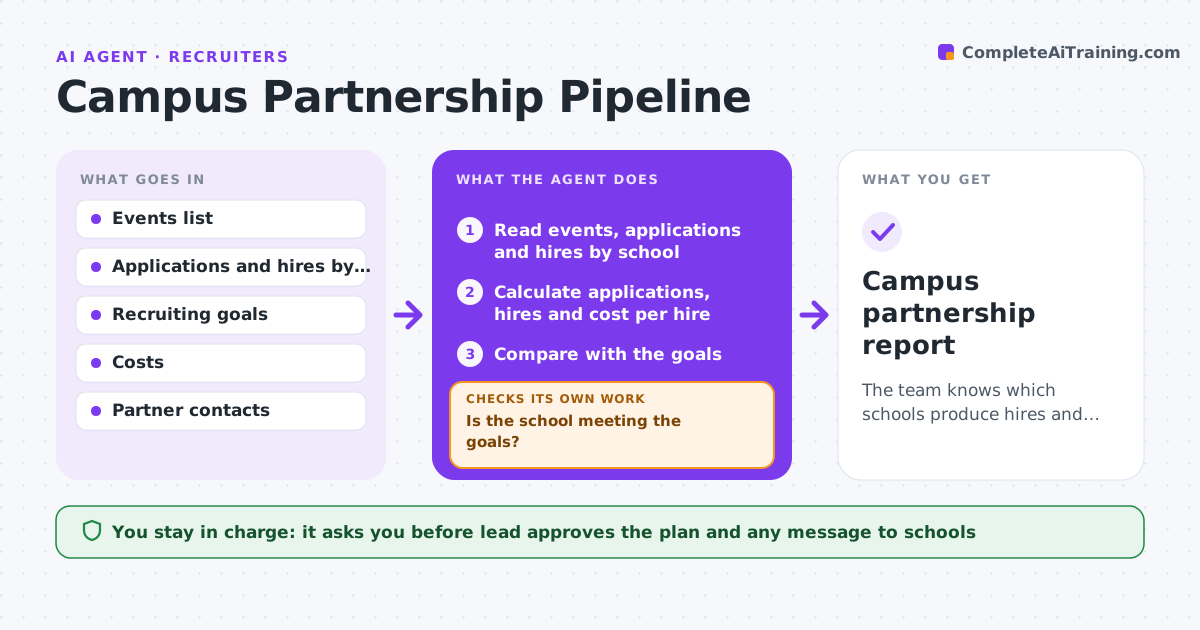
The team knows which schools produce hires and applicants, and has a plan for each partner based on results.
What it does
University partnerships are tracked in spreadsheets and results are unclear, so effort goes to schools that do not produce hires. The agent tracks events, applications and hires per school, compares them with the hiring and diversity goals, and flags weak partners. It suggests changes, such as a different event type or a new student club, and schedules follow-ups. It rechecks results at the end of each recruiting cycle and compares them with what was suggested. The lead approves the plan. Edge case: a school with few applications but the highest offer acceptance, which the agent treats as high value.
How it works
Follow the arrows from top to bottom. The orange dashed arrow is the loop: when a check fails, the agent goes back and tries again.
Read the steps as a list
- Month ends or cycle ends
- Read events, applications and hires by school
- Calculate applications, hires and cost per hire
- Compare with the goals
- Is the school meeting the goals?If not: Mark it as weak and look at its funnel stage. Back to step 4.
- Suggest a change for each weak school and draft follow-ups
- Lead approves the planThe agent waits here for your OK.
- Schedule follow-ups and send invitations
- Read results at the next checkpoint
- Did the change improve results?If not: Try another approach or reduce the effort. Back to step 4.
- Campus partnership report
How it decides
It scores each school on applications, hires, diversity of the pool and cost per hire, and flags those below the targets for two cycles.
- Flag a school below target for 2 cycles
- Include offer acceptance, not just applications
- Compare cost per hire between schools
- Do not drop a school before a review
Make it yours
Every agent is a starting point. You choose these settings for your own situation.
- Targets for applications and hires
- Cycles before flagging (default 2)
- Cost measures
- Report schedule
What keeps you in control
It always asks you first
- Lead approves the plan and any message to schools
Hard limits
- Never contact a school without approval
- Do not drop a partner automatically
It stops when
- Done: plan approved and results tracked
- Stop: no data is available for a school
Set it up
We guide you through the set-up, step by step
Members get the full set-up guide for this agent. No technical skills needed: you copy, paste and upload.
- One set of instructions to paste into your AI, with the clicks for ChatGPT, Claude, Microsoft 365 Copilot, Gemini and Grok
- The agent then walks you through connecting your own data, one source at a time
- A downloadable copy with the flow chart, the rules and the full guide