AI agent for medical practice managers
Cancellation and No-Show Pattern Agent
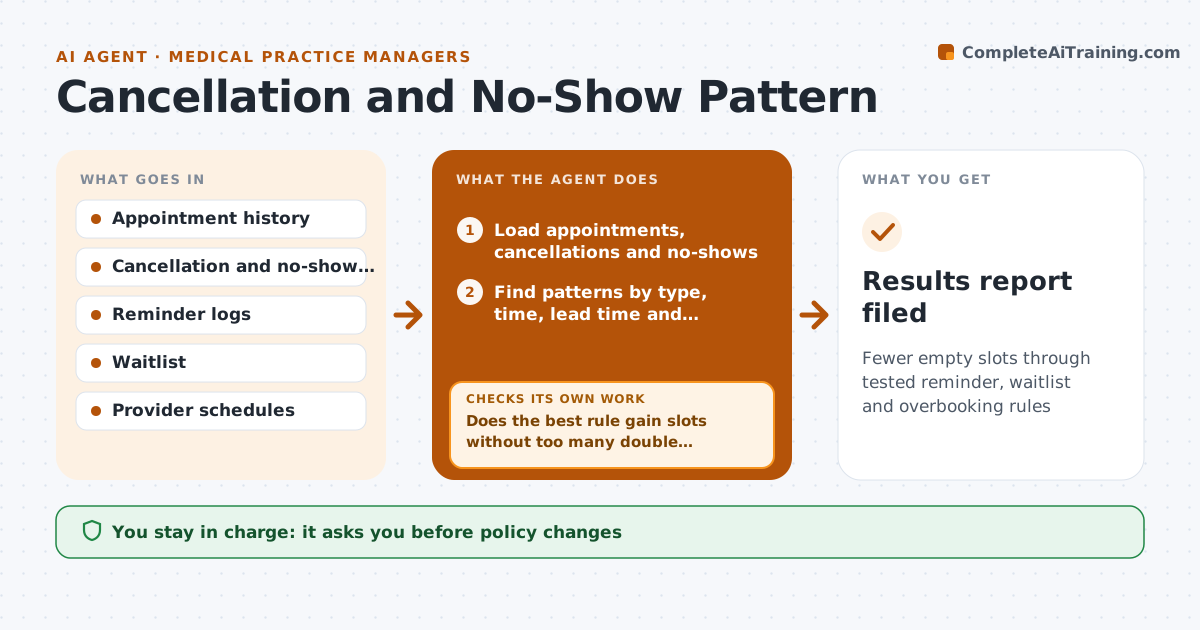
Fewer empty slots through tested reminder, waitlist and overbooking rules
What it does
Open slots from cancellations and no-shows reduce revenue and care. This agent analyzes no-shows by type, time and lead time. It then tests ideas such as reminder timing, waitlist fill and overbooking rules against past data. It measures what each idea would have changed and picks the best candidates. After a change goes live, it measures results and compares them to the forecast. If the result misses, it tries the next idea. The manager approves policy changes. Edge case: late cancellations cluster on Monday mornings for a single provider, so the agent suggests a targeted rule, not a practice-wide one.
How it works
Follow the arrows from top to bottom. The orange dashed arrow is the loop: when a check fails, the agent goes back and tries again.
Read the steps as a list
- Monthly appointment data is ready
- Load appointments, cancellations and no-shows
- Find patterns by type, time, lead time and provider
- Replay candidate rules on past data
- Does the best rule gain slots without too many double bookings?If not: adjust the rule settings and replay again. Back to step 4.
- Manager approves the policy changeThe agent waits here for your OK.
- Record the start date and target
- Measure results after a month
- Did the result meet the forecast gain?If not: try the next candidate rule and compare. Back to step 4.
- Results report filed
How it decides
A rule is recommended when a replay on past data shows a gain without causing too many double-bookings. Live results are compared with the replay.
- Accept a rule that fills 20 percent more empty slots
- Limit double bookings to 3 percent of days
- Prefer targeted rules over practice-wide ones
- Measure for a full month before judging
Make it yours
Every agent is a starting point. You choose these settings for your own situation.
- Gain target (default 20 percent)
- Double booking limit (default 3 percent)
- Data period
- Providers included
What keeps you in control
It always asks you first
- Policy changes
Hard limits
- Never overbook without approval
- Never contact patients
It stops when
- Done: rule adopted or rejected on results
- Stop: fewer than 3 months of data
Set it up
We guide you through the set-up, step by step
Members get the full set-up guide for this agent. No technical skills needed: you copy, paste and upload.
- One set of instructions to paste into your AI, with the clicks for ChatGPT, Claude, Microsoft 365 Copilot, Gemini and Grok
- The agent then walks you through connecting your own data, one source at a time
- A downloadable copy with the flow chart, the rules and the full guide