AI agent for vice president of operations
Capacity Bottleneck Watch Agent
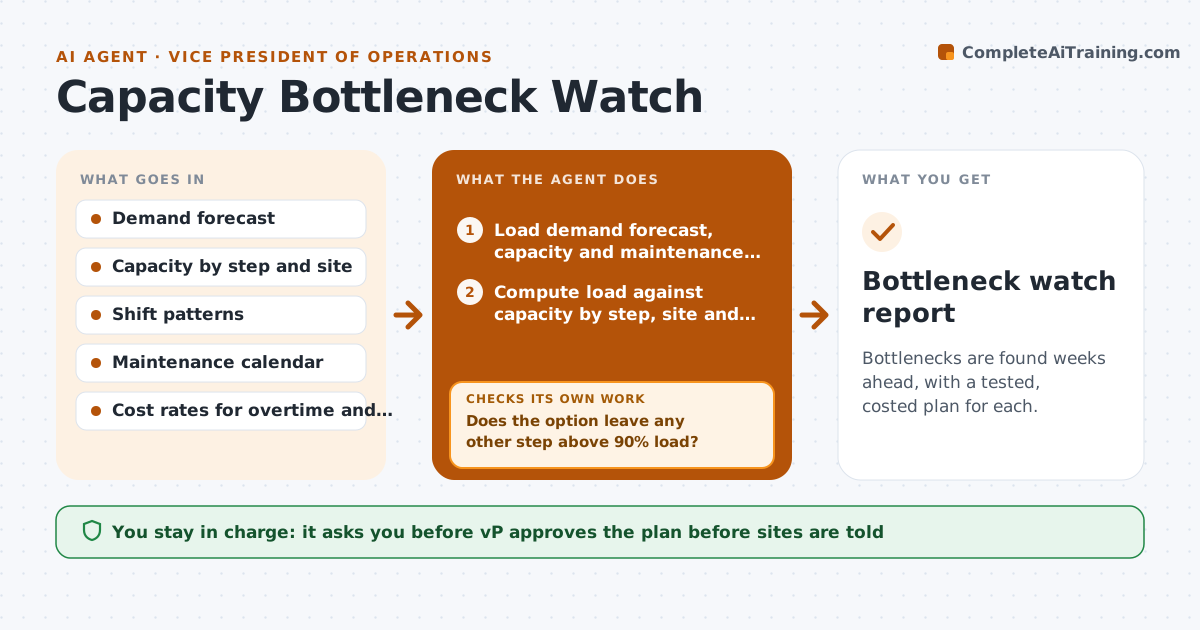
Bottlenecks are found weeks ahead, with a tested, costed plan for each.
What it does
The packing line was the bottleneck last quarter, and this quarter it is the paint shop, but nobody saw it coming. This agent looks ahead every week. It compares forecast demand with capacity at each step and site, and finds the tightest constraint over the next 8 weeks. For each constraint, it tests options such as overtime, shifting volume to another site, adding a shift or outsourcing. After each option it rechecks the knock-on effect, because overtime in one step can overload the next. It ranks the options by cost and risk. You approve any plan before it goes to the sites. Edge case: a machine under maintenance next month reduces capacity, and the agent includes the maintenance calendar.
How it works
Follow the arrows from top to bottom. The orange dashed arrow is the loop: when a check fails, the agent goes back and tries again.
Read the steps as a list
- Weekly Thursday run
- Load demand forecast, capacity and maintenance calendar
- Compute load against capacity by step, site and week
- Find the tightest constraint for the next 8 weeks
- Generate options: overtime, shift volume, extra shift, outsource
- Test each option in the capacity model
- Does the option leave any other step above 90% load?If not: Adjust the option or combine with another, then retest. Back to step 5.
- Rank options by cost and risk
- VP approves a plan before it goes to the sitesThe agent waits here for your OK.
- Bottleneck watch report
How it decides
It marks a step as a constraint when planned load exceeds 90% of available capacity, and picks the cheapest option that stays below 90% everywhere.
- Constraint when load is over 90% of capacity
- Prefer options that need no new commitments first
- Limit overtime to 10% of hours per week
- Include maintenance downtime in capacity
Make it yours
Every agent is a starting point. You choose these settings for your own situation.
- Load threshold (default 90%)
- Planning horizon (default 8 weeks)
- Overtime limit
- Options allowed
What keeps you in control
It always asks you first
- VP approves the plan before sites are told
Hard limits
- Never schedule people or change plans at sites itself
- Never assume capacity beyond tested limits
It stops when
- Done: plan approved or watch noted
- Stop: forecast data is older than 2 weeks
Set it up
We guide you through the set-up, step by step
Members get the full set-up guide for this agent. No technical skills needed: you copy, paste and upload.
- One set of instructions to paste into your AI, with the clicks for ChatGPT, Claude, Microsoft 365 Copilot, Gemini and Grok
- The agent then walks you through connecting your own data, one source at a time
- A downloadable copy with the flow chart, the rules and the full guide