AI agent for fraud analysts
Card Testing Attack Monitor Agent
A tested, low-false-positive rule that stops each card testing pattern, approved by the analyst before it goes live
What it does
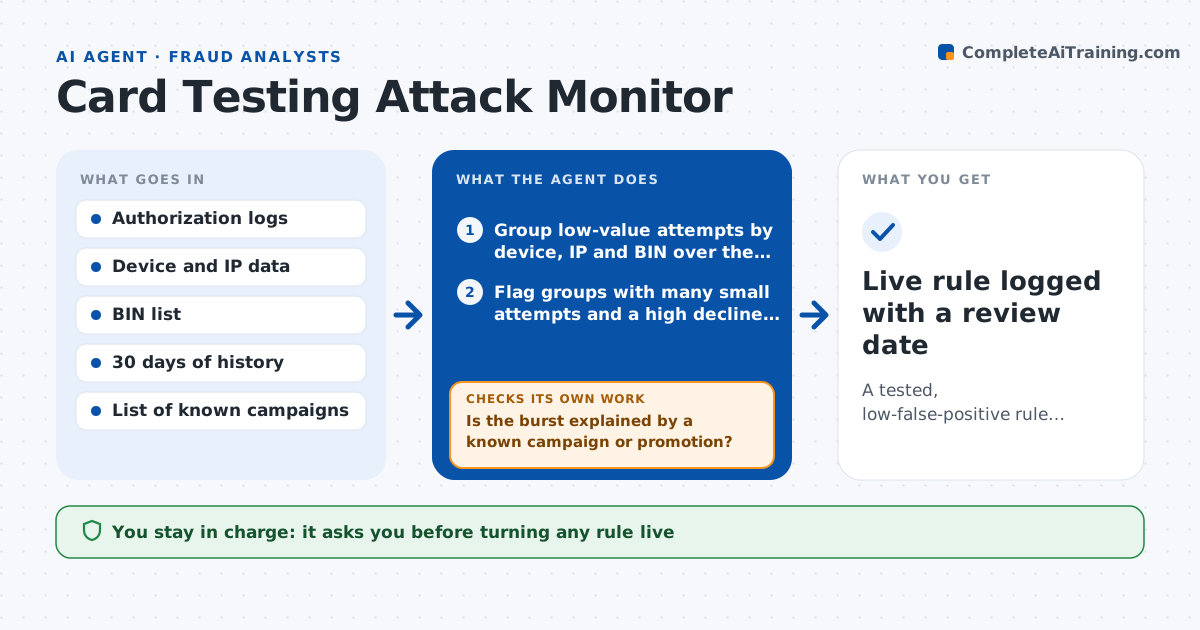
Card testers run many tiny charges to find which stolen numbers still work, and the big fraud follows hours later. Analysts usually notice after the damage. This agent watches the authorization stream for bursts of low-value attempts grouped by device, IP address and card BIN. When it sees a pattern it drafts a blocking rule, then replays the rule on the past 30 days of traffic to count how many good customers it would have stopped. If the false blocks are too high, it loosens the rule, narrows the time window or adds an exception, and tests again. Only a rule that passes goes to the analyst. It never switches a rule on by itself. Edge case: a charity fundraiser produces hundreds of $5 donations in an hour, so the agent checks for a known campaign before alarming.
How it works
Follow the arrows from top to bottom. The orange dashed arrow is the loop: when a check fails, the agent goes back and tries again.
Read the steps as a list
- Authorization stream is scanned on schedule
- Group low-value attempts by device, IP and BIN over the last hour
- Flag groups with many small attempts and a high decline rate
- Is the burst explained by a known campaign or promotion?If not: drop the group from the flag list and recheck the remaining groups. Back to step 3.
- Draft a blocking rule for the pattern
- Replay the rule on 30 days of past traffic
- Does the rule block under 0.2% of good transactions?If not: loosen the rule by raising the attempt count or shortening the window, then redraft. Back to step 5.
- Write the rule, its test results and examples of blocked and saved traffic
- Analyst approves putting the rule liveThe agent waits here for your OK.
- Live rule logged with a review date
How it decides
It flags a burst when one device, IP or BIN sends many small attempts with a high decline rate in a short window. It accepts a rule only when it blocks most of the testing traffic and stops few approved customers in the history replay.
- Flag at 10 or more attempts under $3 from one source in 10 minutes
- Accept a rule only if false blocks stay under 0.2% of good traffic
- Skip groups tied to a listed fundraising or promotion
- Retire a rule after 14 days with no hits unless the analyst keeps it
Make it yours
Every agent is a starting point. You choose these settings for your own situation.
- Attempt count and window that flag a burst (default 10 in 10 minutes)
- Maximum false block rate (default 0.2%)
- Amount treated as low-value (default under $3)
- How often the agent scans (default every 15 minutes)
What keeps you in control
It always asks you first
- Turning any rule live
- Changing a live rule
Hard limits
- Never activates a rule without analyst approval
- Never blocks by customer name or personal traits
- Keeps the test results with every rule
It stops when
- Done: a tested rule is approved or the group is cleared as legitimate
- Stop: authorization data is missing for the test window
Set it up
We guide you through the set-up, step by step
Members get the full set-up guide for this agent. No technical skills needed: you copy, paste and upload.
- One set of instructions to paste into your AI, with the clicks for ChatGPT, Claude, Microsoft 365 Copilot, Gemini and Grok
- The agent then walks you through connecting your own data, one source at a time
- A downloadable copy with the flow chart, the rules and the full guide