AI agent for law students
Case Brief Builder Agent
Accurate case briefs written by the student
What it does
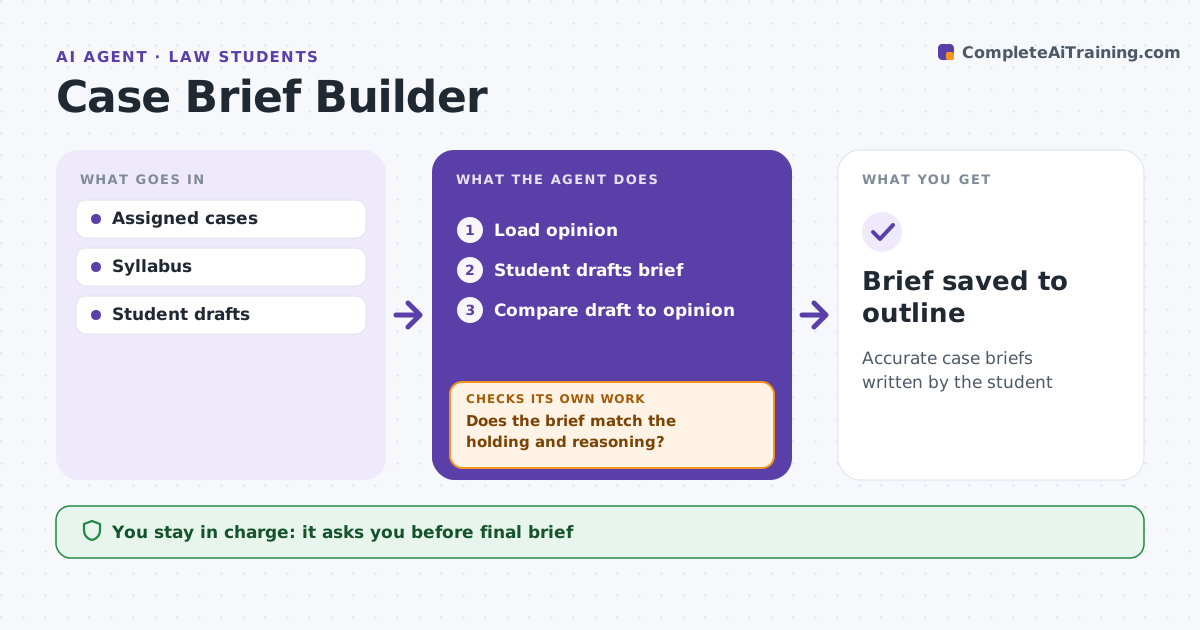
Law students learn by briefing cases, but most get feedback only when called on in class. For each assigned case, this agent reads the opinion and asks the student to write the facts, issue, holding and reasoning first, rather than writing it for them. It compares the draft with the opinion and points to passages that support or contradict each part. If the holding is broader than the opinion, or the reasoning misses a step, it asks a follow-up question and points to the passage. The student revises, and the agent checks again until the brief matches the holding and reasoning. It saves the final brief to the course outline. The student decides the final wording. Edge case: the case has a concurrence that the professor often asks about, so the agent prompts the student to note it.
How it works
Follow the arrows from top to bottom. The orange dashed arrow is the loop: when a check fails, the agent goes back and tries again.
Read the steps as a list
- Assignment added
- Load opinion
- Student drafts brief
- Compare draft to opinion
- Does the brief match the holding and reasoning?If not: ask follow-up questions and point to passages. Back to step 3.
- Student finalizes wordingThe agent waits here for your OK.
- Brief saved to outline
How it decides
It compares the student's brief to the text of the opinion.
- Holding broader than the opinion: question
- Missing reasoning step: point to passage
- Separate opinions: prompt note
Make it yours
Every agent is a starting point. You choose these settings for your own situation.
- Brief format
- Feedback detail
- Courses
- Outline location
What keeps you in control
It always asks you first
- Final brief
Hard limits
- Never writes the brief for the student
- Never submits graded work
It stops when
- Done: brief saved
- Stop: opinion unavailable
Set it up
We guide you through the set-up, step by step
Members get the full set-up guide for this agent. No technical skills needed: you copy, paste and upload.
- One set of instructions to paste into your AI, with the clicks for ChatGPT, Claude, Microsoft 365 Copilot, Gemini and Grok
- The agent then walks you through connecting your own data, one source at a time
- A downloadable copy with the flow chart, the rules and the full guide