AI agent for aerospace engineers
Certification Compliance Matrix Agent
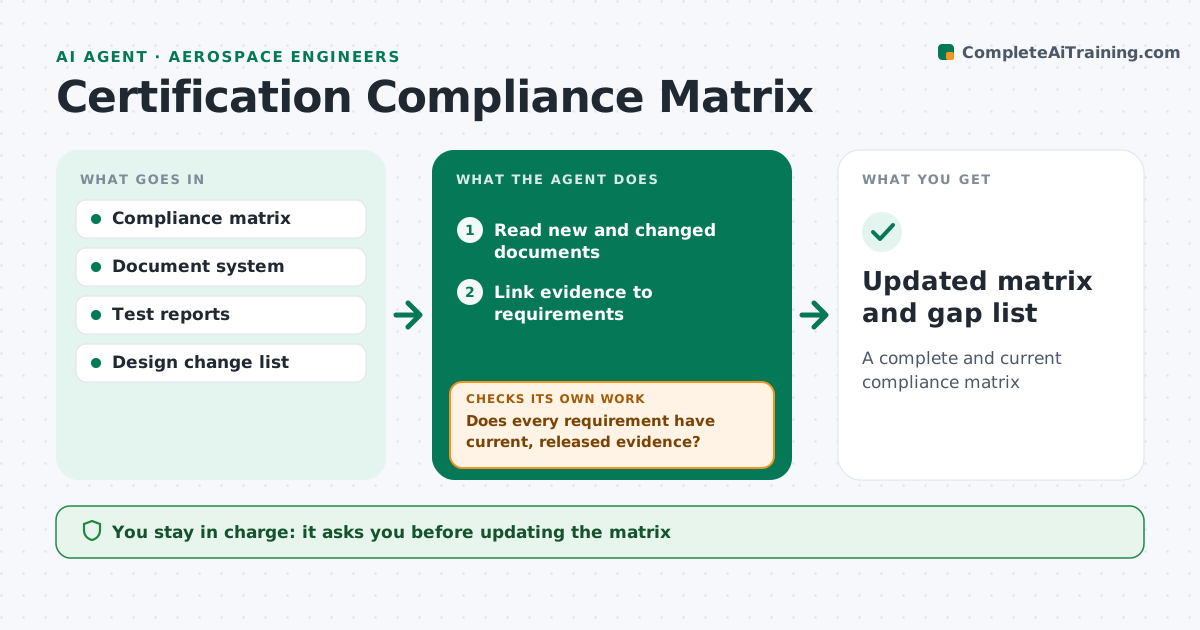
A complete and current compliance matrix
What it does
Aircraft certification needs proof that each regulation is met through tests, analysis or inspection, and the compliance matrix goes stale fast. Each week this agent reads new and changed documents and links reports and test results to the right requirements. It checks that each piece of evidence uses the method of compliance agreed in the plan and that the document is released, not draft. It then checks that every requirement has current, released evidence. Gaps and outdated evidence are listed with owners, and the agent rechecks links whenever documents change. The certification engineer approves every update to the matrix. The output is an updated matrix and gap list. Edge case: when a design change affects a part with completed evidence, the agent flags that evidence as needing review instead of leaving it marked complete.
How it works
Follow the arrows from top to bottom. The orange dashed arrow is the loop: when a check fails, the agent goes back and tries again.
Read the steps as a list
- Weekly update
- Read new and changed documents
- Link evidence to requirements
- Check document status and method of compliance
- Does every requirement have current, released evidence?If not: list gaps with owners and due dates. Back to step 3.
- Certification engineer approves matrix updatesThe agent waits here for your OK.
- Updated matrix and gap list
How it decides
It links documents to requirements by reference and checks status and method. Evidence tied to changed parts is flagged.
- Accept only released documents
- Flag evidence affected by design changes
- Check method of compliance matches the plan
Make it yours
Every agent is a starting point. You choose these settings for your own situation.
- Requirement sets
- Update frequency
- Owner list
- Report format
What keeps you in control
It always asks you first
- Updating the matrix
- Submitting evidence to authorities
Hard limits
- Never submits evidence to authorities
- Keeps an audit trail
It stops when
- Done: matrix current
- Stop: document system unavailable
Set it up
We guide you through the set-up, step by step
Members get the full set-up guide for this agent. No technical skills needed: you copy, paste and upload.
- One set of instructions to paste into your AI, with the clicks for ChatGPT, Claude, Microsoft 365 Copilot, Gemini and Grok
- The agent then walks you through connecting your own data, one source at a time
- A downloadable copy with the flow chart, the rules and the full guide