AI agent for content creators
Channel Analytics Next-Video Agent
Clear, data-backed choices for the next videos
What it does
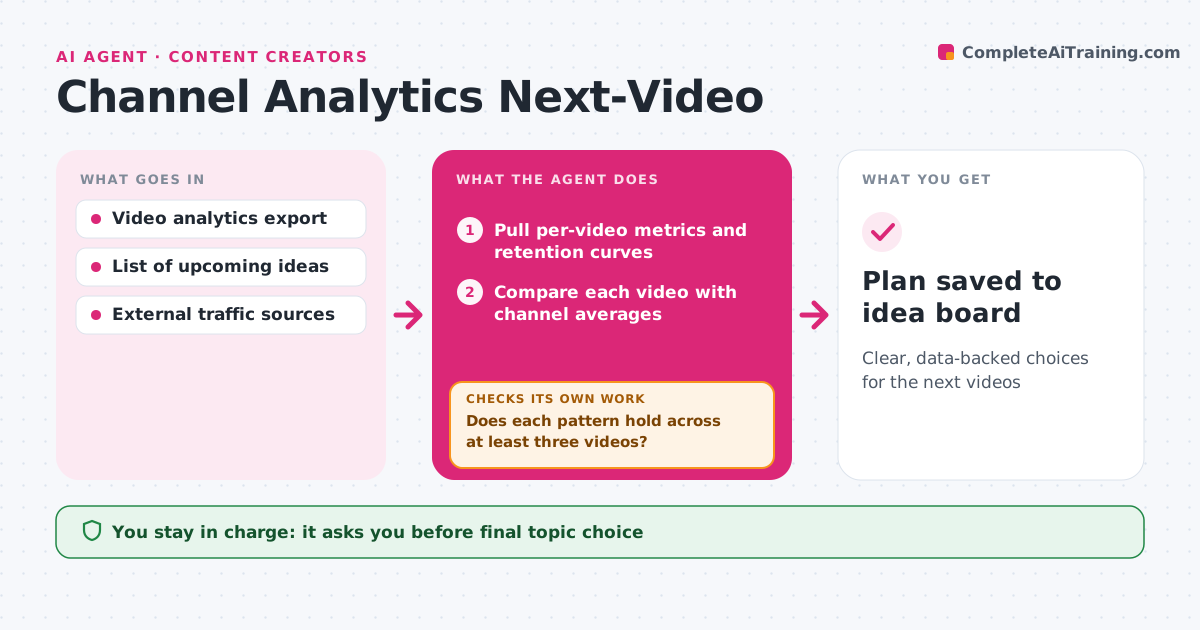
Creators often guess what to make next, even though their analytics hold clear clues. Every week this agent pulls video analytics: views, thumbnail click-through rate, average view duration, retention dips, traffic sources and new subscribers per video. It compares each recent video with the channel's own averages, not with other channels. It looks for patterns, such as topics that keep viewers longer or titles with higher click rates, then checks whether each pattern holds across at least three videos. Patterns that do not hold are dropped. It suggests three next-video ideas tied to the patterns and points to retention dips to avoid. The creator decides what to make. Edge case: a video boosted by an external link, such as a news site, is excluded from pattern-finding because its numbers are not typical.
How it works
Follow the arrows from top to bottom. The orange dashed arrow is the loop: when a check fails, the agent goes back and tries again.
Read the steps as a list
- Weekly analytics review
- Pull per-video metrics and retention curves
- Compare each video with channel averages
- Find candidate patterns in topics, titles and length
- Does each pattern hold across at least three videos?If not: drop the pattern and look for another. Back to step 4.
- Draft three next-video ideas with reasons
- Creator chooses next topicsThe agent waits here for your OK.
- Plan saved to idea board
How it decides
It only reports patterns seen across three or more videos and excludes outliers driven by outside traffic.
- Exclude videos with over 40% external traffic from patterns
- Need three videos to call a pattern
- Point to the biggest retention dip each week
Make it yours
Every agent is a starting point. You choose these settings for your own situation.
- Minimum videos for a pattern (default 3)
- Metrics weighted most
- Review day
- Number of ideas
What keeps you in control
It always asks you first
- Final topic choice
Hard limits
- Read-only analytics access
- Never changes titles or thumbnails on live videos
It stops when
- Done: ideas delivered
- Stop: fewer than five videos published
Set it up
We guide you through the set-up, step by step
Members get the full set-up guide for this agent. No technical skills needed: you copy, paste and upload.
- One set of instructions to paste into your AI, with the clicks for ChatGPT, Claude, Microsoft 365 Copilot, Gemini and Grok
- The agent then walks you through connecting your own data, one source at a time
- A downloadable copy with the flow chart, the rules and the full guide