AI agent for school administrators
Chronic Absence Intervention Agent
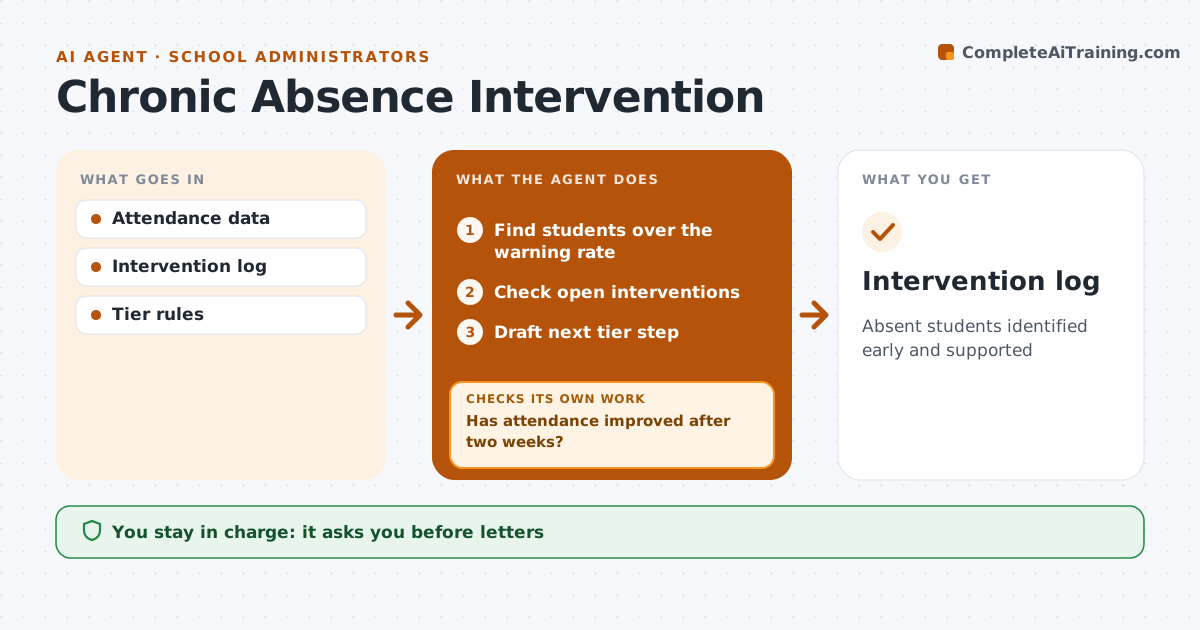
Absent students identified early and supported
What it does
Students who miss 10 percent or more of school days fall behind, and catching them early depends on someone watching the numbers every week. This agent checks attendance weekly and finds students who have crossed the warning rate. For each one, it checks whether an intervention is already open and what has been tried. It then drafts the next step in the school's tiers, such as a parent call script, a letter or a meeting invitation. The administrator approves every letter and meeting before anything reaches a family. Two weeks later, the agent checks whether that student's attendance has improved. If it has not, it moves to the next tier and drafts that step for approval. Every action goes into the intervention log. Edge case: a long illness backed by a doctor's note is handled separately, with support plans instead of warning letters.
How it works
Follow the arrows from top to bottom. The orange dashed arrow is the loop: when a check fails, the agent goes back and tries again.
Read the steps as a list
- Weekly attendance check
- Find students over the warning rate
- Check open interventions
- Draft next tier step
- Administrator approvesThe agent waits here for your OK.
- Has attendance improved after two weeks?If not: move to next tier. Back to step 4.
- Intervention log
How it decides
It flags students at or above the warning absence rate and picks the next tier step that has not yet been tried, skipping absences covered by a medical note.
- 10% warning rate
- Medical notes handled separately
- Tiers in order
Make it yours
Every agent is a starting point. You choose these settings for your own situation.
- Warning rate
- Tiers
- Check interval
What keeps you in control
It always asks you first
- Letters
- Meetings
Hard limits
- Never contacts families directly
It stops when
- Done: improved
- Stop: refer to district
Set it up
We guide you through the set-up, step by step
Members get the full set-up guide for this agent. No technical skills needed: you copy, paste and upload.
- One set of instructions to paste into your AI, with the clicks for ChatGPT, Claude, Microsoft 365 Copilot, Gemini and Grok
- The agent then walks you through connecting your own data, one source at a time
- A downloadable copy with the flow chart, the rules and the full guide