AI agent for police officers
Citation and Court Date Reconciliation Agent
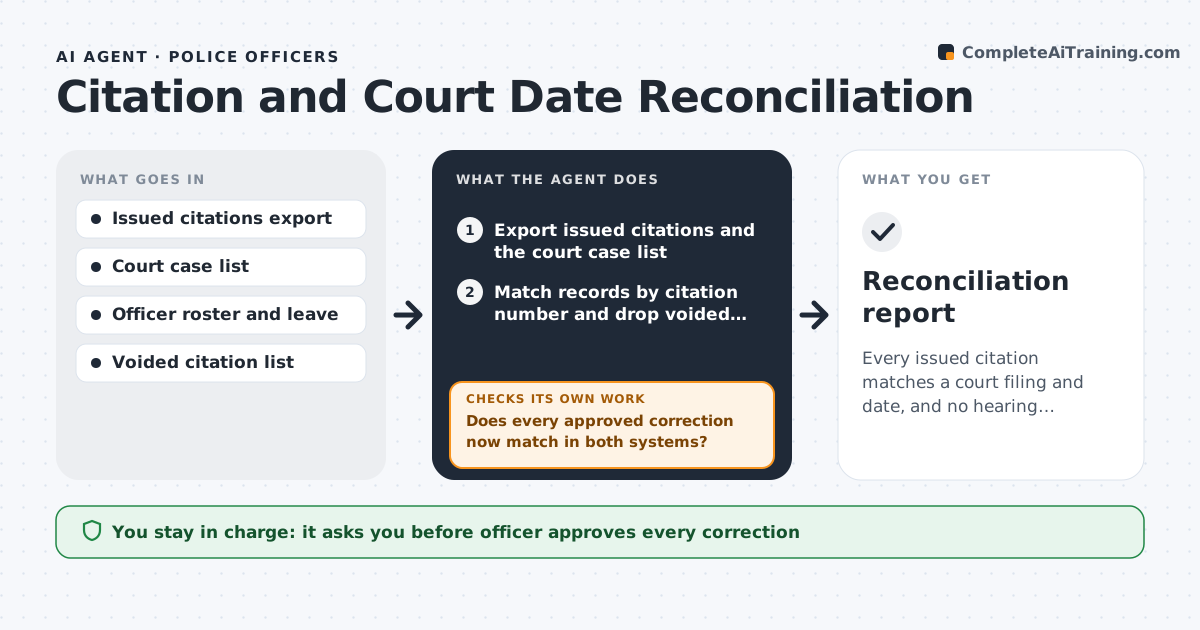
Every issued citation matches a court filing and date, and no hearing conflicts with the officer's schedule.
What it does
Traffic officers issue citations in one system and the court holds the case calendar in another, so some citations never get filed, some carry the wrong date and some court dates fall on a day the officer is on leave. Each week the agent exports issued citations and the court's filed cases and matches them by citation number. It sorts the differences into missing filings, wrong or changed dates and officer schedule conflicts. For each one it drafts a correction request to the clerk or a note to the officer. After the clerk responds, it pulls the court data again and confirms the record now matches. The officer approves every correction before anything goes to the court. Edge case: a citation voided by the officer should not be chased as missing.
How it works
Follow the arrows from top to bottom. The orange dashed arrow is the loop: when a check fails, the agent goes back and tries again.
Read the steps as a list
- Weekly run
- Export issued citations and the court case list
- Match records by citation number and drop voided citations
- Classify differences: missing filing, wrong date, schedule conflict
- Draft a correction for each difference
- Officer approves each correction before it goes to the courtThe agent waits here for your OK.
- Send corrections to the clerk and log them
- Pull the court data again after the clerk responds
- Does every approved correction now match in both systems?If not: Re-run the match, redraft the ones still wrong with the clerk's answer and flag repeats. Back to step 3.
- Is any hearing now on a day the officer is off duty?If not: Draft a swap or reschedule request for the officer to approve. Back to step 4.
- Reconciliation report
How it decides
It matches by citation number, then classifies each mismatch and drafts the fix that matches the type.
- A citation with no court filing after 10 days is flagged as missing
- A date differing from the citation is flagged wrong
- A hearing on an off day is a conflict
- Voided citations are excluded
Make it yours
Every agent is a starting point. You choose these settings for your own situation.
- Days before a missing filing is flagged (default 10)
- Court contact for corrections
- Run day and time
- Which citation types to include
- Conflict rules for leave and rest days
What keeps you in control
It always asks you first
- Officer approves every correction
- Supervisor approves any hearing reschedule request
Hard limits
- Never submit to the court without officer approval
- Never change a citation record directly
- Never chase a voided citation
It stops when
- Done: both systems match for all non-voided citations
- Stop: the court data feed is unavailable
Set it up
We guide you through the set-up, step by step
Members get the full set-up guide for this agent. No technical skills needed: you copy, paste and upload.
- One set of instructions to paste into your AI, with the clicks for ChatGPT, Claude, Microsoft 365 Copilot, Gemini and Grok
- The agent then walks you through connecting your own data, one source at a time
- A downloadable copy with the flow chart, the rules and the full guide