AI agent for police officers
Warrant Application Packet Agent
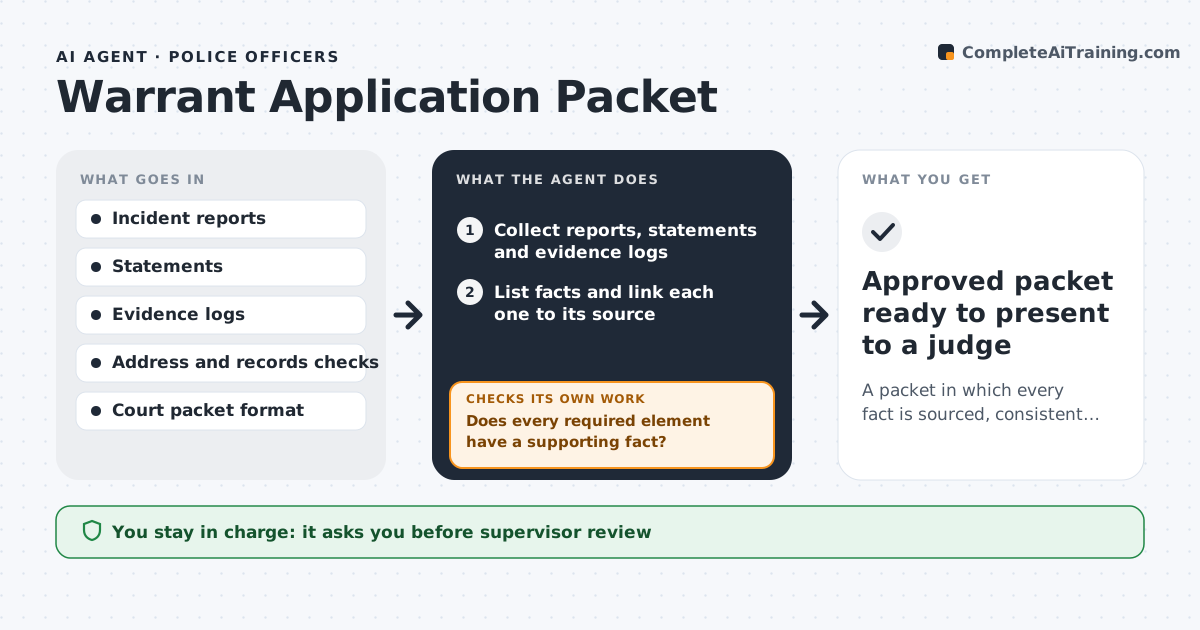
A packet in which every fact is sourced, consistent and mapped to the needed elements, ready for review
What it does
A warrant application can be rejected because a date does not match, an address is wrong or a fact has no source. This agent compiles the facts from reports, statements and evidence logs and links each fact to its source document. It checks addresses, dates, names and descriptions for consistency across all documents. It flags facts that are weak, such as old information or an unnamed source, and facts that are missing for each element the warrant needs. It drafts the packet in the format the court uses. After edits, it checks all the facts and cross-references again. A supervisor and a prosecutor approve before anything goes to a judge. Edge case: an address that appears in two versions in different reports is flagged and not used until confirmed.
How it works
Follow the arrows from top to bottom. The orange dashed arrow is the loop: when a check fails, the agent goes back and tries again.
Read the steps as a list
- Officer starts a warrant application
- Collect reports, statements and evidence logs
- List facts and link each one to its source
- Map facts to each required element
- Does every required element have a supporting fact?If not: list the gaps for the officer and mark what to investigate. Back to step 3.
- Are names, dates and addresses consistent across documents?If not: flag the conflict and ask the officer which source is correct. Back to step 3.
- Draft the packet in the court's format
- Supervisor reviews the draftThe agent waits here for your OK.
- After edits, do all facts still match their sources?If not: correct the packet and recheck citations. Back to step 4.
- Prosecutor approves before filingThe agent waits here for your OK.
- Approved packet ready to present to a judge
How it decides
A fact is included only if a source document supports it. Each legal element must be matched to at least one fact. Conflicts block drafting until resolved.
- Include a fact only with a cited source
- Do not use information older than the freshness window without a note
- Block drafting while names, dates or addresses conflict
- Flag unnamed sources for supervisor review
Make it yours
Every agent is a starting point. You choose these settings for your own situation.
- Court packet template
- Freshness window (default 30 days)
- Required elements by warrant type
- Approval chain
What keeps you in control
It always asks you first
- Supervisor review
- Prosecutor approval
Hard limits
- Never submits to a court
- Never adds a fact that has no source
It stops when
- Done: the packet is approved
- Stop: required elements cannot be supported
Set it up
We guide you through the set-up, step by step
Members get the full set-up guide for this agent. No technical skills needed: you copy, paste and upload.
- One set of instructions to paste into your AI, with the clicks for ChatGPT, Claude, Microsoft 365 Copilot, Gemini and Grok
- The agent then walks you through connecting your own data, one source at a time
- A downloadable copy with the flow chart, the rules and the full guide