AI agent for insurance claims processors
Claim Intake Completeness Agent
Complete claim files within days of first notice
What it does
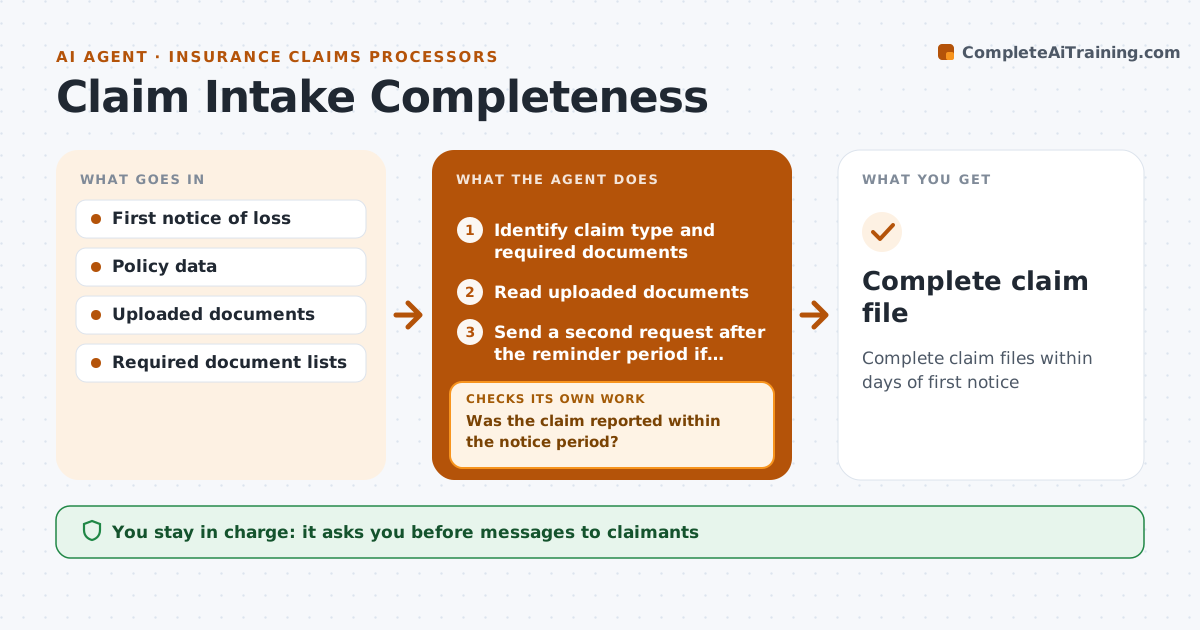
Many claims stall in the first week because the file is incomplete, and claimants get frustrated by several separate requests. When a claim is opened, this agent identifies the claim type and lists the required documents, such as photos, police report, repair estimate, medical bills or proof of ownership. It reads what has arrived to confirm each document is the right one and legible. Illegible documents count as missing. It drafts one clear request listing everything missing, which the processor approves before sending. When new documents arrive, it checks again. If something is still missing after the reminder period, it drafts a second request. A claim reported after the policy's notice period is flagged for the adjuster. Once complete, it routes the file to the adjuster. Edge case: a document for a different vehicle or address is rejected even when it looks complete.
How it works
Follow the arrows from top to bottom. The orange dashed arrow is the loop: when a check fails, the agent goes back and tries again.
Read the steps as a list
- Claim opened
- Identify claim type and required documents
- Was the claim reported within the notice period?If not: flag late notice for the adjuster and continue. Back to step 2.
- Read uploaded documents
- Is every required document present, legible and matching the claim?If not: draft one request listing all missing items. Back to step 4.
- Processor approves claimant messagesThe agent waits here for your OK.
- Send a second request after the reminder period if still incomplete
- Mark file complete and route to the adjuster
- Complete claim file
How it decides
Each claim type has a required list; a document only counts if it is legible and matches the claim.
- One request listing everything missing
- Illegible documents count as missing
- Late notice is flagged
Make it yours
Every agent is a starting point. You choose these settings for your own situation.
- Required lists by claim type
- Reminder period
- Message templates
- Routing rules
What keeps you in control
It always asks you first
- Messages to claimants
Hard limits
- Never makes coverage decisions
- Never contacts claimants without approval
It stops when
- Done: file complete
- Stop: claimant unresponsive after two requests, notify the adjuster
Set it up
We guide you through the set-up, step by step
Members get the full set-up guide for this agent. No technical skills needed: you copy, paste and upload.
- One set of instructions to paste into your AI, with the clicks for ChatGPT, Claude, Microsoft 365 Copilot, Gemini and Grok
- The agent then walks you through connecting your own data, one source at a time
- A downloadable copy with the flow chart, the rules and the full guide