AI agent for medical billers
Claim Scrubbing Agent
Clean claims on first submission
What it does
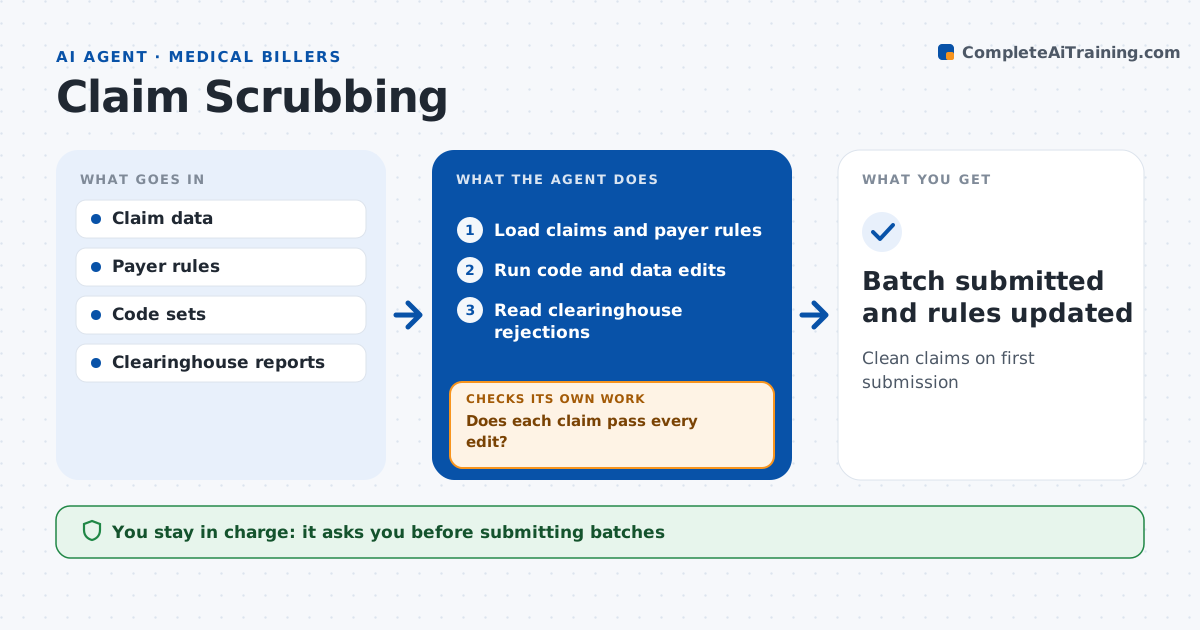
Claims rejected by a payer delay cash and cost staff time to rework. Before claims are sent, this agent checks each one. It compares diagnosis and procedure codes for medical necessity matches and checks modifiers, units, place of service, provider details and patient insurance details. It applies payer-specific rules. A claim whose diagnosis does not support the procedure, or that lacks a required payer modifier, is held. Errors go to a fix list with the reason. The biller corrects them and the agent rechecks until each claim passes every edit. Clean claims are batched, and the biller approves every batch and any code change. After submission, it reads clearinghouse rejections, and when the same rejection appears three times it adds a new rule. Edge case: a payer needs a specific modifier for telehealth visits, so the agent applies that payer's rule only.
How it works
Follow the arrows from top to bottom. The orange dashed arrow is the loop: when a check fails, the agent goes back and tries again.
Read the steps as a list
- Claims ready for batch
- Load claims and payer rules
- Run code and data edits
- Does each claim pass every edit?If not: send to fix list and recheck after correction. Back to step 3.
- Biller approves batchThe agent waits here for your OK.
- Read clearinghouse rejections
- Batch submitted and rules updated
How it decides
It applies code edits and payer rules and holds any claim that fails.
- Diagnosis does not support procedure: hold
- Payer modifier rule missing: hold
- Same rejection 3 times: add rule
Make it yours
Every agent is a starting point. You choose these settings for your own situation.
- Payer rules
- Edit list
- Batch timing
- Fix list format
What keeps you in control
It always asks you first
- Submitting batches
- Code changes
Hard limits
- Never changes codes without the biller or coder
- Never submits without approval
It stops when
- Done: batch submitted
- Stop: payer rules outdated
Set it up
We guide you through the set-up, step by step
Members get the full set-up guide for this agent. No technical skills needed: you copy, paste and upload.
- One set of instructions to paste into your AI, with the clicks for ChatGPT, Claude, Microsoft 365 Copilot, Gemini and Grok
- The agent then walks you through connecting your own data, one source at a time
- A downloadable copy with the flow chart, the rules and the full guide