AI agent for preschool teachers
Classroom Supply and Craft Material Agent
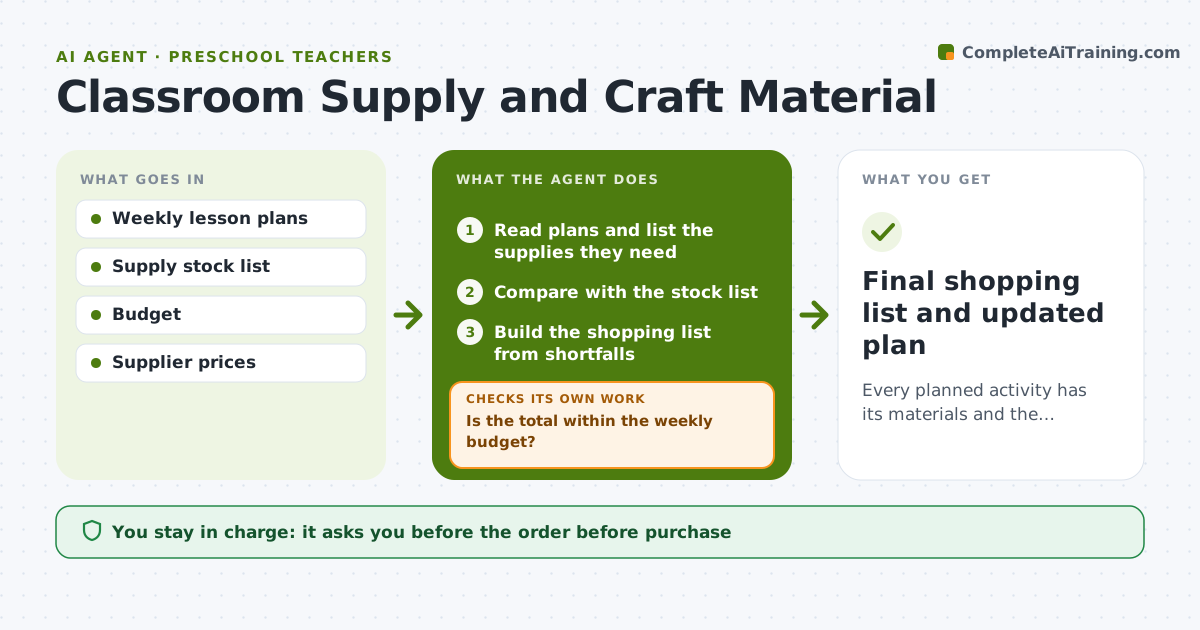
Every planned activity has its materials and the weekly spend stays within budget.
What it does
Craft day arrives and the glue sticks are gone, or the month's budget is spent by week two. This agent reads the week's plans, checks your stock and budget, and builds a shopping list with cheaper options. When an item is unavailable, it adjusts the plan, for example swapping a painting activity if paint is out of stock. It rechecks the total against budget and rechecks the plan after each swap. Edge case: a seasonal item is out of stock everywhere, so the agent replaces the activity with one using what you have. The teacher approves the order.
How it works
Follow the arrows from top to bottom. The orange dashed arrow is the loop: when a check fails, the agent goes back and tries again.
Read the steps as a list
- Weekly plan is ready
- Read plans and list the supplies they need
- Compare with the stock list
- Build the shopping list from shortfalls
- Check supplier prices and cheaper alternatives
- Is the total within the weekly budget?If not: replace items with cheaper options or reduce quantities. Back to step 4.
- Is every item available in time?If not: swap the item or adjust the activity. Back to step 3.
- Update the plan for changed activities
- Teacher approves the orderThe agent waits here for your OK.
- Final shopping list and updated plan
How it decides
It buys the cheapest option that meets the activity's needs and changes the activity when a supply is unavailable or over budget.
- Stay within the weekly budget set by the teacher.
- Use stock before buying new.
- Choose lower-cost options if they meet the activity needs.
- Reorder when stock falls below 20% of weekly use.
Make it yours
Every agent is a starting point. You choose these settings for your own situation.
- Weekly budget
- Preferred suppliers
- Low-stock threshold
- Substitution rules
- Order day
What keeps you in control
It always asks you first
- The order before purchase
- Any change to a planned activity
Hard limits
- Do not place orders.
- Do not exceed the budget without approval.
It stops when
- Done: all activities supplied within budget and approved
- Stop: budget is too small for the plan, so the agent lists what to cut
Set it up
We guide you through the set-up, step by step
Members get the full set-up guide for this agent. No technical skills needed: you copy, paste and upload.
- One set of instructions to paste into your AI, with the clicks for ChatGPT, Claude, Microsoft 365 Copilot, Gemini and Grok
- The agent then walks you through connecting your own data, one source at a time
- A downloadable copy with the flow chart, the rules and the full guide