AI agent for preschool teachers
Preschool Transition to Kindergarten Agent
A complete, accurate transition summary for every child before the school year ends.
What it does
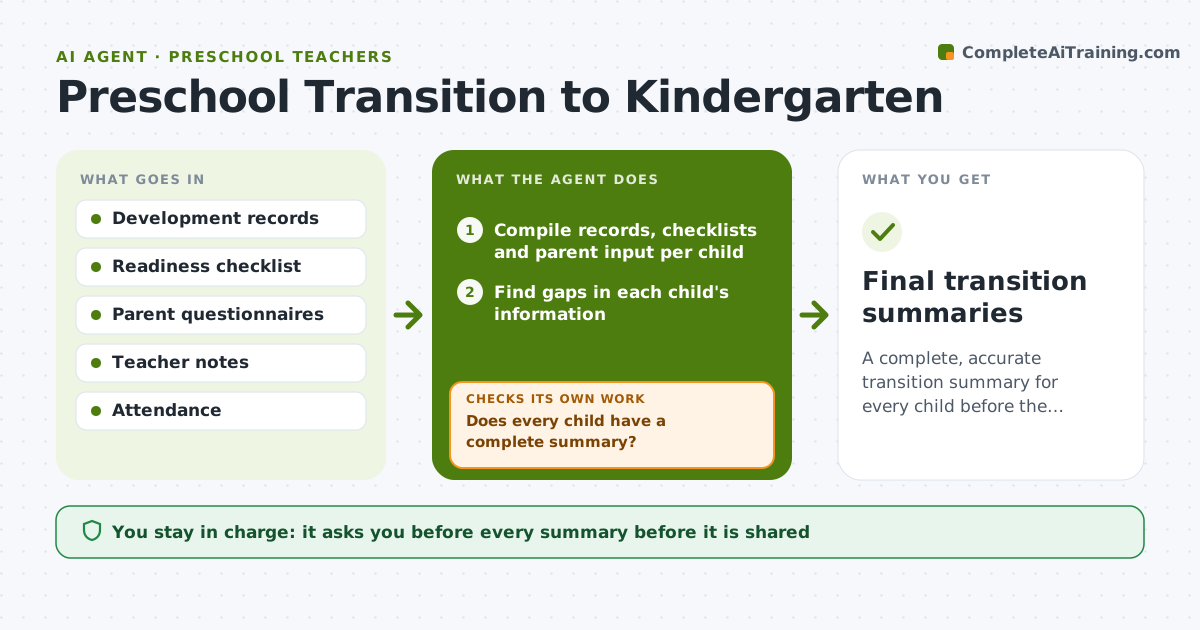
In May a teacher realizes she has no readiness information for half the class and parents are asking what to expect. This agent compiles development records, readiness checklists and parent input for each child and finds gaps. It suggests activities that build the missing skills and builds a transition summary for each child. It then checks that every child has a complete summary and lists the children who do not. Edge case: a child with an incomplete checklist because of long absence is flagged with a note instead of guessed. The teacher approves what is shared with parents or the school.
How it works
Follow the arrows from top to bottom. The orange dashed arrow is the loop: when a check fails, the agent goes back and tries again.
Read the steps as a list
- Transition period begins
- Compile records, checklists and parent input per child
- Find gaps in each child's information
- Suggest activities to address skill gaps
- Draft a transition summary for each child
- Does every child have a complete summary?If not: list the missing items and request observations or parent input. Back to step 2.
- Collect new observations and update the summaries
- Are all gaps now filled or marked unknown?If not: repeat the request for the remaining gaps. Back to step 7.
- Teacher approves what is sharedThe agent waits here for your OK.
- Final transition summaries
How it decides
It fills each summary only from recorded evidence and lists blank areas as gaps with an activity to address them.
- Use recorded evidence only, never guesses.
- Mark unknown areas as unknown.
- Share parent input only with consent.
- Summaries stay within the school's template.
Make it yours
Every agent is a starting point. You choose these settings for your own situation.
- Readiness areas
- Summary template
- Timeline
- Parent form
- Recipients
What keeps you in control
It always asks you first
- Every summary before it is shared
- Any message to parents or the school
Hard limits
- Do not share any summary without approval.
- Do not state readiness conclusions about a child.
It stops when
- Done: every child has a complete or flagged summary and the teacher approved
- Stop: records are missing for a child, so the agent asks for a meeting
Set it up
We guide you through the set-up, step by step
Members get the full set-up guide for this agent. No technical skills needed: you copy, paste and upload.
- One set of instructions to paste into your AI, with the clicks for ChatGPT, Claude, Microsoft 365 Copilot, Gemini and Grok
- The agent then walks you through connecting your own data, one source at a time
- A downloadable copy with the flow chart, the rules and the full guide